Questionnaires for Research
Questionnaires are a data collection method that can be used to gather quantitative and qualitative data directly from participants about their perceptions, preferences, opinions, experiences and more. With Labvanced, questionnaire research can be as simple or as dynamic as you want it to be. From administering standard questionnaires to implementing unique designs, you can get a sense below of what you can do, as well as a look at questionnaire designs other researchers have used.
Key Topics: Versatile Questionnaire Research Design and Data Collection Questionnaire Elements and Objects Randomization Add Participant Feedback Branching Logic & Advanced Design Data Output Sample Questionnaires - Public Experiment Library
How Researchers Utilize Questionnaires in Labvanced
Questionnaires in Labvanced have been utilized in the following ways:
- Demographics: Collect demographic information
- Assessments / Scales: Administer assessments and scales, such as with Likert scales
- Branching: Use participant’s responses for branching and specify how the experiment should progress.
- Advanced Logic: Customize experiments using advanced coding.
- Combined with other Labvanced Features: Such as eye tracking, multi user studies, APIs and more
Versatile Questionnaire Research Design and Data Collection
Labvanced provides researchers with so many ways to handle presenting and collecting data via questionnaires.
Stimuli Presentation in Questionnaires
Stimuli presentation refers to the display of any element to participants during an experiment to elicit responses. These elements could be in the form of:
- Images
- Text
- Videos
- Audio
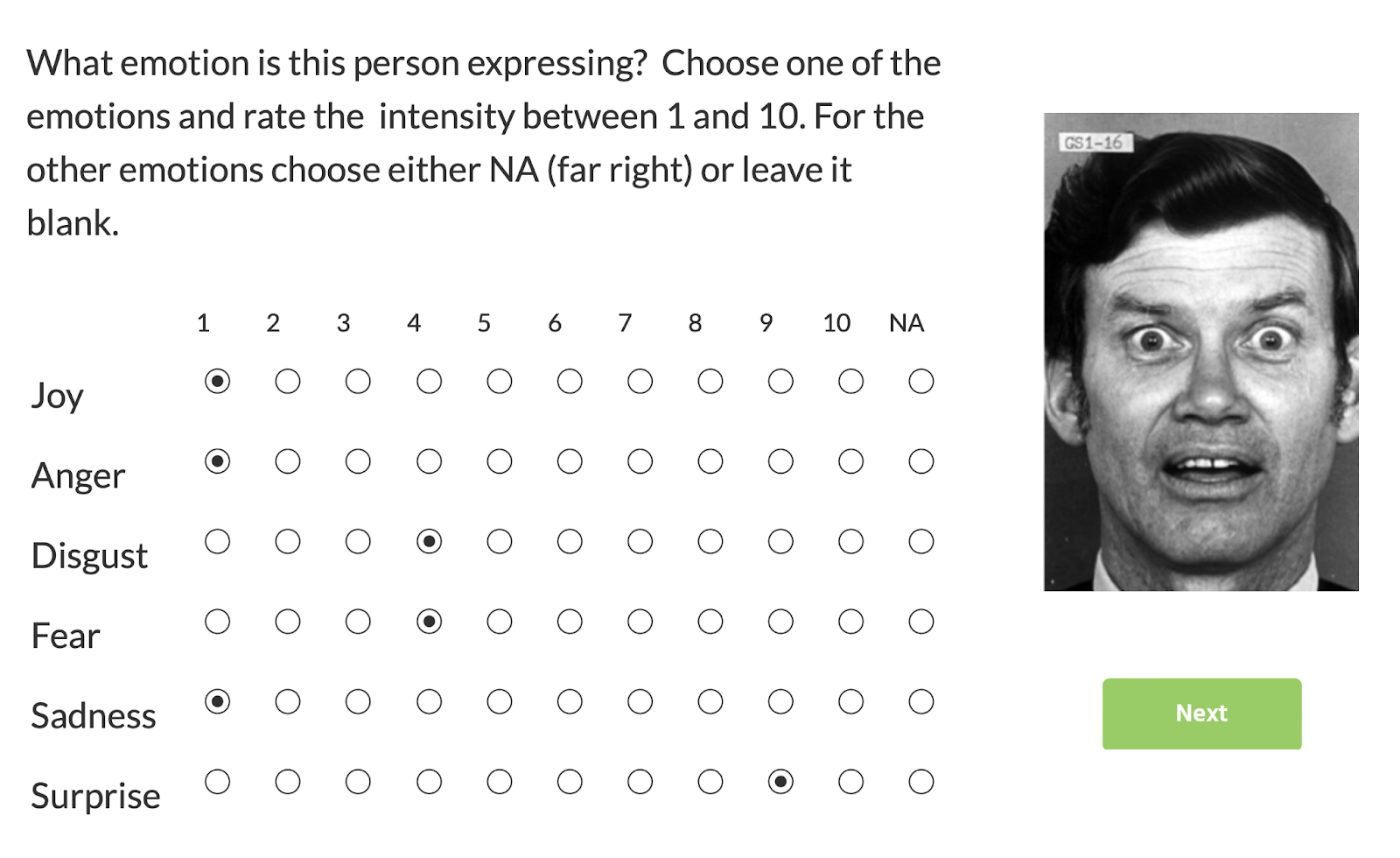
Image Stimuli with Matrix Questionnaire object used in Labvanced to classify emotion recognition.
Data Collection and Questionnaires
Participants can respond to stimuli or questions using different formats, allowing both qualitative and quantitative data collection. These formats include, but are not limited to:
- Likert / Matrix
- Multiple Choice/ Radio Buttons / Checkbox
- Open answer
- Range / Slider
For more in-depth analysis, Labvanced supports advanced data collection features. These features include:
- Mouse tracking
- Audio recording (where the participant is talking freely and records themselves)
- Video recording (of the participant, if enabled)
- Gaze (via our peer-reviewed webcam-based eye tracker)
Try out this Editing Text Dynamically demo, as shown above, where participants were asked to edit questionnaire input-field items while their keystrokes and mouse clicks were tracked.
📕 Case Study: Ranking Items via Drag & Drop
Rasse et al. (2023) in their study approached questionnaire research in a different light, using a drag and drop design where image stimuli ought to be arranged in a specific way. Participants were asked to categorize the order of how specific landmarks appeared by dragging and dropping images, ranking their order from 1-8. This approach demonstrates an interesting approach to questionnaires where they become interactive by asking participants to drag and drop the rank item (pin) to the corresponding image before submitting their answers.
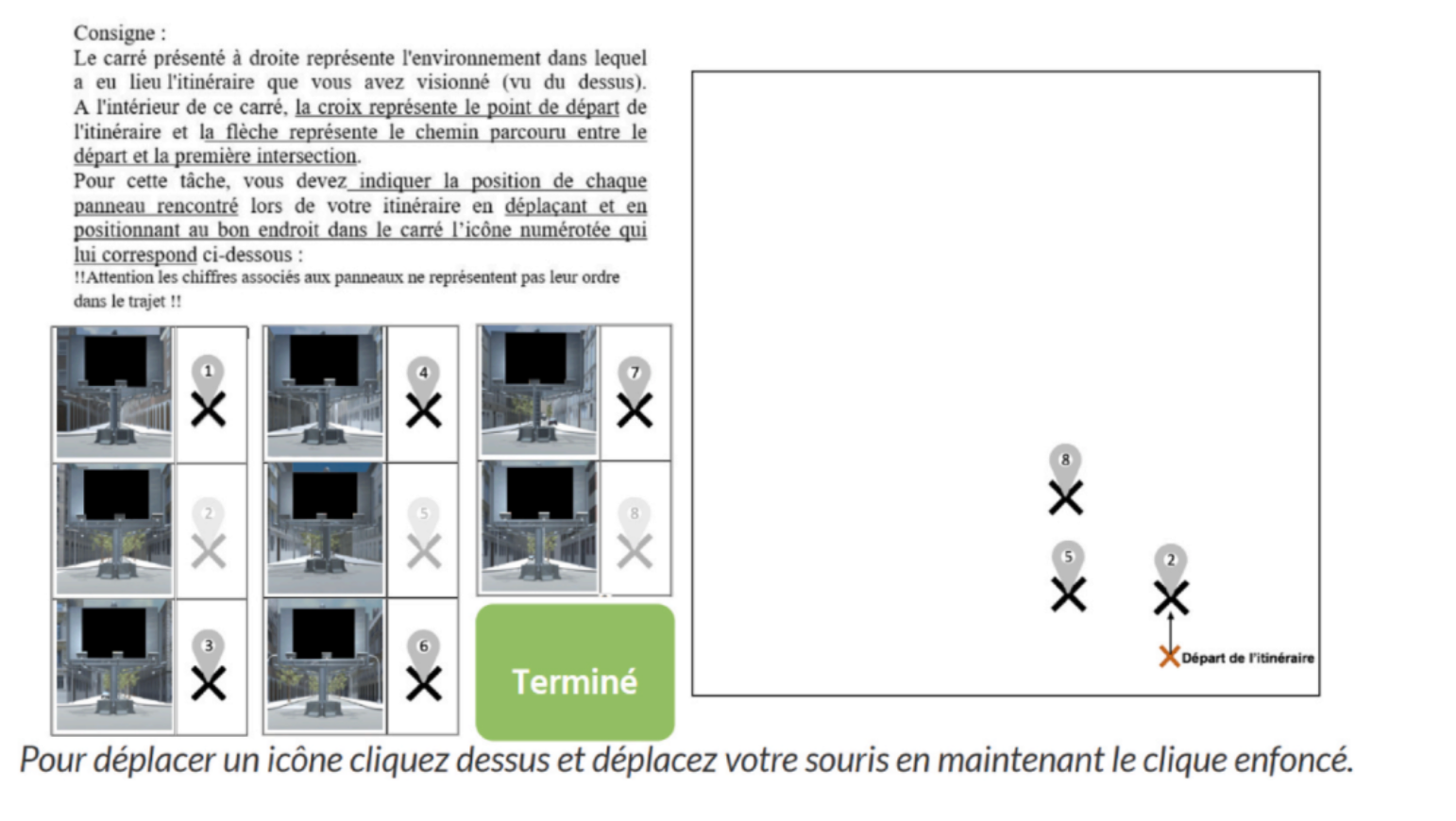
Dragging & Dropping task; Rasse et al. (2023).
Reference: Rasse, T., Gyselinck, V., & Guegan, J. (2023). Encountering an emotional landmark on the route for a better spatial memory: What matters, valence or arousal? Journal of Environmental Psychology, 91, 102145. https://doi.org/10.1016/j.jenvp.2023.102145
Questionnaire Elements and Objects
How are questionnaires created?
Labvanced offers 30+ customizable elements (AKA objects) that can fit any research need, from straightforward surveys to complex, dynamic forms.
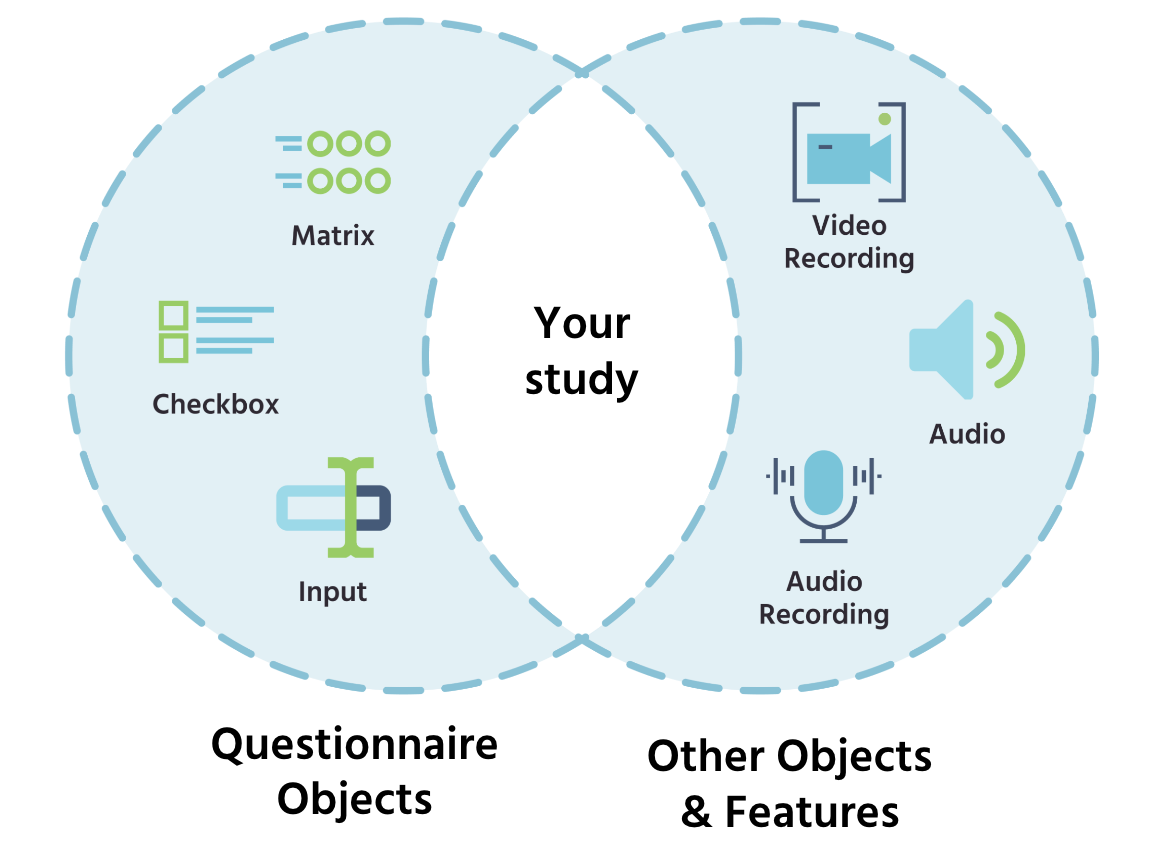
Here’s an overview of some of the questionnaire-related objects that Labvanced provides:
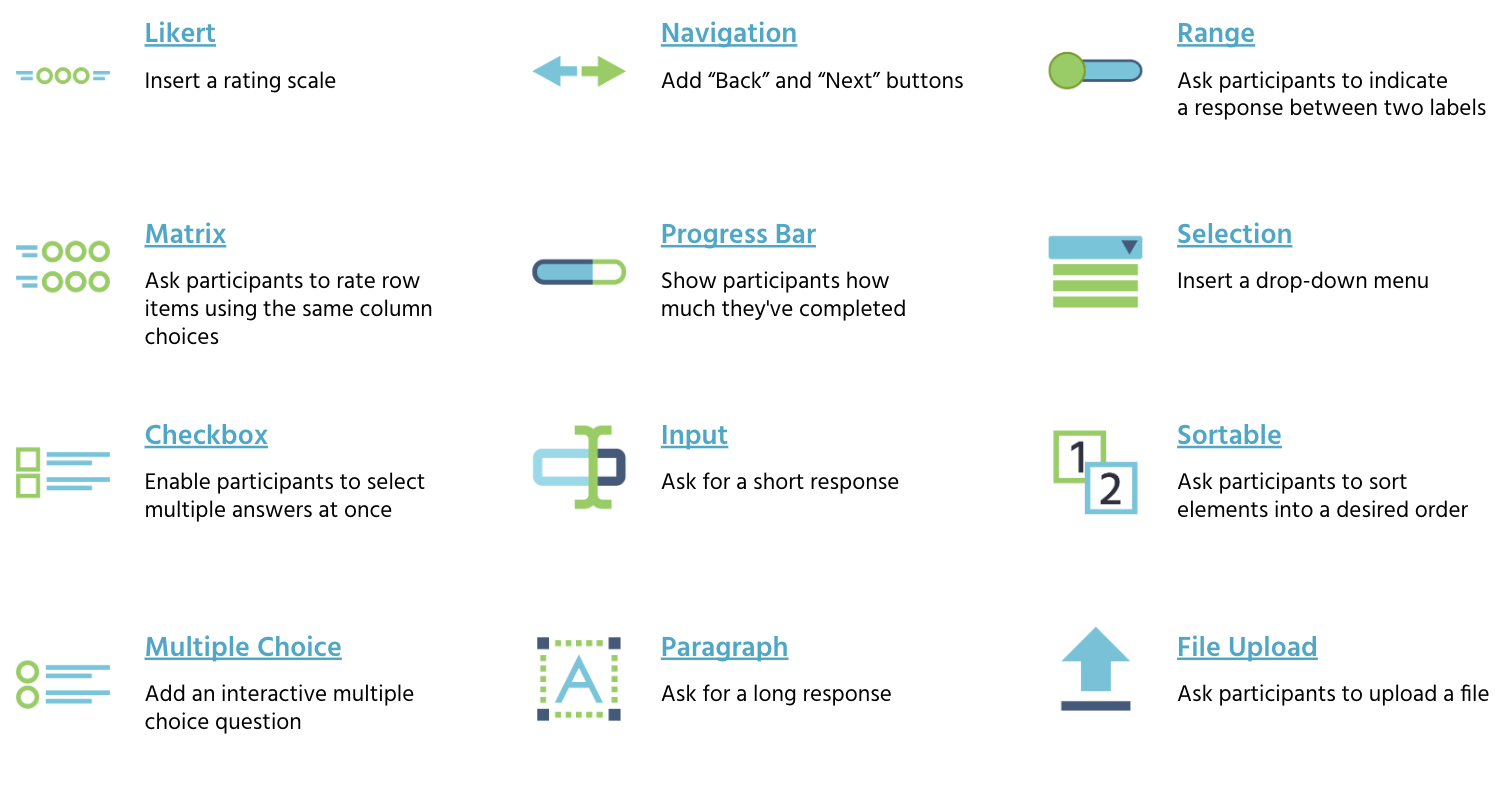
Examples of popular questionnaire objects used in questionnaire design.
📕 Case Study: Swiping Task & Evaluating Social Attractiveness
In the study by Valuch et al. (2023), the researchers utilized image presentation together with Likert scales to determine how smiling in a photograph influences aesthetics. In task 1 (a), the participants had to quickly swipe whether to ‘discard’ or ‘keep’ images. In a later task, they had to rate the attractiveness of the images using a 7-point Likert scale. The researchers also added an on-screen duration limit where the presentation of the image was visible for a maximum of 1000ms (experiment 1) or 750ms (experiment 2):
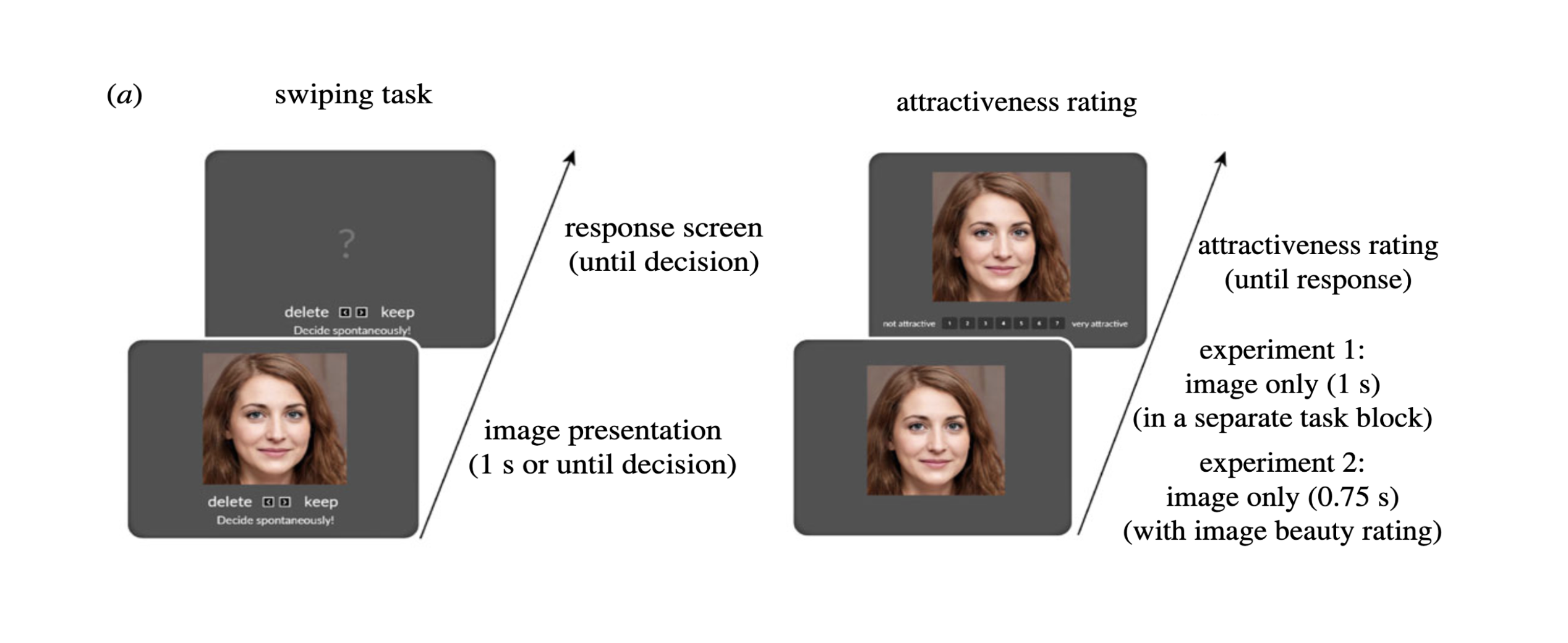
Overview of the attractiveness evaluation tasks utilizing image stimuli followed up by Likert-based beauty ratings; Valuch et al. (2023).
Reference: Valuch, C., Pelowski, M., Peltoketo, V. T., Hakala, J., & Leder, H. (2023). Let's put a smile on that face—A positive facial expression improves aesthetics of portrait photographs. Royal Society Open Science, 10(10), 230413. https://doi.org/10.1098/rsos.230413
Labvanced offers exceptional experimental flexibility for questionnaire research by allowing you to combine various objects/ elements and features in order to bring your unique experimental design to life. Whether it’s designing simple questionnaires or complex setups, the possibilities provided by Labvanced are endless.
📕 Case Study: Audio Presentation in Q&A Format
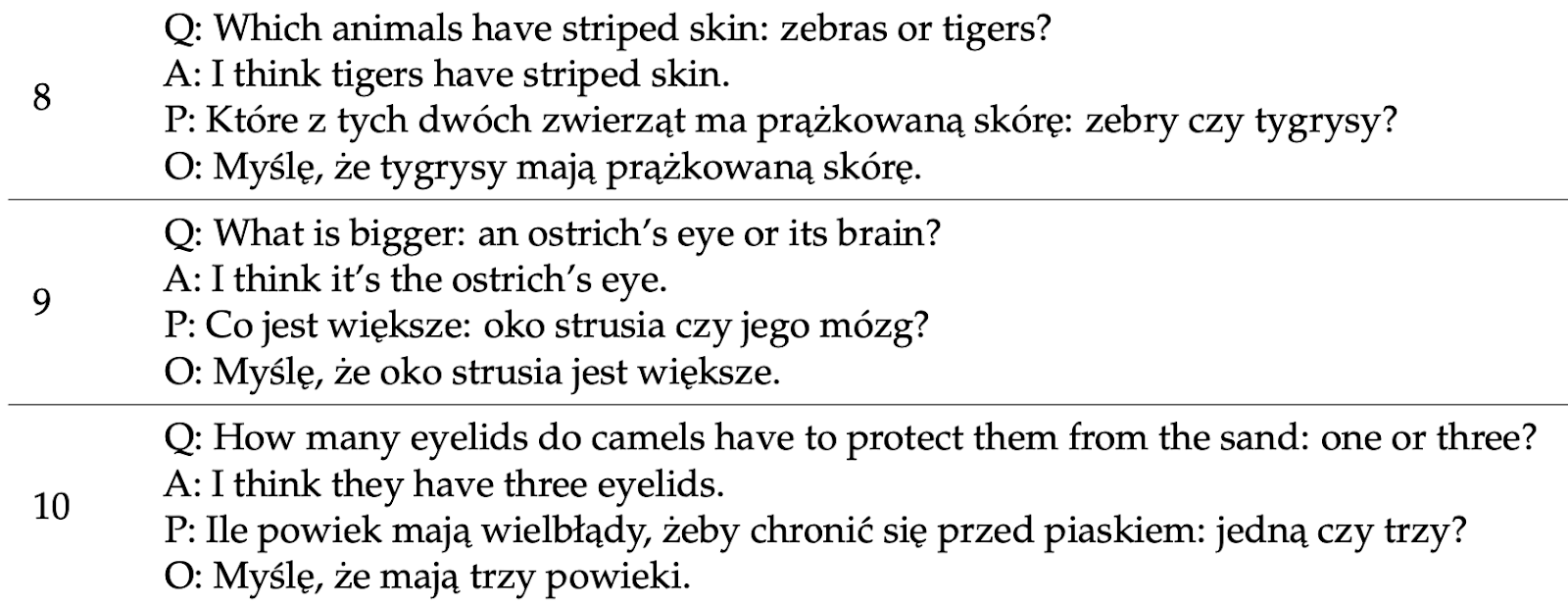
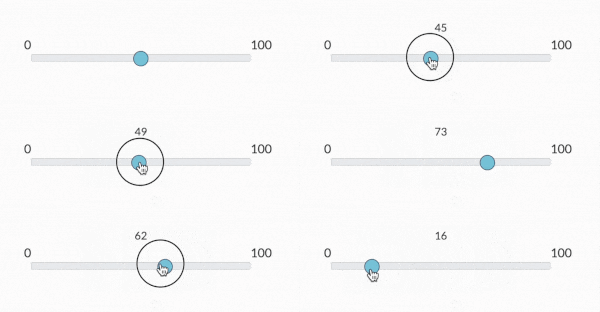
In a study by Matzinger et al. (2023) the researchers presented audio stimuli and then followed up with questionnaire objects. The aim of the study was to assess how native Polish-speaking individuals rated native and non-native speakers of Polish on their knowledge, confidence and willingness. A set of questions and answers were presented randomly in an audio format and the participants used a range / slider element in Labvanced, labeled from 0 to 100, to rate how knowledgeable or confident the speaker was.
The image below shows a sample of the questionnaire items:
The participants rated the speaker’s knowledge or confidence using a Slider / Range Object in Labvanced where 0 = not knowledgeable/confident at all and 100 = very knowledgeable/confident:
Reference: Matzinger, T., Pleyer, M., & Żywiczyński, P. (2023). Pause Length and Differences in Cognitive State Attribution in Native and Non-Native Speakers. Languages, 8(1), 26. https://doi.org/10.3390/languages8010026
Questionnaire Randomization
There are several ways to ensure experimental integrity in Labvanced, such as through randomization. You can randomize the item order within questions, the order of trials, as well as the order of whole questionnaires or tasks.
Item-specific Randomization
Allows you randomize the order of the listed options.
Tasks Randomization
You can randomize selected tasks/blocks with the Randomization Separator or shuffle all tasks/blocks across participants.
Add Participant Feedback
You can let the participants know if they answered the questions correctly by adding participant feedback to your experiment.
📕 Case Study: Tutorial-focused Study with Answer Feedback
In a study by Kessler et al. (2023), the researchers sought to determine how a tutorial intervention would help with complex problem-solving. The tutorial questions included multiple choice answers. Based on the participant’s selection, elaborated feedback would be provided as it has been shown to be more beneficial for learning as opposed to simply showing the correct answer. The image below (left) shows the Tutorial question and the image (right) shows examples of feedback when an incorrect response is selected (red box) vs. a correct answer (green box).
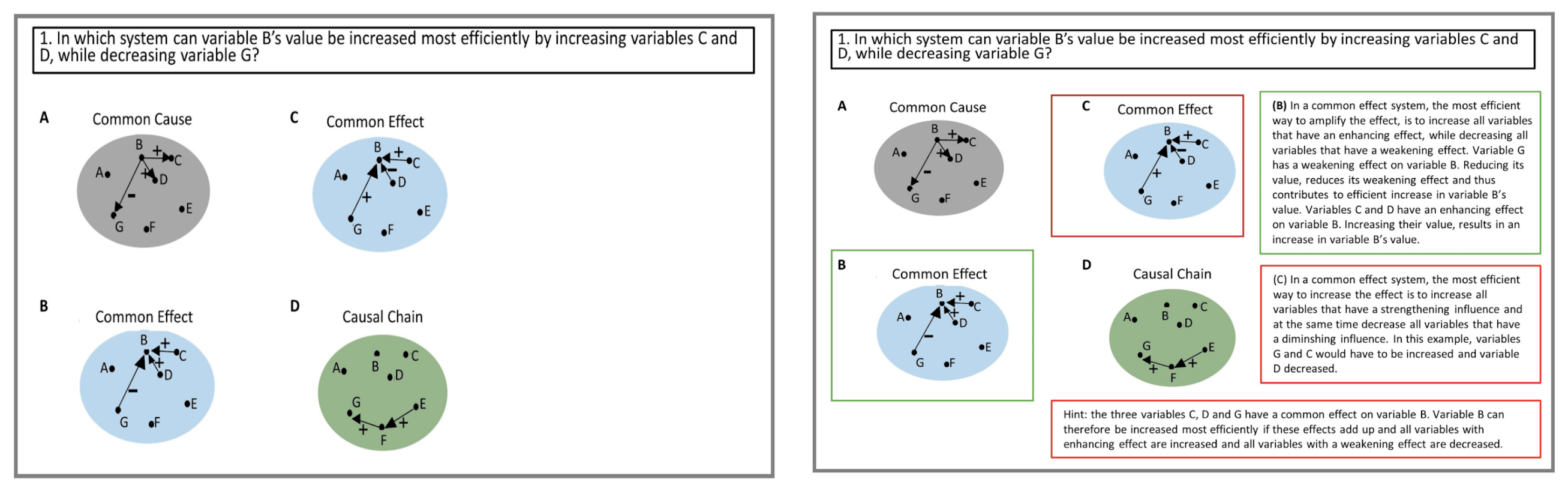
Tutorial question (left) and detailed answer feedback provided after choosing an option where the green border color indicates and right explanation and the red indicates the incorrect answer and an explanation (right); Kessler et al. (2023).
Reference: Kessler, F., Proske, A., Urbas, L., Goldwater, M., Krieger, F., Greiff, S., & Narciss, S. (2023). Promoting Complex Problem Solving by Introducing Schema-Governed Categories of Key Causal Models. Behavioral Sciences, 13(9), 701. https://doi.org/10.3390/bs13090701
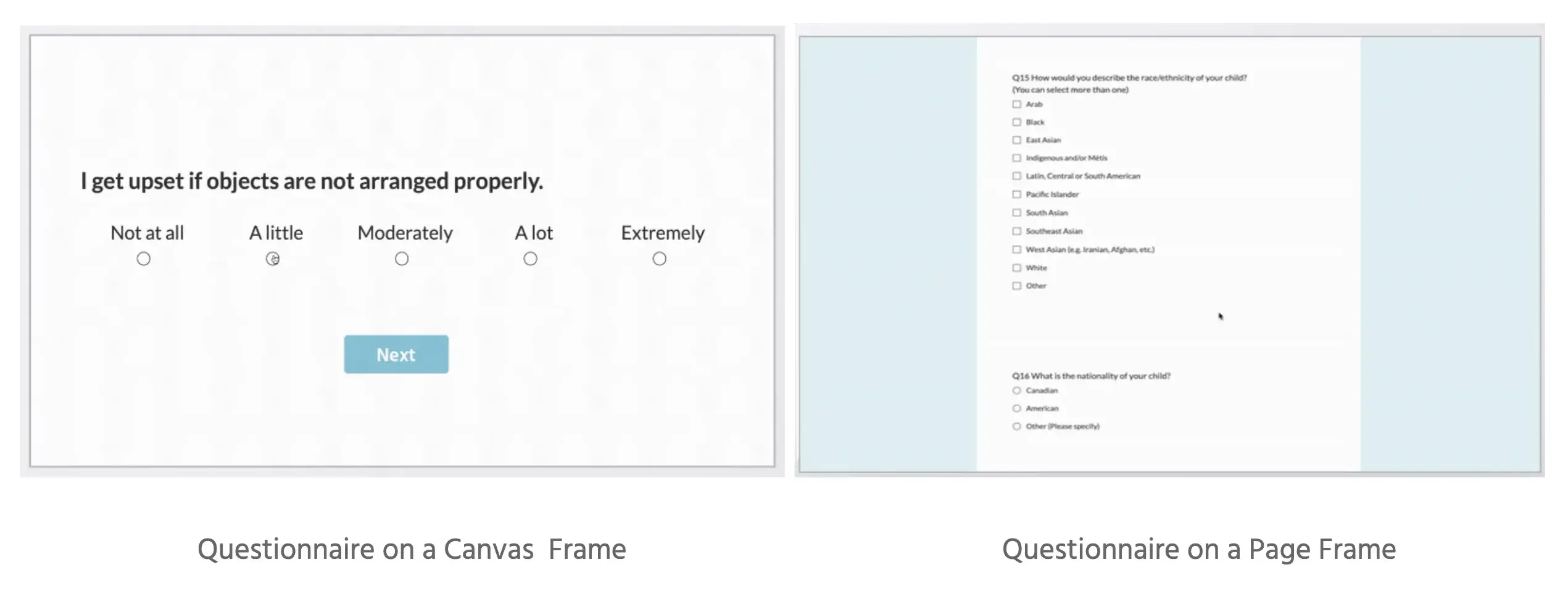
Canvas Frames & Page Frames
Labvanced offers you the flexibility to design your questionnaires with 2 modes / frame types, each with its unique features. The options are:
- Canvas Frames: Questionnaire elements can be freely positioned using drag & drop, and the size of the stimuli and all elements will scale with the screen size. This frame type offers a high degree of customizability and in general can be used for more complex scenarios.
- Page Frames: Questionnaire elements automatically flow below each other, there are build in options for randomizations, and the questionnaire has a max-width defined in pixel, making it easier to use and better looking for pure questionnaires.
📕 Case Study: Visual Storytelling and Participant Feedback
In some cases, such as when children are the participants, instead of showing multiple choice answers and feedback in a text format, it may be more effective to have a more visual approach and have the options as images. For such a design, researchers can use canvas frames and add events where stylized feedback appears in whatever shape or form.
For instance, in a study by Schuhmacher et al. (2023), the researchers asked questions after visual storytelling tasks and children received feedback visually over the images.
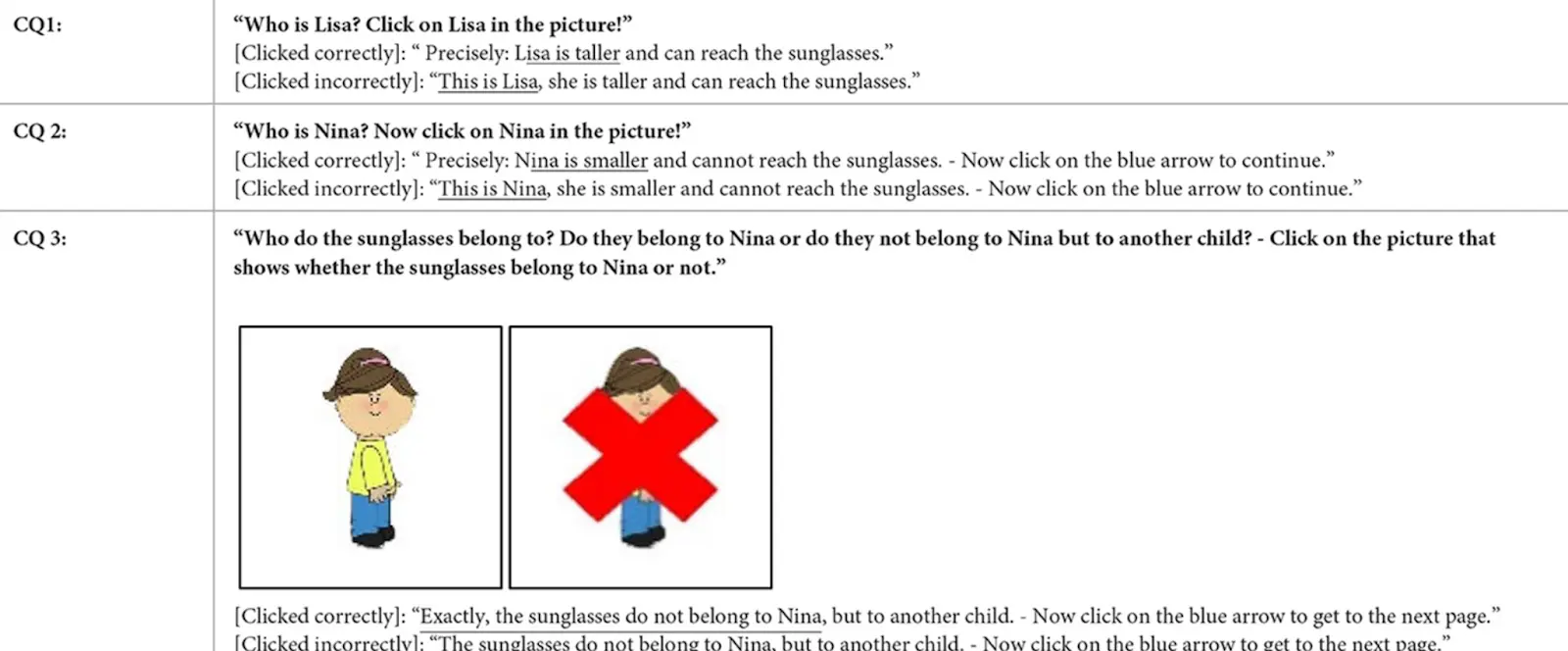
Adding visual feedback for child participants using Canvas Frames in Labvanced;
Schuhmacher et al. (2023).
Reference: Schuhmacher, N., Rack, N., Beckmann, L., & Kärtner, J. (2023). Is helping always the preferred decision? Preschool-and elementary school-aged children's helping decisions in complex social situations. Frontiers in Developmental Psychology, 1, 1278034. https://doi.org/10.3389/fdpys.2023.1278034
Advanced Questionnaire Design
Branching Logic
Branching allows you to control the flow of your questionnaire and determine which questions are presented to the participants. Our advanced system handles branching and dynamic responses, allowing you to create different questionnaire routes per participant. This flexibility enables you to capture detailed and nuanced data, tailored precisely to your study requirements.
Advanced Logic In Questionnaires
If required, you can use advanced event logic and or code to customize your questionnaire research design in Labvanced. A few examples are given below:

Questionnaire Data Output
While you can collect choice selections for each questionnaire item, Labvanced allows you to go beyond basic data, such as perform calculations with those scores. This is especially important when working with questionnaires and scales that involve reverse-scoring or a choice has a different value scoring system.
Commonly performed calculations using Labvanced include:
- Total score
- Correct responses
- Tabulation across categories and sub-categories
For example, the image below shows the questionnaire choice q which has the Likert-scale range of 1-5 and the corresponding assigned numeric value q-value of that choice. The total column shows how the score calculation is increasing based on the choice q and its value q_value:
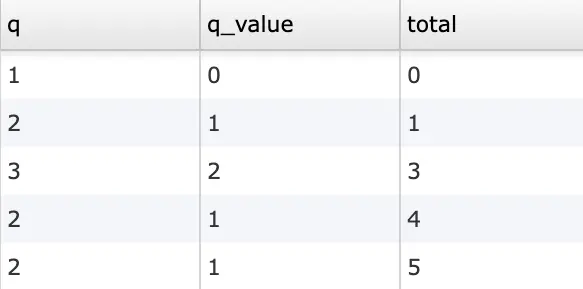
Example where a participant’s choice (q) via a Likert-scale has a specific value of (q_value) and how that score is then summated across trials (total).
📕 Case Study: Questionnaire Values as Predictors of Performance
Another common scenario for questionnaires is to take the data and then use them as predictors for performance in cognitive-related tasks.
For example, Wöstmann et al. (2021) aimed to determine how tolerance to noise is associated with personality. The Questionnaires / Scales used for the study were:
- BFI-S: Personality questionnaire, where the Big-5 dimensions are assessed
- Demographic information also collected data on musicality
- WNSS: Noise resistance questionnaire
- SSQ: Speech-hearing ability questionnaire
- ANL: Acceptable noise level test
- DTT: Adapted digit-triplet-test to determine speech-in-noise reception
Findings showed that lower neuroticism and higher extraversion independently explained superior self-reported noise resistance, as well as speech-hearing ability and acceptable background noise levels.
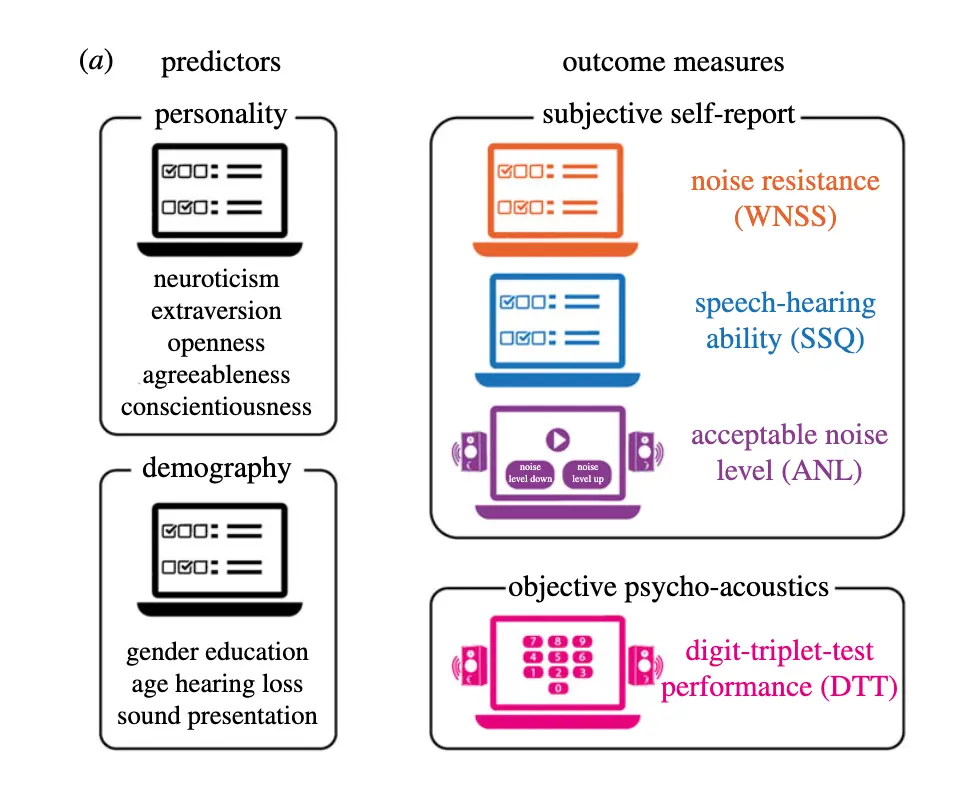
Questionnaires / Scales administered in Labvanced and used as predictors for noise sensitivity; Wöstmann et al. (2021).
Reference: Wöstmann, M., Erb, J., Kreitewolf, J., & Obleser, J. (2021). Personality captures dissociations of subjective versus objective hearing in noise. Royal Society Open Science, 8(11), 210881. https://doi.org/10.1098/rsos.210881
Reaction Times in Questionnaires
Reaction time allows you to measure how quickly a response was selected by participants or how long it took them to provide written inputs/ answers.
Reaction time can be used throughout the duration of the experiment for various purposes and in various ways, including:
- The total time taken to complete the entire questionnaire/ survey
- The time taken to answer a single question
- The amount of time it took to select a response in relation to some other event (such as an image stimuli appearing / disappearing)
Import Questionnaires from our Library
You can save time by importing existing scales & questionnaires directly into your account from the Public Experiment Library of Labvanced. It has over 600 templates that can be further customized as per your research needs