labvanced logoLabVanced
  • Research
    • Publications
    • Researcher Interviews
    • Use Cases
      • Developmental Psychology
      • Linguistics
      • Clinical & Digital Health
      • Educational Psychology
      • Cognitive & Neuro
      • Social & Personality
      • Arts Research
      • Sports & Movement
      • Marketing & Consumer Behavior
      • Economics
      • HCI / UX
      • Commercial / Industry Use
    • Labvanced Blog
    • Services
  • Technology
    • Feature Overview
    • Code-Free Study Building
    • Eye Tracking
    • Mouse Tracking
    • Generative AI Integration
    • Multi User Studies
    • More ...
      • Reaction Time/Precise Timing
      • Text Transcription
      • Heart Rate Detection (rPPG)
      • Emotion Detection
      • Questionnaires/Surveys
      • Experimental Control
      • Data Privacy & Security
      • Desktop App
      • Mobile App
  • Learn
    • Guide
    • Videos
    • Walkthroughs
    • FAQ
    • Release Notes
    • Documents
    • Classroom
  • Experiments
    • Cognitive Tests
    • Sample Studies
    • Public Experiment Library
  • Pricing
    • Licenses
    • Top-Up Recordings
    • Subject Recruitment
    • Study Building
    • Dedicated Support
    • Checkout
  • About
    • About Us
    • Contact
    • Downloads
    • Careers
    • Impressum
    • Disclaimer
    • Privacy & Security
    • Terms & Conditions
    • Third-Party Licenses
  • Appgo to app icon
  • Logingo to app icon
Technology
Feature Overview - All
Study Builder
Eye Tracking
Mouse Tracking
Web Bridge
Generative AI Integrations
Multi User Studies
  • 中國人
  • Deutsch
  • Français
  • Español
  • English
  • 日本語
Feature Overview - All
Study Builder
Eye Tracking
Mouse Tracking
Web Bridge
Generative AI Integrations
Multi User Studies
  • 中國人
  • Deutsch
  • Français
  • Español
  • English
  • 日本語
Labvanced Text Segmentation Object displaying a sentence with a per-word area of interest box drawn around each word

Text Segmentation

Text Segmentation in Labvanced allows researchers to build a word-level area of interest for every word in a sentence automatically in just a few minutes. There is no manual AOI placement: link a spreadsheet of stimuli and Labvanced measures every word's position, then, with webcam eye tracking enabled, records five gaze metrics per word, per trial.


Table of Contents

  • How Text Segmentation Works
  • Automatic AOIs Instead of Manual Placement
  • Data Collected and Preview
  • Interactive Demos

How Text Segmentation Works

Reading research built around per-word or per-region gaze data has historically meant hand-placing an AOI for every word or phrase in every stimulus, a process that does not scale much past a handful of sentences. Text Segmentation in Labvanced removes that step: upload a spreadsheet of sentences, and every word in every row gets its own AOI without a researcher placing a single box.

PropertySpecification
Text SourceCSV upload, existing data frame, or array variable (one sentence per trial)
AOI UnitOne box per word, measured automatically in Labvanced frame units
Layout ModesFlow (wraps at element width) or Grid (equal-width columns, gapless AOI coverage)
Recorded TablesAOI geometry (word, position, size) and, with eye tracking on, per-word gaze metrics
Per-Word Gaze MetricsDwell time, total fixations, total fixation duration, time to first fixation, mean fixation duration
Compatible WithLongitudinal designs, mouse tracking and more

Each word's AOI is measured directly from the rendered element, not estimated from font metrics, so the recorded geometry matches what was actually on screen when the trial displayed it. See the AOI geometry table below for what this looks like recorded.

The per-word gaze metrics run on Labvanced's peer-reviewed webcam eye tracking pipeline (1.3 visual degrees of accuracy, validated against an EyeLink 1000; Kaduk et al., 2024, Behavior Research Methods), the same gaze engine behind every other eye tracking capability on the platform. See the per-word metrics table below for what this looks like recorded.

Automatic AOIs Instead of Manual Placement

The spreadsheet format matches how stimuli are usually built for this kind of study already, one row per trial, one word per column, so an existing stimulus set can often be linked directly.

Spreadsheet preview of stimulus sentences, one row per sentence, one word per cell
A stimulus spreadsheet ready to link: one sentence per row, one word per cell.

Within just a few minutes, you can go from a CSV to a fully functional prototype study in Labvanced, with AOIs mapped and webcam eye tracking enabled.
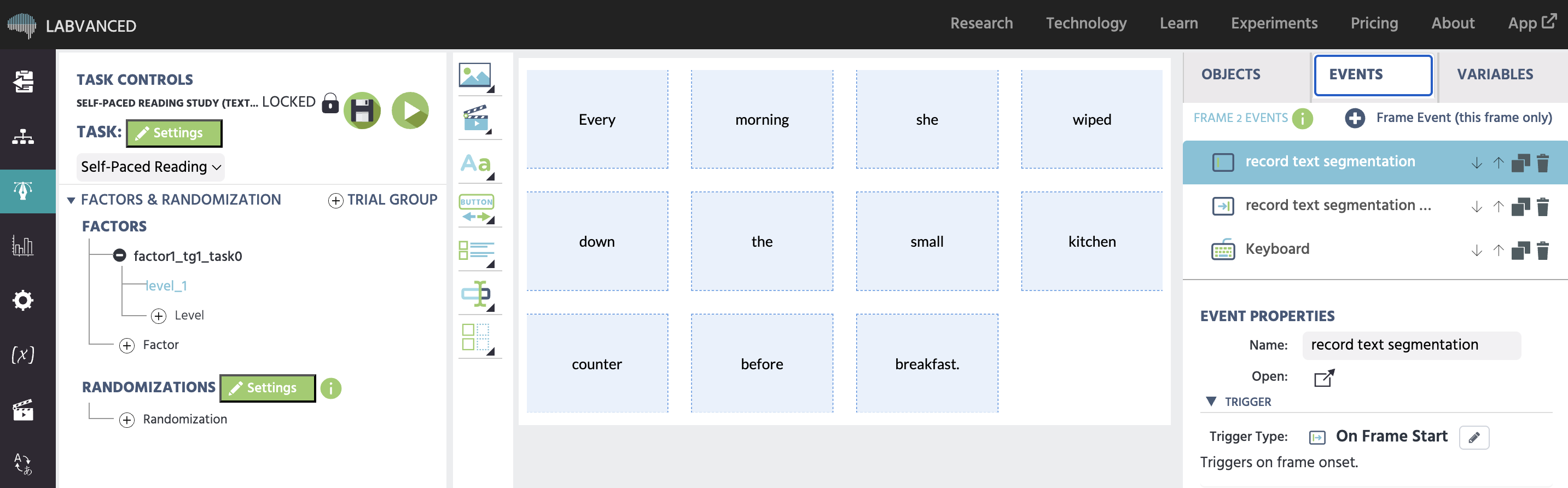
Text Segmentation Object in Grid layout showing a stimulus sentence split into one cell per word
A sentence rendered with Grid layout: every word in its own equal-width cell, with no gaps or overlaps between adjacent AOIs.

Data Collected and Preview

Two data frame tables are available per trial, row-aligned so the same word occupies the same row in both:

AOI Geometry TablePer-Word Metrics Table
word_index, word, line_index, x, y, width, heightword_index, word, line_index, dwell_time, total_fixations, total_fixation_duration, time_to_first_fixation, mean_fixation_duration

A word that was never looked at keeps its row with zeros across every metric column, rather than an empty cell, so no analysis script has to special-case missing data.
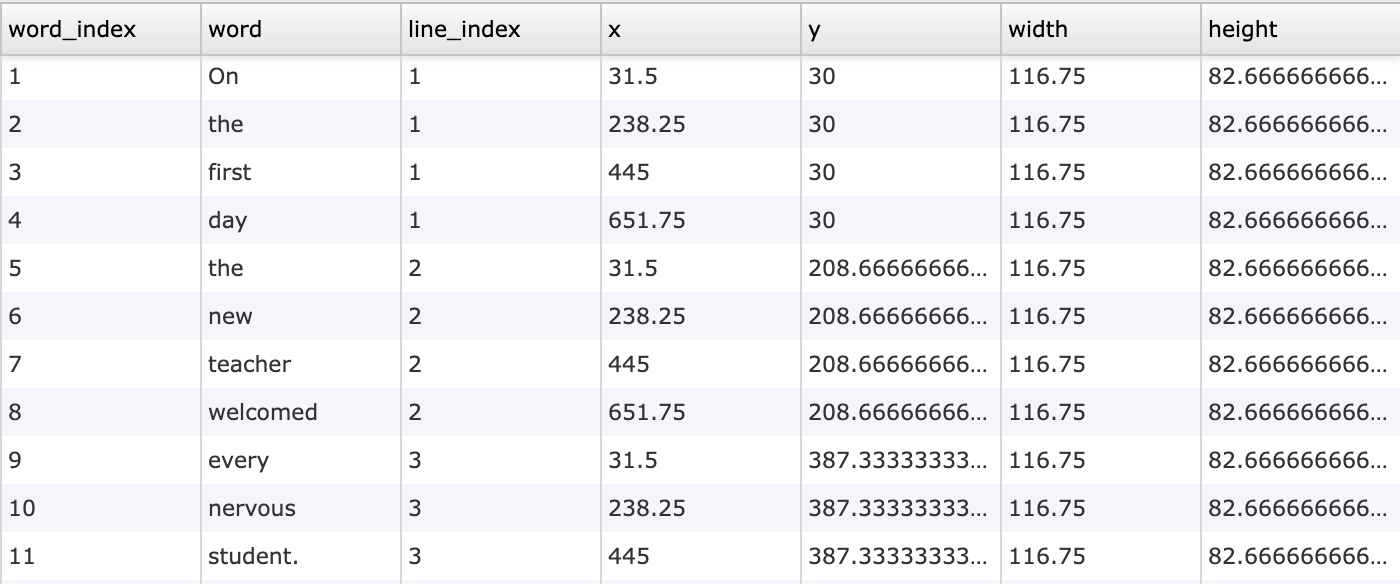
AOI geometry data frame recorded by Record Text Segment AOIs, one row per word
The AOI geometry table: each word's word_index, word, line_index, x, y, width, and height, one row per word.

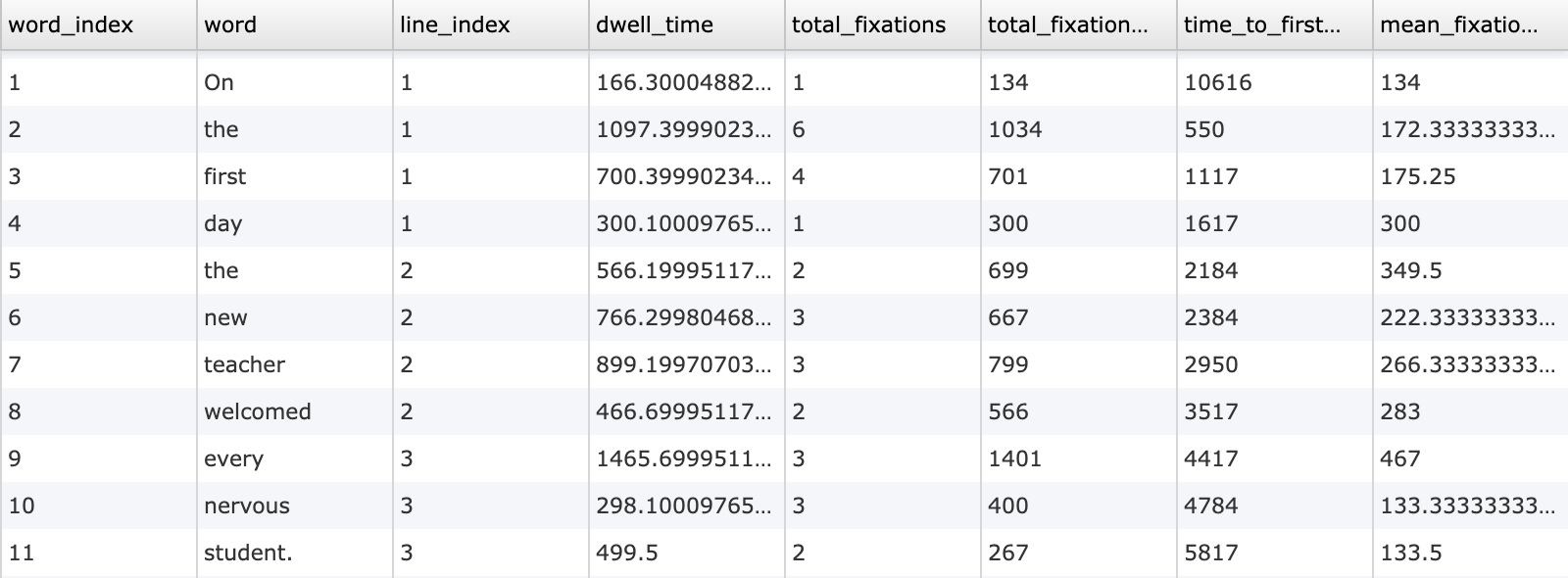
Eyetracking metrics data frame recorded by Record Text Segment Eyetracking Metrics, one row per word
The per-word metrics table: dwell time, fixation counts, and timing, row-aligned with the geometry table above by word_index.

Both tables are written by dedicated event actions: Record Text Segment AOIs writes the geometry at the start of a frame and keeps it in step with what is rendered, and Record Text Segment Eyetracking Metrics writes the gaze metrics at frame end, once every word's fixation data for that trial is final.


Sign Up

Interactive Demos

Self-Paced Reading Study (Demo)

A ten-sentence word-frequency reading study with per-word AOI geometry and eye tracking metrics recorded automatically. Import it directly into your account.

Documentation

Text Segmentation Object reference page in the Labvanced guide

Text Segmentation Object

Full object reference: properties, setup wizard, and the two recording actions.

Walkthrough of building a reading study with the Text Segmentation Object in Labvanced

Building a Reading Study

Step-by-step walkthrough of a real word-frequency reading study built with Text Segmentation.
Common Questions


Can Labvanced automatically generate an AOI for every word in a sentence?
Yes. The Text Segmentation Object measures every word in a linked spreadsheet, data frame, or array and records its position, size, and the line it fell on, with no manual AOI placement required.

Does per-word reading data require webcam eye tracking?
The AOI geometry (each word's position and size) does not. The per-word gaze metrics (dwell time, fixations, time to first fixation) do, since they are measured from live gaze data, and the setup wizard enables the required eye tracking settings for you.

Can I show more than one sentence in a single frame?
Each Text Segmentation Object displays one sentence per frame. A study that needs to swap the text mid-frame needs its own events to do so; the object itself does not change its linked row within a frame.

Can I upload my own stimulus spreadsheet?
Yes. The setup wizard accepts a CSV upload directly, parsed into a data frame, one row per trial. An existing data frame or array variable can be linked instead if the stimuli are already in Labvanced.

Further Reading

Labvanced webcam eye tracking technology overview

Webcam Eye Tracking

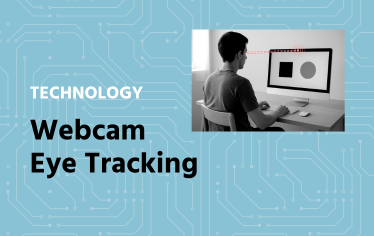
The peer-reviewed gaze engine behind Text Segmentation's per-word metrics.

Mouse tracking technology overview

Mouse Tracking

Track cursor position and trajectory as another behavioral measure alongside gaze.

Labvanced technology features overview

Feature Overview

The full range of technology capabilities available on the Labvanced platform.