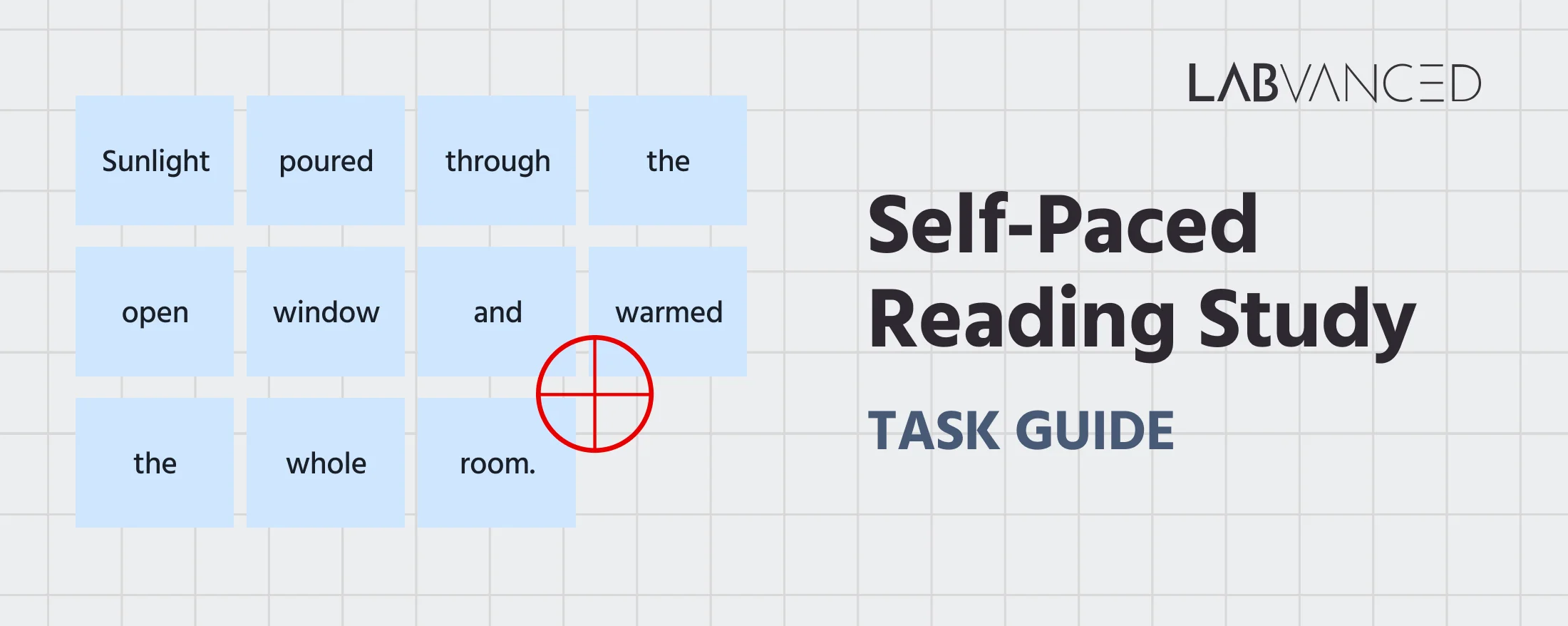
Self-Paced Reading Task
The Self-Paced Reading Task measures how people read sentences at their own pace, word by word. In the Labvanced version, each sentence is shown in full and webcam eye tracking records reading behavior on every word, so researchers get word-level reading times without having to reveal the text one word at a time. Reading times on individual words have been used to study language processing since the earliest reading paradigms (Just et al., 1982).
Table of Contents
Task Format | Self-Paced Reading Task
The study starts with a short instruction screen and a webcam eye tracking calibration. Participants then read 10 sentences, one per trial, in random order.
Each trial has two steps:
- Fixation cross: a fixation cross appears on screen. The sentence follows one second after the participant's gaze lands on the cross, so every trial starts with the eyes in the same place.
- Sentence: the full sentence is displayed with each word in its own cell. Participants read it as they normally would, then press any key or click to move on.
Because the participant decides when to move on, reading stays self-paced. The difference from the classic method is how word-level times are measured. In the classic moving-window version, participants press a key to reveal each next word, and the time between presses is the reading time. Here, the whole sentence stays on screen and eye tracking measures how long the eyes spend on each word, which keeps reading closer to normal.
Data Collected with the Self-Paced Reading Task
The Self-Paced Reading Task records two levels of data: how long participants took to read each sentence, and how they read each individual word. The word-level tables are recorded automatically by the Text Segmentation Object, with one row per word. All variables can be viewed and customized within the task's Variables Tab.
Below are the key variables collected in the Labvanced version of the Self-Paced Reading Task:
| Variable Name | Description |
|---|---|
Text Segmentation Object_1_word_metrics | Table with one row per word: word_index, word, line_index, dwell_time, total_fixations, total_fixation_duration, time_to_first_fixation, and mean_fixation_duration |
Text Segmentation Object_1_aoi | Table with one row per word: word_index, word, line_index, and the word's position and size on screen (x, y, width, height) |
reaction_time_Keyboard | Time (ms) from sentence onset to the key press that ended the trial, the total reading time for the sentence |
reaction_time_Mouse | Time (ms) from sentence onset to the click that ended the trial, when the participant clicked instead of pressing a key |
The two word tables share the same word_index, so each word's eye tracking metrics can be matched to the word itself and its position in the sentence.
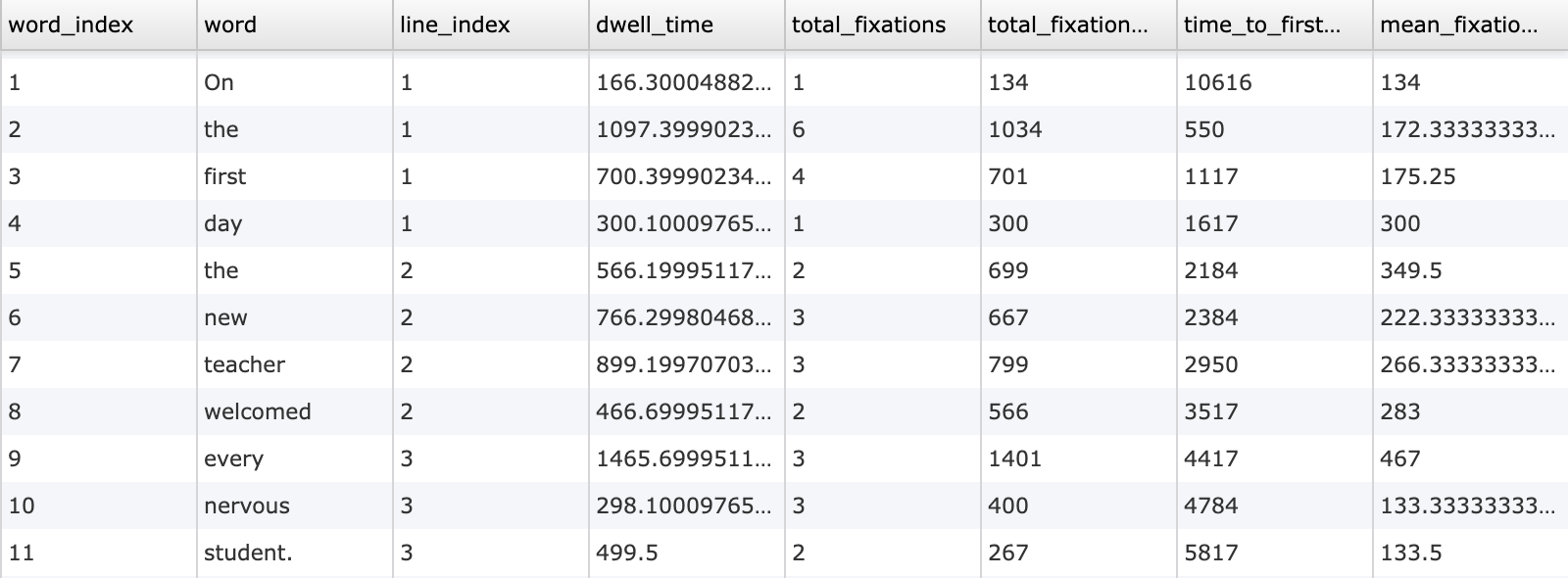
This study measures reading at the level of single words. Participants read ten sentences at their own pace while webcam eye tracking records dwell time, fixations, and time to first fixation on every word.
Technology for the Self-Paced Reading Task
Labvanced includes several technologies that make the Self-Paced Reading Task suitable for remote and in-lab reading research:
Text Segmentation Object: Each sentence is split into words automatically, and every word becomes its own area of interest (AOI). There is no need to draw AOIs by hand for each word and each sentence. Learn more on the Text Segmentation technology page.
Webcam Eye Tracking 2.0: Gaze is recorded with the participant's own webcam, with no extra hardware. For reading at word level, the ET 2.0 validation recommends the longer calibration with strict screening, which delivered about 1.5° of visual angle (Labvanced, 2026). The grid layout in this template gives each word a wide cell, which makes word-level AOIs easier to hit.
Gaze-Contingent Trial Start: The sentence appears only once the participant's gaze has reached the fixation cross, so every trial starts from the same eye position.
Built-in Fixation Detection: Fixations are detected automatically while the sentence is shown, and the word metrics table is calculated when the trial ends, with no post-processing needed.
High Precision Timing: Sentence onsets and responses are recorded with millisecond accuracy, so total reading times per sentence are measured precisely.
Desktop App Mode: For in-lab studies, the Desktop App can also be used to administer this test and then combine it with lab hardware like EEG or any other LSL-based connection.
Privacy by Design: All face and eye processing runs on the participant's device. Only numeric gaze data is saved, never webcam images or video.

Webcam Eye Tracking
Capture gaze patterns and visual attention with built-in, code-free and peer-reviewed webcam eye-tracking.
Timing Precision
Capture reaction times, task performance, and more with millisecond accuracy for time-sensitive tasks.

Desktop App
Run in-lab studies using the Desktop App, compatible with EEG and other LSL-connected lab hardware.
Customization of the Self-Paced Reading Task
There are many ways to go about customizing this template. Below are a few themes researchers commonly ask about when it comes to modifying this task.
Sentence Set
The sentences come from a spreadsheet-style data frame: each sentence is one row of the data frame and each word sits in its own column. On screen, the Grid layout then wraps each sentence into lines of 4 words. You can replace them by uploading your own spreadsheet through Set Text Source… in the Object Properties panel. Sentences of different lengths are supported, since shorter rows simply have fewer words. For a step-by-step setup, see the Text Segmentation Object guide.
Word Layout
The template uses the Grid layout, which places each word in an equal-width cell so the AOIs cover the text with no gaps or overlaps. You can switch to the Flow layout for text that wraps like a normal paragraph, and change the number of columns, the spacing between words, and the font in Object Properties.
Comprehension Questions and Conditions
To check that participants read for meaning, add a frame after each sentence with a question about its content. To compare sentence types, such as easy versus difficult or ambiguous versus unambiguous sentences, add a factor in Factors & Randomization and link each condition to its own set of sentences.
Eye Tracking Settings
Calibration length, screening level, and how often drift correction runs can be adjusted in the study's eye tracking settings. For word-level analysis, a longer calibration and stricter screening improve accuracy, at the cost of screening out more participants (Labvanced, 2026).
If there is something else you'd like to know, please feel welcome to write to us and ask:
Recommended Use of the Self-Paced Reading Task
The Self-Paced Reading Task is used in research on how people read and understand language, one word at a time:
Psycholinguistics and Sentence Processing: Measure where reading slows down in a sentence, for example at a word that is unexpected or hard to integrate. How long the eyes stay on a word reflects how much processing that word needs (Rayner, 1998).
Second Language Research: Self-paced reading is a common method in second language research. A synthesis of 74 such studies called for more standardized use and reporting of the method (Marsden et al., 2018).
Online Language Studies: A comparison of 134 second language learners tested online or in the lab found comparable evidence of lexical and sentence-level processing in both settings, including in a self-paced reading experiment (Gastmann et al., 2025).
Reading Development and Education: Eye tracking shows how word length and word frequency affect reading in children. In 66 German-speaking children, slow readers were more sensitive to word length and showed weaker word frequency effects than fast readers (Gerth & Festman, 2021).
Readability and Applied Research: Test how easily people read product copy, instructions, or health information, and find the exact words where readers slow down.
References
Gastmann, F., Schimke, S., & Poarch, G. J. (2025). Conducting psycholinguistic research online: Comparable evidence of second language lexical and sentence-level processing in web-based versus lab-based studies. Bilingualism: Language and Cognition, 29(3), 615–628. https://doi.org/10.1017/S136672892510028X
Gerth, S., & Festman, J. (2021). Reading development, word length and frequency effects: An eye-tracking study with slow and fast readers. Frontiers in Communication, 6, 743113. https://doi.org/10.3389/fcomm.2021.743113
Just, M. A., Carpenter, P. A., & Woolley, J. D. (1982). Paradigms and processes in reading comprehension. Journal of Experimental Psychology: General, 111(2), 228–238. https://doi.org/10.1037/0096-3445.111.2.228
Labvanced. (2026). Labvanced Eye Tracking 2.0: Accurate webcam eye tracking for all online research. Labvanced Lab Notes. https://www.labvanced.com/content/research/en/lab-notes/2026-10-webcam-eyetracking-2-0/
Marsden, E., Thompson, S., & Plonsky, L. (2018). A methodological synthesis of self-paced reading in second language research. Applied Psycholinguistics, 39(5), 861–904. https://doi.org/10.1017/S0142716418000036
Rayner, K. (1998). Eye movements in reading and information processing: 20 years of research. Psychological Bulletin, 124(3), 372–422. https://doi.org/10.1037/0033-2909.124.3.372
Related Tasks
Self-paced reading sits alongside other language and word processing tasks in Labvanced's task library.
Dual Lexical Decision Task
This study investigates word recognition and decision-making in language processing. Participants will view pairs of letter strings and decide whether they are real words or non-words. The task measures accuracy and reaction times in lexical processing.
Bouba-Kiki Task
In this experiment, two shapes are presented and a word. The participant must select one of the two shapes as being the best match to the presented word.