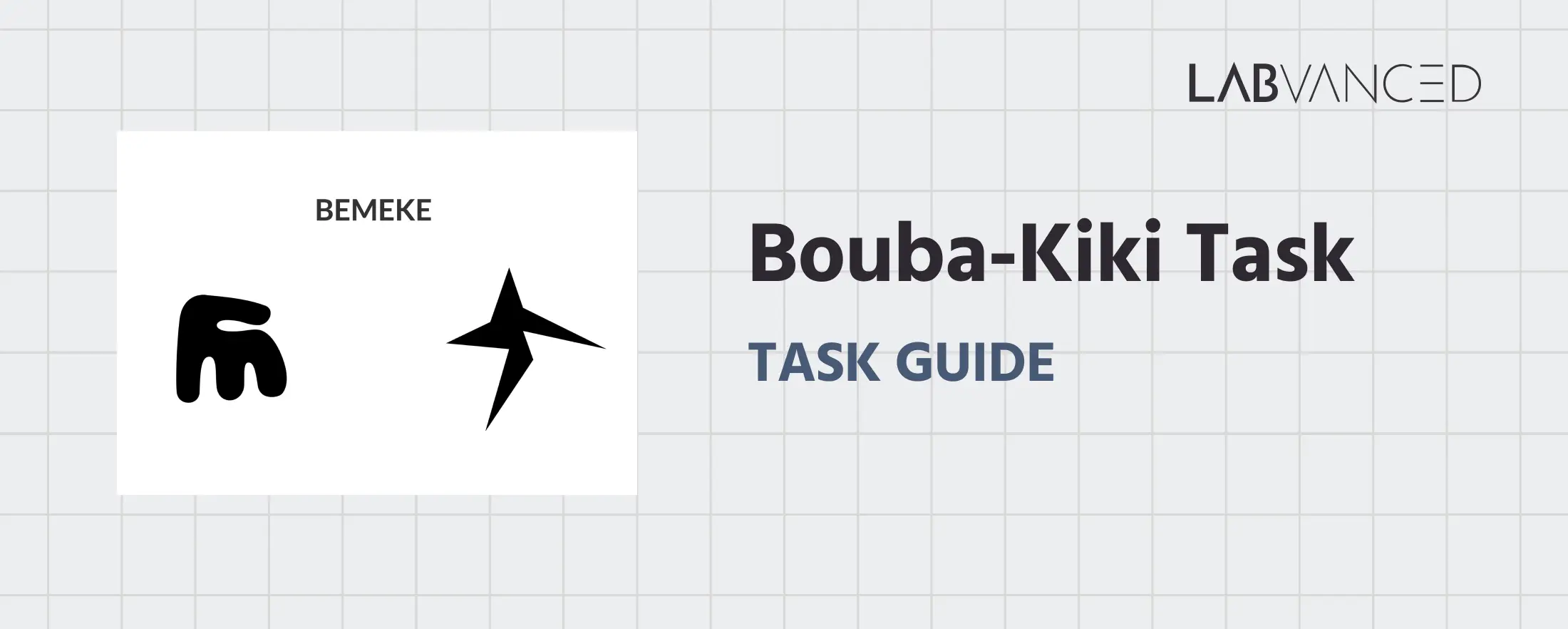
The Bouba–Kiki Task
The Bouba–Kiki Task measures sound–shape correspondence by examining how people associate unfamiliar words with visual forms. It is widely used in cognitive psychology and linguistics research to study perception, language processing, and multisensory integration.
Table of Contents
Task Format | Bouba-Kiki Task Online & In-Lab
In the Bouba–Kiki Task, participants are presented with a novel word along with two abstract shapes and are asked to decide which shape best corresponds to the word. The task is designed to capture intuitive sound–shape associations rather than learned semantic meaning. The session begins with a short practice block to familiarize participants with the response format before the main experimental trials.
Two versions of the bouba-kiki task are available, each optimized for the type of device and input method being used:
Desktop Version
In the desktop version, a word is displayed at the top of the screen with two abstract shapes shown side by side at the bottom. Participants respond using the keyboard by pressing A to select the left shape or L to select the right shape. Participants are instructed to keep their fingers on the respective keys to respond quickly. A practice block precedes the main task.
Mobile Version
In the mobile version, the word and shapes are displayed in the same layout. Participants respond by tapping directly on the shape they believe best matches the presented word. This version is optimized for touchscreen interaction and includes practice trials before the main task begins.
Bouba-Kiki Task Data Collected & Metrics
The Bouba–Kiki Task captures a range of behavioral measurements that reveal how individuals associate sounds with visual shapes, reflecting crossmodal correspondence and sound symbolism effects. The variables recorded enable researchers to assess choice patterns, response times, accuracy where applicable, and trial-specific characteristics that may influence perceptual matching. These measures help quantify consistency of sound–shape associations and the strength of crossmodal integration. All variables can be viewed and customized within the task’s Variables Tab.
Below are examples of variables collected in the Labvanced version of the Bouba-Kiki Task:
| Variable Name | Description |
|---|---|
Task_Name | Records the name of the specific task of the trial |
Answer | Records the response of the participant (If computer version: key pressed by the participant in that trial (A/L). If mobile version: Image clicked on (Target shape/ Non-target shape) |
Choice_shape | The shape chosen by the participant in a trial |
non-target image name | The filename of the non-target image presented in the trial |
reaction time | Time taken by the participant to respond (eg. press A/L) in a trial |
target image name | The filename of the target image presented in the trial. |
text_presented | The word presented in a trial |
bouba-bouba_avg_RT | Average RT for bouba-word + bouba-shape matches |
kiki-kiki_avg_RT | Average RT for kiki-word + kiki-shape matches |
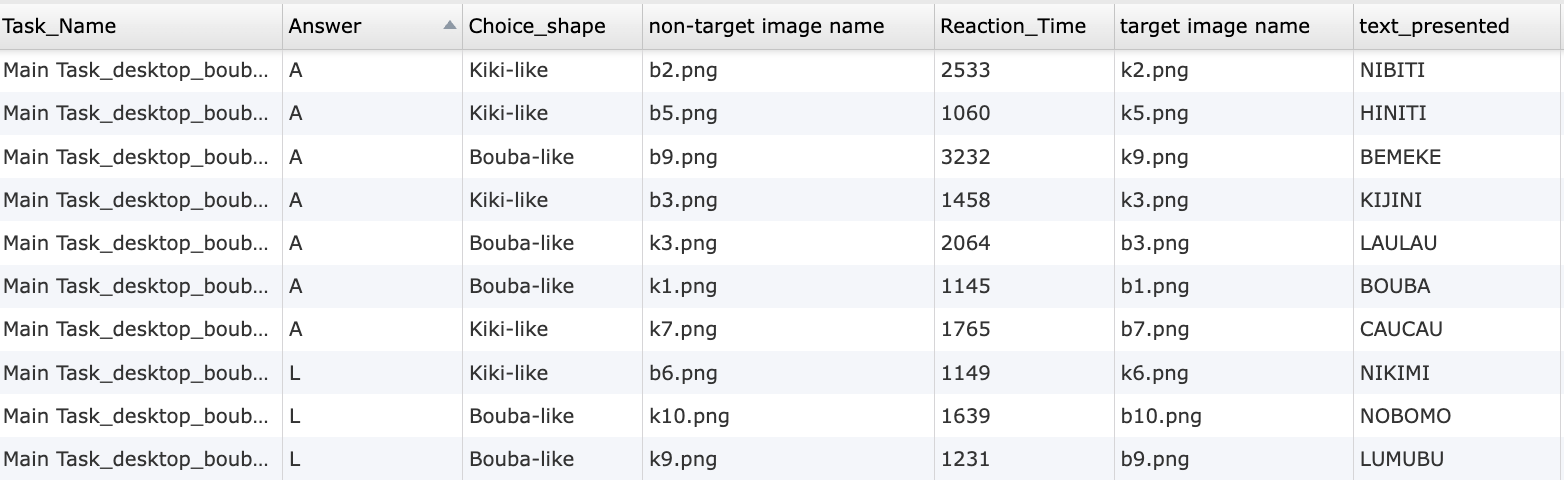
Data table showing individual trial level outputs from the online Bouba-Kiki Task in Labvanced.
In this experiment, two shapes are presented and a word. The participant must select one of the two shapes as being the best match to the presented word.
Technology Driving the Bouba-Kiki Task for Online & In-Lab Research
The Bouba–Kiki Task requires flexible stimulus handling, multimodal presentation, and reliable response recording. Labvanced provides the technical infrastructure needed to support these requirements across diverse study designs.
Multimodal Stimulus Presentation: Visual shapes, written text, and audio stimuli can be combined within the same trial. This allows researchers to present words visually, auditorily, or both, depending on the experimental design.
Flexible Input Collection Across Devices: Responses can be collected through keyboard input on desktop devices or direct touch selection on mobile devices. The same task logic can be reused while adapting the interface to the available input method.
Desktop App Support for Controlled Studies: For lab based experiments requiring precise timing or integration with external hardware, the task can be deployed using the Labvanced desktop app. This supports compatibility with EEG or other LSL based systems.
Remote and Longitudinal Deployment: The task can be delivered remotely and repeated across multiple sessions, making it suitable for longitudinal studies examining stability or change in perceptual associations over time.
Optional Webcam Eye Tracking Integration: The task can be combined with webcam based eye tracking to analyze visual attention, fixation patterns, and decision processes during shape selection.

Webcam Eye Tracking
Capture gaze patterns and visual attention with built-in, code-free and peer-reviewed webcam eye-tracking.
Timing Precision
Capture reaction times, task performance, and more with millisecond accuracy for time-sensitive tasks.

Desktop App
Run in-lab studies using the Desktop App, compatible with EEG and other LSL-connected lab hardware.
Customization of the Bouba-Kiki Task
There are many ways to adapt the Bouba-kiki Task template to meet specific research questions. Below are a few themes researchers commonly ask when it comes to modifying this task.
Shape and Stimulus Design
Abstract shapes are implemented as visual objects that can be replaced or edited directly in the editor. Researchers can modify shape complexity, border, size, or background color through the Object Properties panel.
Word and Audio Configuration
Novel words can be presented as text objects or audio files. Audio stimuli can be uploaded and linked to trials, allowing precise control over pronunciation, timing, and repetition. Audios could be added using the audio option from the media objects.
Condition Logic and Trial Variations
Different phonetic contrasts or shape pairings can be defined through trial conditions. These condition values are read during runtime to determine which stimuli are presented on each trial. You could always make the best out of the Trials & Conditions panel.
Response Handling and Trial Flow
Participant selections are captured through clicks, taps, or key presses and evaluated using Event logic. Researchers can modify how responses during the Bouba-Kiki task (regardless of whether it's administered online or in-lab) are logged, how missed responses are handled, and how trials progress, all through the event system. Simply modify the triggers or actions specific to your needs.
If you need help customizing this task, please feel welcome to write to us and ask:
Recommended Use and Applications of the Bouba-Kiki Task
The Bouba–Kiki Task is widely used across research domains, in online and in-lab settings, that investigate perception, language, and multisensory processing.
Perception and Multisensory Integration Research: Commonly used to study how auditory and visual features are integrated and how sensory correspondences emerge.
Language and Phonetic Processing Studies: Applied to examine how phonetic features such as consonant sharpness or vowel quality influence perceptual associations.
Developmental Research: Used with children and adults to investigate when sound–shape correspondences emerge and how they change across development.
Cross Cultural and Linguistic Studies: Frequently employed to compare perceptual mappings across languages and cultural contexts.
Neurocognitive and Brain Function Research: Included in studies exploring neural mechanisms underlying crossmodal perception and symbolic mapping.
References
Passi, A., & Arun, S. P. (2024). The Bouba–Kiki effect is predicted by sound properties but not speech properties. Attention, Perception, & Psychophysics, 86(3), 976-990.
Piller, S., Senna, I., & Ernst, M. O. (2023). Visual experience shapes the Bouba-Kiki effect and the size-weight illusion upon sight restoration from congenital blindness. Scientific Reports, 13(1), 11435.
Related Tasks
The Bouba-Kiki Task pairs naturally with other language and sound-symbolism tasks in Labvanced's task library.