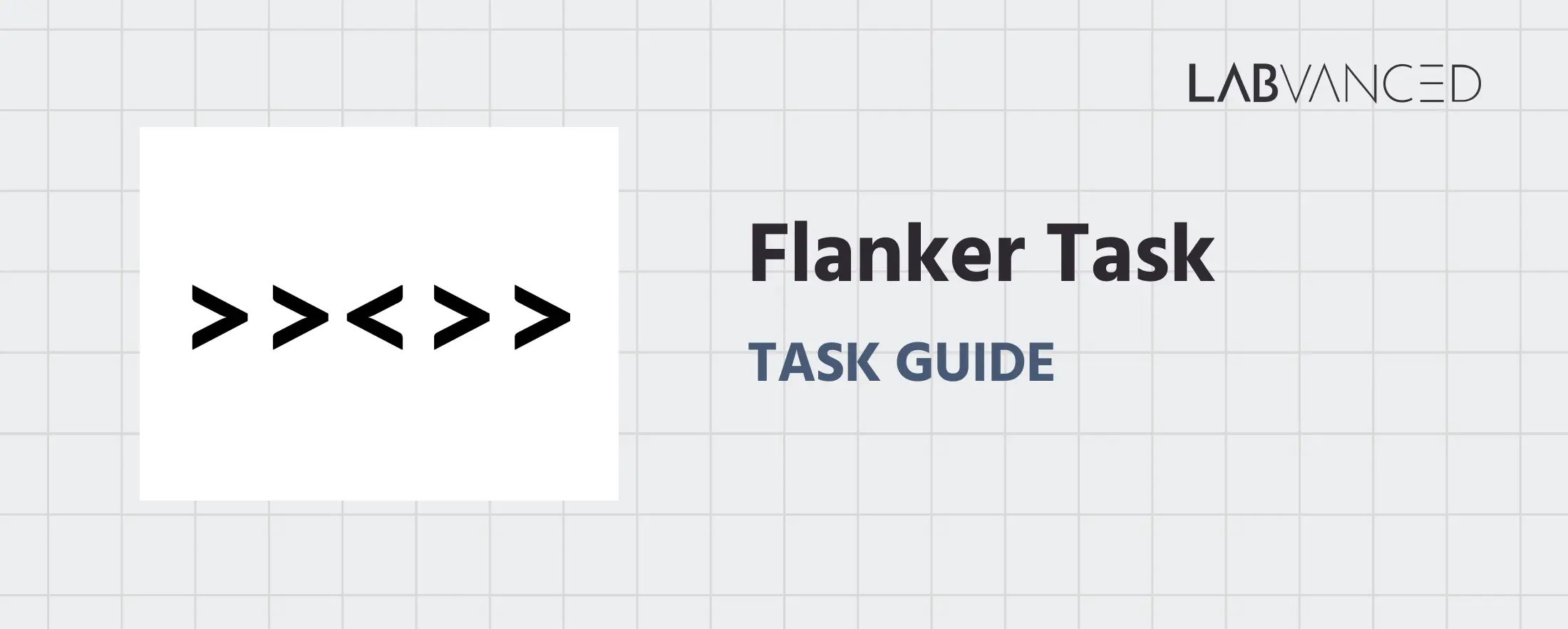
Flanker Task
The Flanker Task is a widely used cognitive control paradigm that measures selective attention and inhibitory control. Participants must respond to a central target stimulus while ignoring surrounding distracting stimuli that may be congruent or incongruent.
Table of Contents
Task Format | Flanker Task Online & In-Lab
In the Flanker Task, participants are presented with a row of five symbols displayed briefly in the center of the screen. The central symbol is the target, while the two symbols on either side act as distractors called flankers. The participant’s task is to identify the direction of the central arrow as quickly and accurately as possible while completely ignoring the flanking symbols. Each session begins with a practice block that allows participants to become familiar with the task structure and response rules before proceeding to the main trials.
Two versions of the task are available, each optimized for the type of device and input method being used:
Desktop Version
In the desktop version, participants view a horizontal array of five symbols presented at the center of the screen, with the central arrow serving as the target stimulus. Responses are made using the keyboard. Participants press the D key when the central arrow points to the left and the K key when the central arrow points to the right. Each trial begins with a fixation cross displayed in the center of the screen. After the fixation cross disappears, the stimulus array is shown for 200 ms, followed by a response window of 1800 ms during which participants must respond. If no response is made within this window, the trial is recorded as a ‘no response’ and the task advances to the next trial.
Mobile Version
The mobile version is optimized for touchscreen interaction. Participants see the same horizontal array of five symbols, with the central arrow as the target and the surrounding symbols serving as flankers. Responses are made by tapping on on screen buttons. Participants tap the < button when the central arrow points left and the > button when the central arrow points right. As in the desktop version, each trial starts with a fixation cross, followed by a 200 ms presentation of the stimulus array and a response window of 1800 ms. If the participant does not respond within this window, the trial is logged as a ‘no response’.
Participants in both versions are instructed to respond as quickly and accurately as possible while focusing only on the central arrow and ignoring the flankers. A practice block of 24 trials is included before the main task to help participants familiarize themselves with the timing and response mapping.
Flanker Task Metrics and Data Collected
The Flanker Task captures a range of behavioral measurements that reveal how attention is focused on a target stimulus while suppressing interference from surrounding distractors. The variables recorded enable researchers to measure reaction times, response accuracy, congruency. These metrics help quantify attentional control, conflict monitoring, and response inhibition. All variables can be viewed and customized within the task’s Variables Tab.
Below are examples of variables collected in the Labvanced version of the Flanker Task:
| Variable Name | Description |
|---|---|
reaction_time | Time taken in milliseconds by the participant to respond to the stimulus presented. |
choice | Response of the participant (Desktop: D or K, Mobile: < (Left) or > (Right) |
flanker_effect | Difference in mean RT between incongruent and congruent trials (flanker_effect = avg_incongruent_RT - avg_congruent_RT) |
avg_congruent_RT | Mean of reaction times of congruent trials with accurate response |
avg_incongruent_RT | Mean of reaction times of incongruent trials with accurate response |
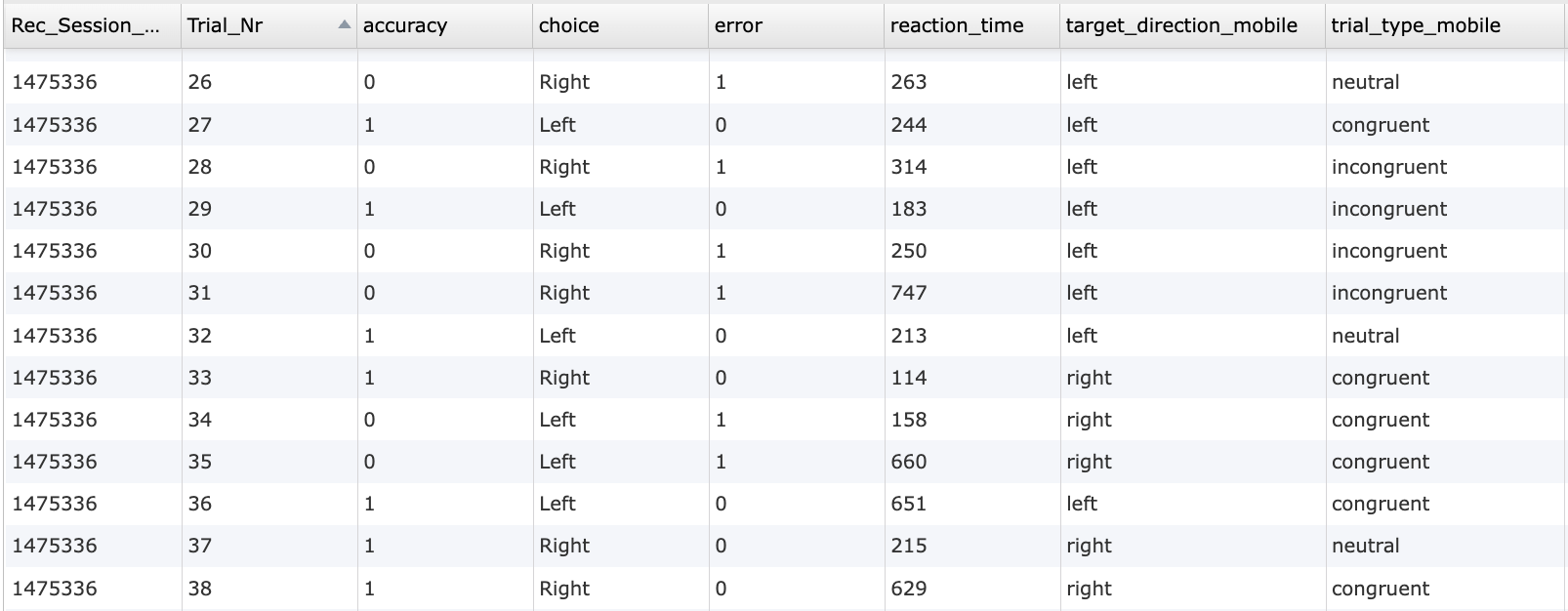
Data table showing individual trial level outputs from the online Flanker Task in Labvanced.
This study measures selective attention and inhibitory control using the Flanker Task. Participants respond to the direction of a central arrow while ignoring surrounding distractors. Reaction time and accuracy are recorded as performance indicators.
Technology Driving the Flanker Task for Online & In-Lab Research
Labvanced includes several technologies that make the Flanker Task highly accurate, flexible, and suitable for both laboratory and online research:
High Precision Timing: The Flanker Task relies on millisecond level timing to detect subtle differences in reaction time between trial types. Labvanced ensures precise stimulus presentation and response logging for reliable cognitive measurement.
Web Based and Desktop Deployment: The task can be administered remotely through a browser or run in controlled lab settings using the desktop app, supporting both large scale data collection and in lab experiments.
Webcam Eye Tracking Compatibility: Optional webcam based eye tracking can be added to examine attentional focus, fixation patterns, and distraction effects during stimulus presentation.
Longitudinal Study Support: The Flanker Task can be deployed across multiple sessions to track changes in attentional control over time while maintaining consistent task parameters.
Flexible Input Handling Across Devices: Labvanced supports both keyboard based and touchscreen based input. This allows the same experimental design to be deployed across desktops, tablets, and mobile devices while preserving data consistency.
Event-based Data Logging: Every stimulus event and participant response is logged with precise timestamps, enabling detailed trial level analysis of reaction times, missed responses, and error patterns.
Optional Integration With Additional Data Streams: The Flanker Task can be combined with other Labvanced supported technologies such as webcam eye tracking, external hardware via LSL, or concurrent tasks to create richer multimodal study designs when required.

Webcam Eye Tracking
Capture gaze patterns and visual attention with built-in, code-free and peer-reviewed webcam eye-tracking.
Timing Precision
Capture reaction times, task performance, and more with millisecond accuracy for time-sensitive tasks.

Desktop App
Run in-lab studies using the Desktop App, compatible with EEG and other LSL-connected lab hardware.
Customization of the Flanker Task
There are many ways to adapt this Flanker Task template to meet specific research questions. Below are several customization themes researchers commonly explore when modifying this task.
Visual Layout and Display Properties
The central target arrow and surrounding flanker symbols are rendered as individual on screen objects. Each object can be edited directly in the editor to adjust visual properties such as size, color, opacity, and alignment using the Object Properties panel. Object visibility can also be controlled dynamically through Events, enabling stimuli to appear or disappear conditionally based on trial state, response timing, or participant performance.
Condition Assignment and Trial Flow
In the Flanker Task, different types of trials are defined by conditions that specify which stimulus setup appears on each trial. You could use the Trials & Conditions panel to determine the trial type like the direction of the central arrow and whether the surrounding flankers match or conflict with it. You could further utilize the event system to read the active condition on each trial and update the stimuli accordingly.
Input Handling and Response Evaluation
Participant responses are captured through key presses or button selections. These inputs are evaluated in real time to determine response direction and response validity. Response evaluation logic can be modified by editing the conditional checks within Events, allowing you to change what counts as a correct response, how errors are handled, or whether multiple response attempts are allowed within a trial.
Trial Progression and Feedback Control
The progression from one trial to the next is managed through event based transitions rather than fixed timing alone. This makes it possible to alter how and when feedback is shown, how long feedback remains visible, and under what conditions the task advances. Stimulus duration, inter stimulus intervals, and feedback timing can be modified to match the needs of the study. These can be modified through Delayed Action (Time Callback) or frame specific timing controls.
If you need help customizing this task, please feel welcome to write to us and ask:
Recommended Use and Applications of the Flanker Task
The Flanker Task is widely used across research, clinical, and performance settings to measure selective attention and inhibitory control. It is a validated measure of interference and cognitive control, with extensive evidence supporting its use.
Healthy Adult Cognitive Research: Extensively used to investigate attentional selection and executive control processes in typical adult populations, including studies of how people suppress distracting information and resolve response conflict.
Developmental and Lifespan Research: Used to characterize developmental changes in inhibitory control and selective attention from childhood through adulthood, and to assess how these processes evolve with age.
Attention and Inhibitory Control Disorders: Frequently employed in studies of ADHD and other conditions with inhibitory control deficits, showing increased interference effects in clinical groups relative to controls.
Cognitive Neuroscience and Brain Function Studies: Applied in neuroimaging and electrophysiological research to study brain mechanisms of conflict monitoring and cognitive control, often highlighting the role of the anterior cingulate cortex and related networks.
Applied Cognitive Performance and Interference Studies: Used in research on how factors such as physical exertion or multitasking influence attention and conflict resolution, offering insight into cognitive flexibility under varied conditions.
References
Mulvihill, A., Matthews, N., Chidley, K., Macmahon, S., Armitage, K. L., Sherlock, D., Dux, P. E., & Carroll, A. (2025). The meta-attention knowledge questionnaire (MAKQ): A new instrument for investigating meta-attention in a young adolescent sample. Metacognition and Learning, 20(1).
Kinder, K. T., Buss, A. T., & Tas, A. C. (2022). Tracking flanker task dynamics: Evidence for continuous attentional selectivity. Journal of Experimental Psychology: Human Perception and Performance, 48(7), 771.
Related Tasks
The Flanker Task pairs naturally with other inhibitory control and response conflict tasks in Labvanced's task library.
Stroop Test
Participants view color words presented in congruent or incongruent font colors and must respond based on the text color rather than the word meaning.
Simon Task
This study measures cognitive control and stimulus-response compatibility using the Simon Task. Participants respond to stimulus color while ignoring spatial position, allowing measurement of the Simon effect through reaction time and accuracy.
Dot Probe Task
In this task, participants see pairs of images followed by a small dot and must respond as quickly as possible to the dot's location via key press (desktop) or button press (mobile).