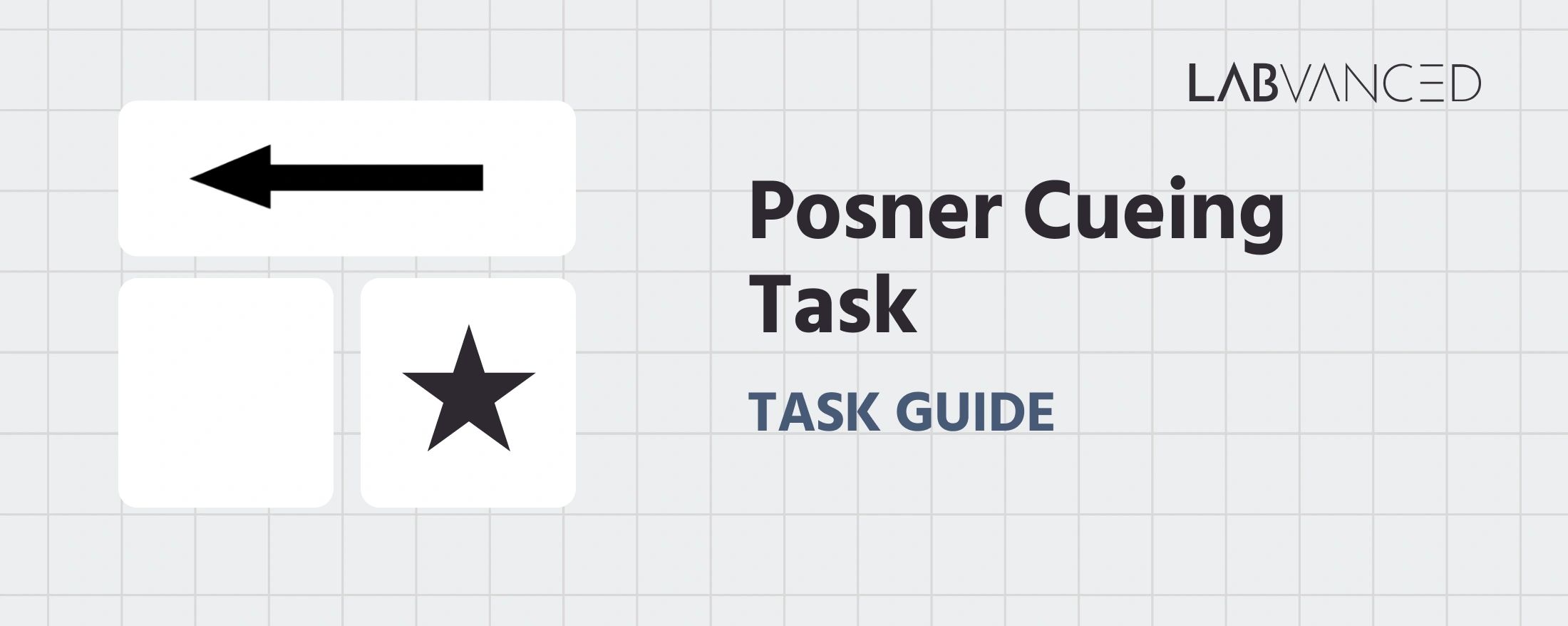
Posner Cueing Task
The Posner Cueing Task, also known as the Posner paradigm, is a classic psychological task introduced by Posner (1980) to measure spatial attention and attentional orienting. By presenting valid, invalid, or neutral cues before a target appears, the task reveals how quickly and accurately attention shifts across the visual field. It is a foundational tool in cognitive science, neuropsychology, and clinical assessments of attentional control.
Table of Contents
Task Format | Posner Cueing Task Online & In-Lab
In the Posner Cueing Task, participants respond to the location of a target stimulus that appears on either the left or right side of the screen. Each trial opens with a central fixation cross, followed by a brief arrow cue that points left, points right, or appears double-headed for neutral trials. The cue correctly predicts the target's location on valid trials, incorrectly predicts it on invalid trials, and carries no predictive information on neutral trials. Participants are instructed to respond only to the target's location, as quickly and accurately as possible, regardless of what the cue indicated. A practice block precedes the main task, and the main task itself provides no trial-by-trial feedback, so response patterns reflect natural attentional orienting rather than corrective learning.
Two versions of the task are available, each optimized for the type of device and input method being used:
Desktop Version
In the desktop version, participants fixate on a central cross before an arrow cue briefly appears at the center of the screen. The arrow may point left, right, or appear double-headed on neutral trials. Shortly after the cue, a target (a black star) appears inside a box on either the left or right side of the screen. Participants respond using the keyboard: they press the D key if the target appears on the left and the K key if the target appears on the right. The target remains visible for up to 2000 ms, during which participants can respond. If no response is made within this window, the trial ends automatically and the task proceeds to the next trial.
Mobile Version
The mobile version is optimized for touchscreen interaction. Participants see the same sequence: a fixation cross, an arrow cue, and then a target appearing inside a box on either the left or right side of the screen. Responses are made by tapping directly on the boxes: participants tap the left box if the target appears on the left and the right box if the target appears on the right. As in the desktop version, the target remains visible for up to 2000 ms, and a trial with no response ends automatically.
Participants in both versions are instructed to respond as quickly and accurately as possible, focusing only on the target's location rather than the cue. Each session begins with a practice block that familiarizes participants with the task structure and response mapping before the main task begins.
Posner Cueing Task Metrics and Data Collected
The Posner Cueing Task captures a range of behavioral measurements that reveal how attention is oriented toward a cued location. The variables recorded help researchers measure reaction times, accuracy, and how the validity of the cue shapes the speed of target detection. All variables can be viewed and customized within the task's Variables Tab.
Below are the most task-specific variables researchers commonly analyze in this version of the task:
| Variable Name | Description |
|---|---|
accuracy | Whether the response was correct (1 = correct, 0 = incorrect) |
choice | Participant's response (key pressed D or K in the desktop version, or the selected box left/right in the mobile version) |
cue direction | The direction the cue arrow pointed to (left/right/neutral) |
cue_duration | Duration of the cue on the current trial, in milliseconds |
error | Whether the response was incorrect (1 = error, 0 = correct) |
reaction_time | Reaction time, in milliseconds, for the participant's response on a given trial |
target location | The side of the screen (left or right box) where the target appeared |
trial_type | Cue validity condition for the trial (valid/invalid/neutral) |
avg_valid_RT | Mean reaction time across valid-cue trials |
avg_invalid_RT | Mean reaction time across invalid-cue trials |
avg_neutral_RT | Mean reaction time across neutral-cue trials |
cueing effect | Difference between invalid and valid reaction time (avg_invalid_RT − avg_valid_RT) |
benefit effect | Speed gained from a valid cue relative to no cue (avg_neutral_RT − avg_valid_RT) |
cost effect | Speed lost from an invalid cue relative to no cue (avg_invalid_RT − avg_neutral_RT) |
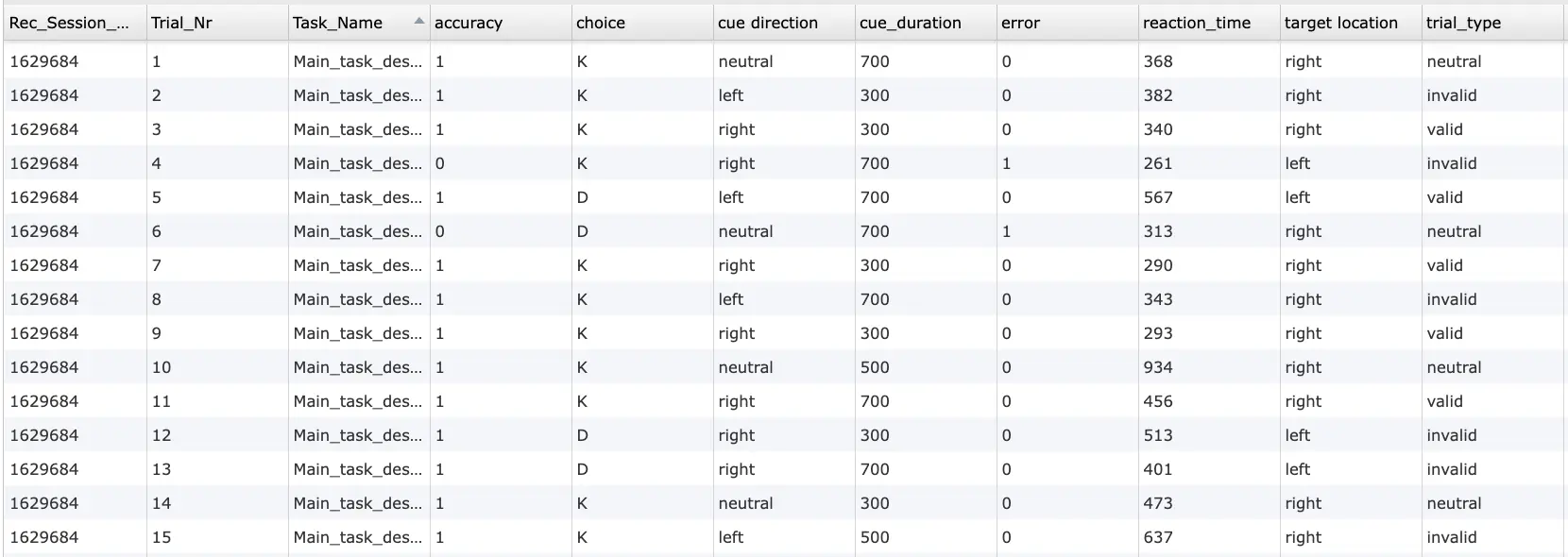
This study measures spatial attention and attentional orienting using the Posner Cueing Task. Participants respond to the location of a target while a preceding cue indicates its location validly, invalidly, or not at all. Reaction time and accuracy are recorded as performance indicators.
Technology Driving the Posner Cueing Task for Online & In-Lab Research
The Posner Cueing Task requires precise control over stimulus timing, cue presentation, and response recording. Labvanced provides tools that allow researchers to accurately measure attentional shifts and cueing effects.
High Precision Timing for Cue-Target Intervals: The task depends on small reaction-time differences between valid and invalid cue trials. Labvanced supports millisecond level timing for cue presentation, stimulus onset, and response logging, ensuring reliable measurement of attentional effects.
Sequential Stimulus Presentation Control: The fixation cross, cue, and target are presented in a strict sequence. This flow can be implemented using frame based presentation and timed Events, allowing researchers to precisely control fixation, cue, and target duration.
Flexible Input Across Devices: Responses can be collected using keyboard input on desktop or touchscreen taps on mobile devices, allowing the same task to be deployed across different devices while maintaining consistent response logic.
Desktop App Mode for Controlled Experiments: For in-lab studies requiring stable timing or integration with external systems, the task can be run through the Labvanced desktop app, supporting compatibility with EEG or other LSL based setups commonly used in attention research.
Optional Eye Tracking Integration: Webcam based eye tracking can be used to verify central fixation and measure attentional shifts during cueing, which is especially useful for confirming that participants maintain fixation before the target appears.

Webcam Eye Tracking
Capture gaze patterns and visual attention with built-in, code-free and peer-reviewed webcam eye-tracking.
Timing Precision
Capture reaction times, task performance, and more with millisecond accuracy for time-sensitive tasks.

Desktop App
Run in-lab studies using the Desktop App, compatible with EEG and other LSL-connected lab hardware.
Customization of the Posner Cueing Task
There are many ways to adapt this Posner Cueing Task template depending on research goals. Below are several customization themes researchers commonly explore when modifying this task.
Cue Type and Stimulus Design
Cues are visual objects that can be replaced directly in the editor. Researchers can use arrows, flashes, faces, or other stimuli by inserting an Image Object or Text Object and updating its appearance in the Object Properties panel. The cue shown on each trial can also be controlled through the event system to switch the displayed object.
Target Stimulus Variation
Targets can also be modified depending on the task design, such as simple shapes, letters, or symbols. These are added as visual objects and linked to Factors & Randomization values so that different targets appear across trials. Events can then use these condition values to evaluate responses and record accuracy.
Cue Validity and Trial Conditions
Valid, invalid, and neutral cue conditions are defined using the Factors & Randomization and Trials & Conditions table. Each factor level determines where the cue points and where the target will appear, and Labvanced automatically creates all combinations of these conditions for trial presentation.
Cue Duration
The duration of the cue presentation can be adjusted by editing frame durations or adding a Delayed Action (Time Callback) Event. This allows researchers to control how long the cue is visible before the target appears, which can influence attentional engagement and cueing effects.
Catch Trials and Response Mapping
Catch trials, where no target appears, can be added by creating a separate trial group in the Factors & Randomization panel, with Events used to prevent responses or flag incorrect responses during these trials. Response keys or condition labels can also be changed to fit your research design; any change to object names or response mapping should be reflected in the corresponding Events to keep scoring accurate.
If you need help customizing this task, please feel welcome to write to us and ask:
Recommended Use and Applications of the Posner Cueing Task
The Posner Cueing Task is widely used in cognitive science and neuroscience as a fundamental paradigm to measure spatial attention and attentional orienting. It serves as a core tool for examining how attention shifts across the visual field and how cues influence this process.
Spatial Attention Research: The Posner Cueing Task is used to study how attention is allocated to different locations and how quickly it can be shifted, even without eye movements, or covert attention (Posner, 1980).
Cognitive Neuroscience: Applied to investigate the neural mechanisms of attentional orienting, including disengaging attention, shifting focus, and re-engaging at a new location (Posner & Cohen, 1984).
Clinical and Neuropsychological Assessment: Used to identify attentional deficits in populations with conditions such as ADHD (Caldani et al., 2020) and unilateral spatial neglect after stroke, a condition linked to parietal lobe damage in which patients show a specific deficit disengaging attention from the intact side of space to respond to a cued target on the affected side (Shida et al., 2022).
Developmental Research: Used to examine how attentional abilities change across the lifespan: children as young as 6 already show adult-like neural markers of covert attentional orienting (Wang et al., 2023), while spatial precues can speed responses in older adults, though at some cost to accuracy once a response choice is also required after the target appears (Huang et al., 2026).
Perception and Consciousness Studies: Applied to understand how attention influences perception. Recent work shows that conscious awareness of a cue sharpens and speeds up the brain's rhythmic sampling of attention, an effect linked to stronger inhibitory modulation within attention networks (Yang et al., 2025).
References
Caldani, S., Isel, F., Septier, M., Acquaviva, E., Delorme, R., & Bucci, M. P. (2020). Impairment in attention focus during the Posner cognitive task in children with ADHD: An eye tracker study. Frontiers in Pediatrics, 8, 484. https://doi.org/10.3389/fped.2020.00484
Huang, P.-C., Schils, L. A., Koch, I., Stephan, D. N., & Hsieh, S. (2026). Age-related differences in cue-guided preparation and target processing in crossmodal response precueing. Psychophysiology, 63(8), e70377. https://doi.org/10.1111/psyp.70377
Posner, M. I. (1980). Orienting of attention. Quarterly Journal of Experimental Psychology, 32(1), 3-25. https://doi.org/10.1080/00335558008248231
Posner, M. I., & Cohen, Y. (1984). Components of visual orienting. In H. Bouma & D. G. Bouwhuis (Eds.), Attention and performance X: Control of language processes (pp. 531-556). Lawrence Erlbaum.
Shida, K., Amimoto, K., Fukata, K., Osaki, S., Takahashi, H., & Makita, S. (2022). The effect of trunk position on attentional disengagement in unilateral spatial neglect. Neurology International, 14(4), 1036-1045. https://doi.org/10.3390/neurolint14040083
Wang, J., Guo, X., Xing, Z., Wang, G., Wang, J., Hu, J., Sun, J., Li, C., Tong, S., & Hong, X. (2023). EEG correlates of anticipatory attention and target processing in children and adults during visual spatial attention. Physiology & Behavior, 271, 114341. https://doi.org/10.1016/j.physbeh.2023.114341
Yang, F., Yuan, P., Shen, L., Zhou, K., He, S., & Jiang, Y. (2025). Visual awareness sharpens and accelerates attentional sampling through enhancing inhibitory neural modulation in the attention network. Nature Communications, 16, 10058. https://doi.org/10.1038/s41467-025-64987-7
Related Tasks
The Posner Cueing Task pairs naturally with other spatial and selective attention tasks in Labvanced's task library.
Dot Probe Task
In this task, participants see pairs of images followed by a small dot and must respond as quickly as possible to the dot's location via key press (desktop) or button press (mobile).
Simon Task
This study measures cognitive control and stimulus-response compatibility using the Simon Task. Participants respond to stimulus color while ignoring spatial position, allowing measurement of the Simon effect through reaction time and accuracy.
Flanker Task
This study measures selective attention and inhibitory control using the Flanker Task. Participants respond to the direction of a central arrow while ignoring surrounding distractors. Reaction time and accuracy are recorded as performance indicators.