Implicit Association Test (IAT)
The Implicit Association Test (IAT) measures the strength of automatic mental associations between concepts by comparing reaction times across paired category-sorting blocks. Participants sort words into one of two response categories as quickly as possible, and the task infers implicit attitudes from how much faster responses are when two concepts share the same response key versus when they are mapped to opposite keys. Labvanced's IAT template is available in Desktop and Mobile-optimized versions with fully customizable category and attribute stimuli.
Table of Contents
Task Format | Implicit Association Test (IAT) Online & In-Lab
Labvanced's IAT template implements the classic seven-block structure introduced by Greenwald, McGhee, and Schwartz (1998). Participants first practice sorting words from a single category pair (for example, product-type words as Eco-Friendly or Conventional) using the E and I keys, then practice a second, unrelated category pair (attribute words as High Quality or Low Quality). These two category pairs are then combined onto the same two response keys, first in one pairing (Eco-Friendly + High Quality sharing a key) across a scored block of trials, then the first category pair's key mapping is reversed and the combined block is repeated with the opposite pairing (Eco-Friendly + Low Quality sharing a key). Comparing reaction times between the two combined ("compatible" and "incompatible") blocks is the core IAT measure: faster, more accurate responses in one pairing than the other indicate a stronger implicit association between those concepts.
The built-in demo version uses a consumer-psychology framing: product-type words (recyclable, synthetic, biodegradable, plastic, and others) sorted against Eco-Friendly or Conventional, and quality-attribute words (reliable, defective, durable, fragile, and others) sorted against High Quality or Low Quality. Which category pairing appears first, and which side of the screen each category is assigned to, is controlled by a four-level counterbalancing factor assigned randomly between subjects, so response-side and block-order effects don't confound the association measure.
Desktop Version
Participants respond using the E and I keyboard keys, with the two response categories displayed as on-screen labels in the top-left and top-right corners and the stimulus word shown centered on screen. A fixation cross precedes each trial, and each trial is followed by a brief intertrial interval. Every response is time-stamped against frame onset, and the task automatically classifies trials as Too Fast if the response is recorded in under 300ms, or Too Slow if it takes longer than 10 seconds, flagging likely non-responses without discarding the trial.
Mobile Version
On mobile and tablet devices, the same category-sorting logic is presented with on-screen Left and Right category buttons in place of keyboard keys, so participants tap the button matching the category each stimulus word belongs to. A Device_selection frame automatically detects the participant's device and routes them into the correct Desktop or Mobile block, so the same study can recruit participants across device types without building two separate studies.
Data Collected with the Implicit Association Test (IAT)
The IAT captures a range of behavioral measurements that reveal the strength and direction of implicit associations. The variables recorded help researchers compute the standard IAT D-score, assess response accuracy, and identify trials affected by response-time outliers. All variables can be viewed and customized within the task's Variables Tab.
Below are key variables collected in the Labvanced version of the IAT:
| Variable Name | Description |
|---|---|
Stimulus Presented | The word shown to the participant on that trial |
Correct Response | The category the presented word belonged to on that trial, used to score accuracy |
Correctness | Whether the response matched the correct category (Correct or Incorrect) |
Accuracy | Binary accuracy score (1/0) for that trial |
reaction_time_Keyboard / reaction_time_button | Time in milliseconds between trial onset and the participant's key press (Desktop) or button tap (Mobile) |
pressed_key_Keyboard / button_clicked | Which key or button the participant selected on that trial |
Counterbalancing_Scenario | The between-subjects counterbalancing condition (one of four) the participant was assigned to |
Time_Limit | Response-time quality flag for that trial (OK, Too Fast, or Too Slow) |
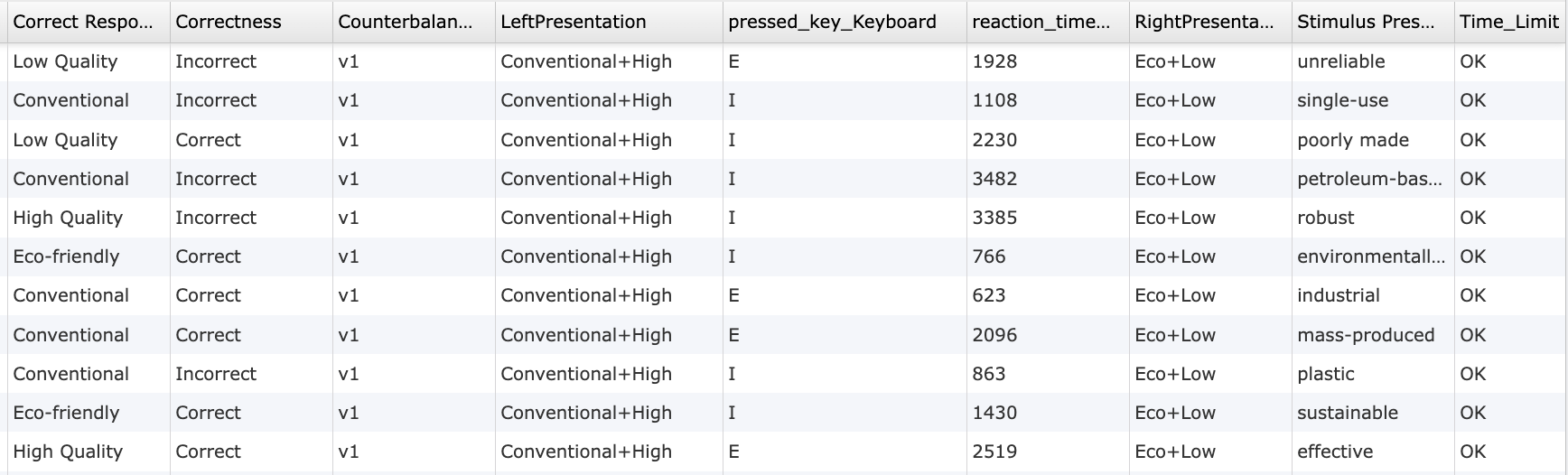
This study measures implicit attitudes using the Implicit Association Test. Participants sort words into paired categories using speeded key presses, and reaction-time differences between compatible and incompatible category pairings reveal the strength of automatic associations.
Technologies Supporting the Implicit Association Test (IAT)
Timing Precision: The IAT is a reaction-time difference paradigm at its core, response latency (
reaction_time_Keyboard/reaction_time_button) is captured with millisecond accuracy on every trial, which is what makes the compatible-versus-incompatible block comparison meaningful.Desktop App: For lab-based IAT studies requiring stable keyboard timing or hardware integration, the task can be deployed using the Labvanced Desktop App, compatible with EEG and other LSL-connected lab hardware.
Webcam Eye Tracking: Optional gaze recording can be layered onto the IAT to capture how participants visually attend to the category labels before responding, adding a window into the categorization process without dedicated hardware.
Timing Precision
Capture reaction times, task performance, and more with millisecond accuracy for time-sensitive tasks.

Desktop App
Run in-lab studies using the Desktop App, compatible with EEG and other LSL-connected lab hardware.

Webcam Eye Tracking
Capture gaze patterns and visual attention with built-in, code-free and peer-reviewed webcam eye-tracking.
Customizing the IAT Template
There are many ways to go about customizing this template. Below are a few themes researchers commonly ask when it comes to modifying this task.
Category and Attribute Stimulus Sets
Because the IAT is a general categorization-and-response-time paradigm rather than a fixed content set, the category labels, attribute labels, and stimulus word lists are stored as editable data frames rather than hardcoded values. The built-in demo uses a consumer-psychology framing (eco-friendly versus conventional products, high versus low quality), but researchers commonly adapt this same structure for other implicit-attitude domains studied in the literature, such as self-esteem, gender-career association, or other social-cognition IATs. Researchers should verify the exact stimulus sets used in any published IAT variant before reuse, since word lists are study-specific and not interchangeable without revalidation.
Counterbalancing Assignment
The four-level Counterbalancing factor controlling response-side and block-order assignment is a between-subjects factor visible in Factors & Randomization. Researchers can adjust how participants are distributed across the four counterbalancing scenarios, or reduce to fewer scenarios if a simplified design is preferred.
Response Keys and Timing Thresholds
The Desktop version's E/I key mapping and the Too Fast (300ms) and Too Slow (10 second) response-time thresholds are set in the task's Events. Both the key assignment and the timing thresholds can be edited to match a specific published IAT protocol.
Number of Trials per Block
Each combined (critical) block runs 30 trials by default, with 10-trial practice blocks preceding each. Trial counts per block can be adjusted in the Trials & Conditions panel to match shorter or longer published IAT protocols.
Frequently Asked Questions
I want to run a racial-IAT, how can I edit the current task to do this?
The block structure, counterbalancing, and response-time scoring logic are the same across every IAT variant, only the category and attribute content changes. To convert this template into a racial-attitude IAT:
- Replace the two
Product Typecategory labels (currentlyEco-Friendly/Conventional) with your two social-group categories, and update the on-screenLeft/Rightcategory label text elements to match. - Replace the
Attributecategory labels (currentlyHigh Quality/Low Quality) with a valenced pair such asGood/BadorPleasant/Unpleasant. - Replace the word lists in the
Practice Trials Stimuli ListandTwo Attribute Stimuli Listdata frames with your stimulus set, keeping the same 10-items-per-category structure the practice and combined blocks are built around.
The E/I key mapping, the four-level Counterbalancing factor, and the Too Fast/Too Slow response-time flags don't need to change, they're paradigm-agnostic.
Labvanced does not ship a validated race-IAT word or face set. Source one from the published literature (for example the stimuli described in Greenwald, McGhee, & Schwartz, 1998, cited below) or from your institution's own validated materials, and route the study through your institution's ethics review before collecting data, as you would for any implicit-bias study involving demographic categories.
Does Labvanced provide the validated Harvard / Project Implicit race-IAT stimulus set?
Does the IAT show a feedback screen for incorrect responses?
Not by default. Correctness and Accuracy are recorded on every trial, but no red X or "Incorrect" message is displayed, and the trial sequence (Fixation Cross → Stimulus Presentation → intertrial) doesn't pause for a correction response.
Many traditional IATs did show this kind of feedback, though not the original 1998 lab procedure itself, which used a simpler penalty: the word "error" replacing the stimulus for a fixed 300ms, with no correction required (Greenwald, McGhee, & Schwartz, 1998). The red-X-and-correct-it-live version comes from the later Web-based demonstration IAT (the model behind the modern implicit.harvard.edu demo), described in Greenwald, Nosek, & Banaji (2003): an incorrect response showed a red X, and the participant had to give the correct response before the trial could continue. That 2003 paper also showed this visible correction step isn't actually necessary: the same error-penalty effect can be reproduced at scoring time instead, by replacing each error trial's reaction time with that block's mean correct-response latency plus an adjusted 600ms-based penalty, rather than making the participant see and correct the mistake live. That's a scoring-time calculation the researcher applies to the exported data, and it depends on each block's full set of correct-trial latencies, so it can only be done once a block is complete, not live, trial by trial, during the task. Labvanced's template records Correctness and reaction time on every trial regardless, so you can apply whichever error-handling strategy your study needs, whether that's the 1998 approach, the 600ms scoring penalty, or a custom rule, post-hoc from the exported data rather than deciding it in advance.
If your study design calls for visible error feedback, add it using the task's Events system: on the Stimulus Presentation frame, add an event triggered on the participant's key press or button click, check the Correctness variable, and conditionally display a feedback element (e.g., a red X image or text) only when Correctness equals Incorrect. The Correctness variable is already being set on every trial, so no new scoring logic is needed, only the conditional display.
If there is something else you'd like to know, please feel welcome to write to us and ask:
Recommended Use and Applications of the IAT
The Implicit Association Test is one of the most widely used measures of implicit social cognition, applied across social psychology, consumer research, and clinical settings to study attitudes participants may not report accurately, or may not be consciously aware of.
Implicit Bias and Social Cognition Research: The IAT paradigm is the standard tool for studying automatic attitudes toward social categories, a substantial literature building on Greenwald, McGhee, and Schwartz's (1998) original method.
Consumer and Marketing Psychology: The built-in demo version measures implicit brand or product-category attitudes (eco-friendly versus conventional, quality perception), directly applicable to market research on consumer attitudes that self-report measures alone can miss.
Health and Clinical Psychology: IAT variants are used in the literature to study implicit self-esteem, addiction-related associations, and other implicit attitudes relevant to clinical assessment, though these require study-specific stimulus sets not included in the default template. Researchers have also adapted IAT methodology to build implicit well-being measures alongside explicit self-report scales in youths (García-Márquez et al., 2024, using the Psychological Well-Being Scales and WHO-5, not the Flourishing Scale itself), giving implicit and explicit well-being assessment a genuine methodological link worth exploring alongside a scale like the Flourishing Scale.
Cross-Cultural and Developmental Research: The category-sorting structure generalizes across age groups and cultural contexts when the stimulus content is adapted appropriately.
References
García-Márquez, R., Stavraki, M., Díaz, D., & Bajo, M. (2024). Development of an implicit well-being measure for youths using the Implicit Association Test. Child Indicators Research, 17(3), 1311-1328. https://doi.org/10.1007/s12187-024-10121-w
Greenwald, A. G., McGhee, D. E., & Schwartz, J. L. K. (1998). Measuring individual differences in implicit cognition: The implicit association test. Journal of Personality and Social Psychology, 74(6), 1464–1480.
Greenwald, A. G., Nosek, B. A., & Banaji, M. R. (2003). Understanding and using the Implicit Association Test: I. An improved scoring algorithm. Journal of Personality and Social Psychology, 85(2), 197–216.
Related Tasks
The IAT shares its core logic, comparing reaction times across compatible and incompatible response mappings to reveal automatic processing, with other response-competition tasks in Labvanced's task library.
Stroop Test
Participants view color words presented in congruent or incongruent font colors and must respond based on the text color rather than the word meaning.
Simon Task
This study measures cognitive control and stimulus-response compatibility using the Simon Task. Participants respond to stimulus color while ignoring spatial position, allowing measurement of the Simon effect through reaction time and accuracy.