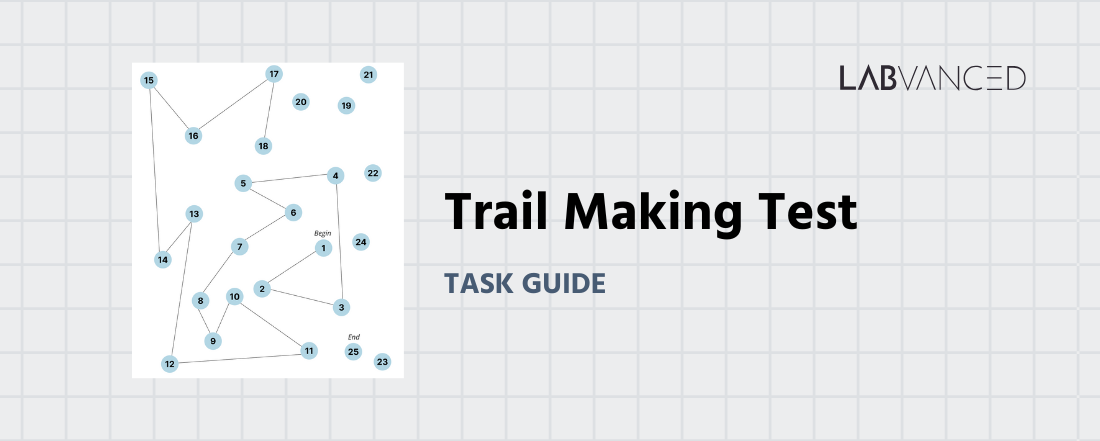
The Trail Making Test
The Trail Making Test is a neuropsychological assessment that measures visual attention, processing speed, and cognitive flexibility by having individuals quickly connect sequenced numbers and letters. It’s a fast, reliable tool used across healthcare, research, and performance-based settings to reveal cognitive strengths and weaknesses and support informed decision-making.
Table of Contents
Trail Making Test Task Setup & Format Overview
The Trail Making Test typically consists of two parts:
Part A: The participant connects numbers in ascending order (1–2–3…) as quickly and accurately as possible
Part B: They alternate between numbers and letters (1–A–2–B…) to assess cognitive flexibility
The participant can respond using a mouse to click on the circles or to press on them via the mobile touchscreen. Participants are instructed to work as fast as possible without making mistakes.
In this Trail Making Test online version in Labvanced, the participant goes through a training trial for Part A, then the Part A test, followed by the training for Part B, concluding with the Part B test.
Trail Making Test Metrics & Cognitive Performance Data
The Trail Making Test captures a range of cognitive performance metrics, providing precise data on attention, processing speed, and executive function for neuropsychological and cognitive research. Under the Variables Tab you have a complete view of all the variables that are used in this online version of the Trail Making Task.
Below are a few key variables that handle behavioral response recording and the trial-specific target stimuli order:
| Variable Name | Description |
|---|---|
Correct Sequence - Part A | An array holding the target sequence order for Part A. |
Correct Sequence - Part B | An array holding the target sequence order for Part B. |
Choice Clicked | Records the choice or element clicked by the participant. Note: 0 = click on the background. |
ChoiceClickedArray | An array containing the sequence of elements clicked during the trial. |
Number of Errors | The total number of errors (clicks that were not the target). |
Completion Time - Part A ms | The time it took to complete Part A in milliseconds. |
Completion Time - Part B ms | The time it took to complete Part B in milliseconds. |
All variables can be renamed and edited. For example, if you need to track timeseries, that setting can be activated with just a click. Furthermore, additional variables can be created for more data recording, as per your experimental needs.
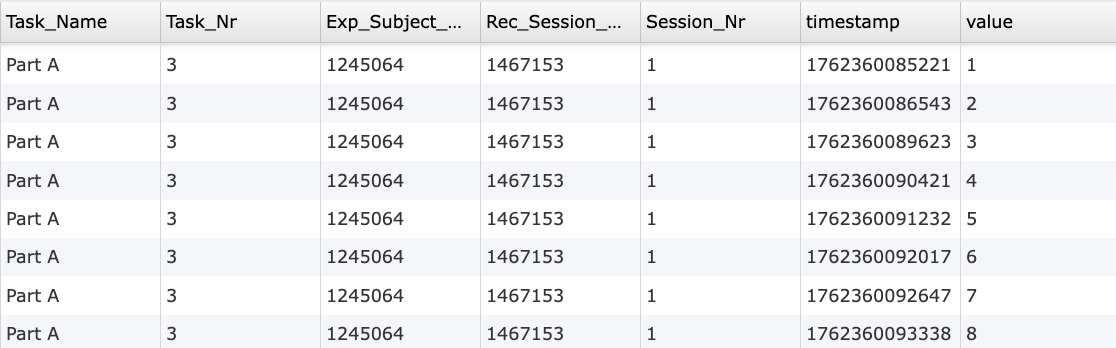
Time series recordings (timespamp) of the Choice Clicked variable where the value is listed under the right-most column.
In Part A, the participant connects numbers in ascending order (1-2-3...) while in Part B, numbers and letters alternate (1-A-2-B...), in this classic task for measuring cognitive flexibility.
Advanced Cognitive Testing Technologies for Trail Making Tasks
High-Precision Timing: The Trail Making Test relies heavily on accurate measurement of completion time and error corrections, and Labvanced’s millisecond-level timing ensures that subtle differences in processing speed are captured reliably.
Webcam Eye Tracking: Because the task is visually guided, you can consider integrating webcam eye tracking to provide valuable insights into search strategies, scanning patterns, and moments of hesitation without requiring external hardware.
Desktop App Mode: For in-lab studies, the Desktop App can also be used to administer this test and then combine it with lab hardware like EEG or any other LSL-based connection.
Touchscreen and Mouse Input Support: The platform accommodates diverse input methods, allowing participants to “connect” targets with naturalistic interactions that match traditional or digital task formats.
Longitudinal & Remote Testing Capabilities: When monitoring cognitive change over time or reaching diverse populations, Labvanced enables consistent delivery of the task across sessions and devices while maintaining data integrity.

Webcam Eye Tracking
Capture gaze patterns and visual attention with built-in, code-free and peer-reviewed webcam eye-tracking.
Timing Precision
Capture reaction times, task performance, and more with millisecond accuracy for time-sensitive tasks.

Desktop App
Run in-lab studies using the Desktop App, compatible with EEG and other LSL-connected lab hardware.
Customizing the Trail Making Test
There are many ways to go about customizing this template. Below are a few themes researchers commonly ask when it comes to modifying this task.
Stimulus Design
The circles on the screen are image files. Clicking on them, you can replace them with your own images via the Object Properties panel under the Image section. Also there, you can specify the Stimulus Info for that particular image which is then used as a part of the Events to record the sequence of the response.
The line / path is created by recording the X- and Y- coordinates of the click into a data frame and then pointing to that value so the Polygon Object takes those coordinates. The style of the line / path can be modified under the Object Properties panel under the Style section.
Correctness
The object name as it is written in the Objects Panel, (eg Circle 1) corresponds to the array (eg. Correct Sequence - Part A Training). Thus, any modification to the object names should also lead to updating the relevant array.
Timing and Trial Parameters
Modifying trial durations, inter-trial intervals, and feedback settings to fit specific research goals.
Training trials do not have allotted trial durations. For the experimental task, to modify the allotted trial duration, refer to the Delayed Action (Time Callback) action and change the permissible value in milliseconds. Frame navigation and progress can also be changed by adding or removing frames, modifying the buttons or events.
If you need help customizing this task, please feel welcome to write to us and ask:
Recommended Use of the Trail Making Test
The Trail Making Test is widely applicable across research, clinical, and performance-focused settings, making it valuable for assessing attention, processing speed, and cognitive flexibility in diverse populations.
Older Adults / Aging Research: Useful for monitoring age-related cognitive changes and identifying early patterns of decline in executive functioning.
Neurological Populations: Commonly administered in studies involving traumatic brain injury, stroke, epilepsy, multiple sclerosis, and other conditions that affect cognitive control and visual–motor coordination.
Neuropsychological & Psychiatric Groups: Relevant for examining executive functioning in ADHD, depression, bipolar disorder, and related conditions where attention and task switching may be impacted.
Developmental Populations: Adapted versions can help investigate attentional control and sequencing skills in adolescents or emerging adults.
High-Performance or Occupational Screening: Supports evaluations in domains like aviation, transportation, safety-critical roles, or high-demand operational settings where rapid cognitive shifting is essential.
References
Gaudino, E. A., Geisler, M. W., & Squires, N. K. (1995). Construct validity in the Trail Making Test: what makes Part B harder?. Journal of clinical and experimental neuropsychology, 17(4), 529-535. https://doi.org/10.1080/01688639508405143
https://www.center-tbi.eu/files/approved-translations/English/ENGLISH_TMT.pdf
Related Tasks
The Trail Making Test pairs naturally with other cognitive flexibility and executive function tasks in Labvanced's task library.
Card Sorting Test
In this task, participants sort cards based on different rules. The rules will change during the task without being announced and the participant needs to figure out the new rules from feedback.
N-Back (2-back) Task
This task examines working memory capacity using the 2-back task. Participants complete a series of trials where they must indicate if the current stimulus matches the one presented two steps earlier. Training trials and immediate feedback are provided to support learning and engagement.