labvanced logoLabVanced
  • Research
    • Publications
    • Researcher Interviews
    • Use Cases
      • Behavioral Psychology
      • Personality & Social Psychology
      • Cognitive & Neuro Psychology
      • Developmental & Educational Psychology
      • Clinical & Health Psychology
      • Sports & Movement Psychology
      • Marketing & Consumer Psychology
    • Labvanced Blog
  • Technology
    • Feature Overview
    • Desktop App
    • Phone App
    • Precise Timing
    • Experimental Control
    • Eye Tracking
    • Multi User Studies
    • More ...
      • Questionnaires
      • Artificial Intelligence (AI) Integration
      • Mouse Tracking
      • Data Privacy & Security
      • Text Transcription
  • Learn
    • Guide
    • Videos
    • Walkthroughs
    • FAQ
    • Release Notes
    • Documents
    • Classroom
  • Experiments
    • Public Experiment Library
    • Labvanced Sample Studies
  • Pricing
    • Pricing Overview
    • License Configurator
    • Single License
    • Research Group
    • Departments & Consortia
  • About
    • About Us
    • Contact
    • Downloads
    • Careers
    • Impressum
    • Disclaimer
    • Privacy & Security
    • Terms & Conditions
  • Appgo to app icon
  • Logingo to app icon
Learn
Guide
Videos
Walkthroughs
FAQ
Release Notes
Classroom
  • 中國人
  • Deutsch
  • Français
  • Español
  • English
Guide
Videos
Walkthroughs
FAQ
Release Notes
Classroom
  • 中國人
  • Deutsch
  • Français
  • Español
  • English
  • Guide
    • GETTING STARTED

      • Objects
      • Events
      • Variables
      • Task Wizard
      • Trial System
      • Study Design
        • Tasks
        • Blocks
        • Sessions
        • Groups
    • FEATURED TOPICS

      • Randomization & Balance
      • Eye Tracking
      • Questionnaires
      • Desktop App
      • Sample Studies
      • Participant Recruitment
      • API Access
        • REST API
        • Webhook API
        • WebSocket API
      • Other Topics

        • Precise Stimulus Timings
        • Multi User Studies
        • Head Tracking in Labvanced | Guide
    • MAIN APP TABS

      • Overview: Main Tabs
      • Dashboard
      • My Studies
      • Shared Studies
      • My Files
      • Experiment Library
      • My Account
      • My License
    • STUDY TABS

      • Overview: Study-Specific Tabs
      • Study Design
        • Tasks
        • Blocks
        • Sessions
        • Groups
      • Task Editor
        • Main Functions and Settings
        • The Trial System
        • Canvas and Page Frames
        • Objects
        • Object Property Tables
        • Variables
        • System Variables Tables
        • The Event System
        • Trial Randomization
        • Text Editor Functions
        • Eyetracking in a Task
        • Head Tracking in a Task
        • Multi-User Studies
      • Study Settings
        • Start Up and Main Settings
        • Browsers & Devices Settings
        • Experiment Features Settings
      • Description
        • More Details about Description Information
        • Images, Links, and References in Descriptions
      • Variables
      • Media
      • Translate
      • Run
      • Publish and Record
        • Requirements for Publishing a Study in Labvanced
        • Recruiting Participants and Crowdsourcing
        • License Selection and Confirmation
        • After Publishing Your Labvanced Study
      • Sharing
      • Participants
      • Dataview and Export
        • Dataview and Variable & Task Selection (OLD Version)
        • Accessing Recordings (OLD Version)
  • Videos
    • Video Overview
    • Getting Started in Labvanced
    • Creating Tasks
    • Element Videos
    • Events & Variables
    • Advanced Topics
  • Walkthroughs
    • Introduction
    • Stroop Task
    • Lexical Decision Task
    • Posner Gaze Cueing Task
    • Change Blindness Flicker Paradigm
    • Eye-tracking Sample Study
    • Infant Eye-tracking Study
    • Attentional Capture Study with Mouse Tracking
    • Rapid Serial Visual Presentation
    • ChatGPT Study
    • Eye Tracking Demo: SVGs as AOIs
    • Multi-User Demo: Show Subjects' Cursors
    • Gamepad / Joystick Controller- Basic Set Up
    • Desktop App Study with EEG Integration
    • Between-subjects Group Balancing and Variable Setup
  • FAQ
    • Features
    • Security & Data Privacy
    • Licensing
    • Precision of Labvanced
    • Programmatic Use & API
    • Using Labvanced Offline
    • Troubleshooting
    • Study Creation Questions
  • Release Notes
  • Classroom
Objects in Labvanced for adding stimuli to online experiments.

Questionnaires

There are many ways to go about adding questionnaires to your experiments. One important distinction to make right off the bat is the difference between using Canvas Frames or Page Frames.

Canvas Frames grant more flexibility, allowing you to position questionnaire objects / elements wherever you want and also customize the design further via events (right image below)

Page Frames are more of the classic approach where there is a form and the items are listed from top to bottom (left image below).
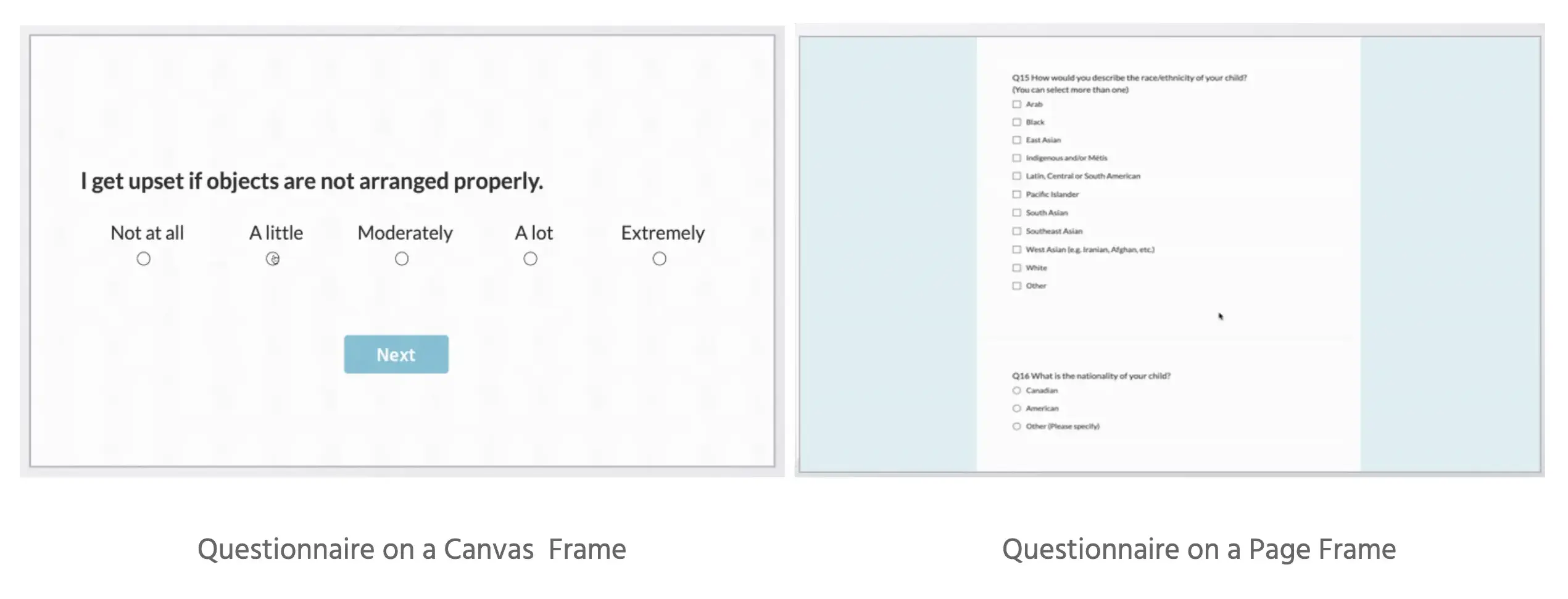
The difference between canvas and page frames for implementing online questionnaire design.

📌 For more information about the capabilities and the technologies behind questionnaires in Labvanced, as well as examples of how researchers utilize Labvanced for questionnaires, refer to this page.
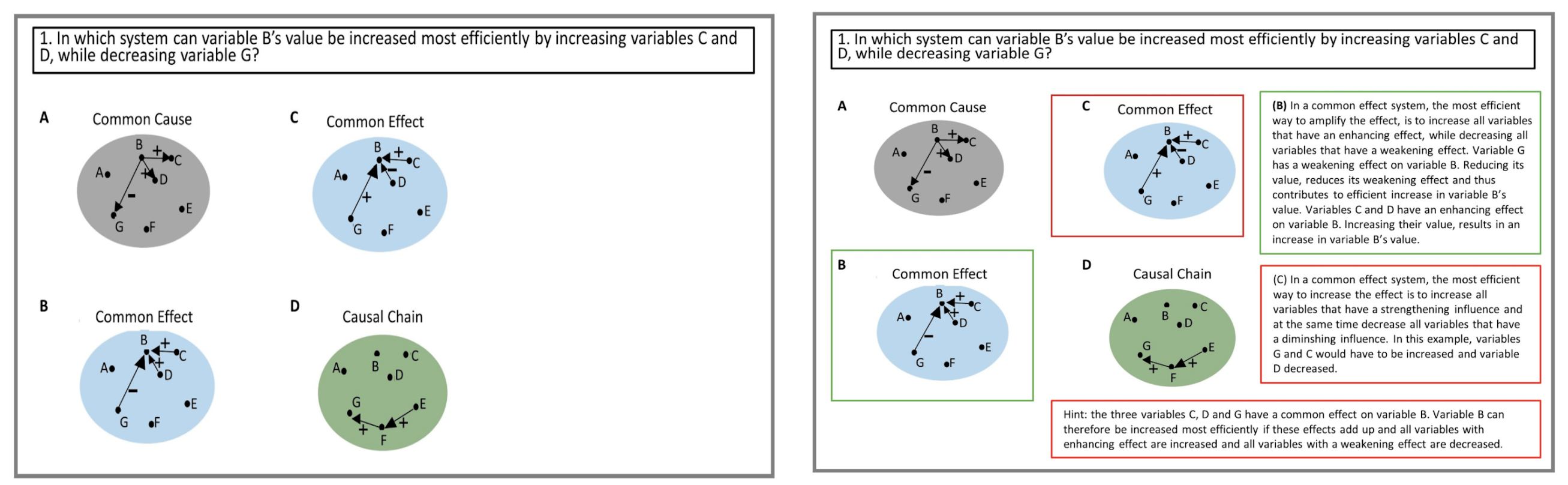
Tutorial question (left) and detailed answer feedback provided after choosing an option where the green border color indicates and right explanation and the red indicates the incorrect answer and an explanation (right) by Kessler et al. (2023).
Example of canvas frames. Tutorial question (left) and detailed answer feedback provided after choosing an option where the green border color indicates and right explanation and the red indicates the incorrect answer and an explanation (right); Kessler et al. (2023).


Implementing Questionnaires

Below are a few helpful videos and guides relating to implementing questionnaires in Labvanced.

Guide TopicOverview
Sum ScoringHow can you go about sum scoring and calculate total scores? In this example, we show you how you can go about doing that.
Reverse ScoringIn certain cases, items need to be reverse scored - ie. a selection of 'Rarely' has a value of 1 for one item but a value of '5' for another item. Learn more.

Objects: Question Options


Objects: Question Inputs


Additional Objects

Sortable File Upload Sub Study


Prev
Eye Tracking
Next
Desktop App