2024 Newsletter Archive
Table of Contents
Q3'24 Newsletter
NEW FEATURES
- Game control / Joystick user input: Now you have the option of incorporating game controllers and joysticks into your study! Participants can move objects and interact with the experiment as specified by your design via the Gamepad/ Joystick Trigger and you can record data, ie. what key they clicked and more using the Gamepad/ Joystick trigger-specific values. Also check out this sample study walkthrough of it how it can be implemented!
- Participants Tab: With Labvanced, you can manage and communicate with your participants via the newly added 'Participants' tab. Using the 'Participants' tab, you have an overview of your subjects for a particular study, customize the emails that are being sent during the course of the data collection, as well as connect your email address using the SMTP Server. Essentially, you can use this tab to manage communication with your study participants taking part in your research which is especially useful for longitudinal research with multiple sessions.
- Multi User Study Features: Multi user studies require a lot of data to be communicated between participants in real time. In very large studies, where hundreds of participants can access a study at once, this can place a big burden on servers which can impact study integrity. For this reason, we have implemented the following safety measures:
- 'rate limiter strategy' where you specify how data is handled in the event of overflowing the server under the distribute variable (scroll down for the description of the options of this feature)
- Additionally, there is now an option in the
Settingstab to specify how many sessions can occur in parallel
- More Text Objects: The following additions have been made to the editor to give you more control over design and presentation:
- DisplayVariable Element: This element allows you to link directly and call on variable values to display within the experiment.
- DisplayHTML Element: If you need to utilize HTML and display it within the study, you can make use of this element.
- SVG stimuli assignment via data frames: Researchers utilizing SVGs in their studies can now assign them to trials via data frames.
IMPROVEMENTS
- Flashing Retry Screen: A problem where if the eye tracking calibration failed and upon retrying the screen would overlay the calibration points (during the second phase of the calibration where there is a circular pattern) is now fixed.
- Duplicate First Sessions: A problem where participants that were added in the Participants Tab had 2 sessions (instead of one) created for their first experiment is now fixed.
LIBRARY HIGHLIGHTS
What's new in the library? Here are a few new studies that you can explore and consider importing and working with for your next experiment:
- Animal Word Search (multi-user): In this demo, two players compete as to who can find the most words in a word search puzzle! Try now! (Note: Copy paste the URL in a second tab and play against yourself if you just want to test it out on the fly!)
- ChatGPT: In this Labvanced demo, you can communicate directly with ChatGPT. Simply enter your prompt and hit the 'Enter' key to send. Try now!
NEW DOCS
- Chat GPT Study: This walkthrough explains how to build a study where the ChatGPT feature can be incorporated in a design where a chat interface displays and records the exchange / conversation between the participant and ChatGPT.
- SVGs as AOIs in Eye Tracking: In this walkthrough, you can see how an eye tracking study incorporates SVG objects to collect gaze data over Areas of Interest (AOIs).
- Multi-user Show Cursor Location: Are you working on a multi-user study where you want participants to see each other's cursor location? In this walkthrough, we present two approaches to how you can accomplish this in Labvanced.
NEW PUBLICATIONS
Want to see what other researchers are working on using Labvanced? Check out this list of some examples of newly published research:
- Visual Perception Supports 4-place Event Representations: A case study of TRADING in the Proceedings of the Annual Meeting of the Cognitive Science Society (Vol. 46) by Khlystova, E., Williams, A., Lidz, J., & Perkins, L. (2024).
- What Makes a Movement Human-Like? in Japanese Psychological Research by Yang, X. et al. (2024).
- Inherent Linguistic Preference Outcompetes Incidental Alignment in Cooperative Partner Choice in Language and Cognition by Matzinger, T., et al. (2024).
- Scrolling and Hyperlinks: The effects of two prevalent digital features on children's digital reading comprehension in Journal of Research in Reading by Krenca, K., Taylor, E., & Deacon, S. H. (2024).
UPCOMING
- Task Wizard
- Desktop App with SLS connection
- Phone App for Android
- Improved fixation detection algorithm (eye tracking)
Q2'24 Release Note
NEW FEATURES
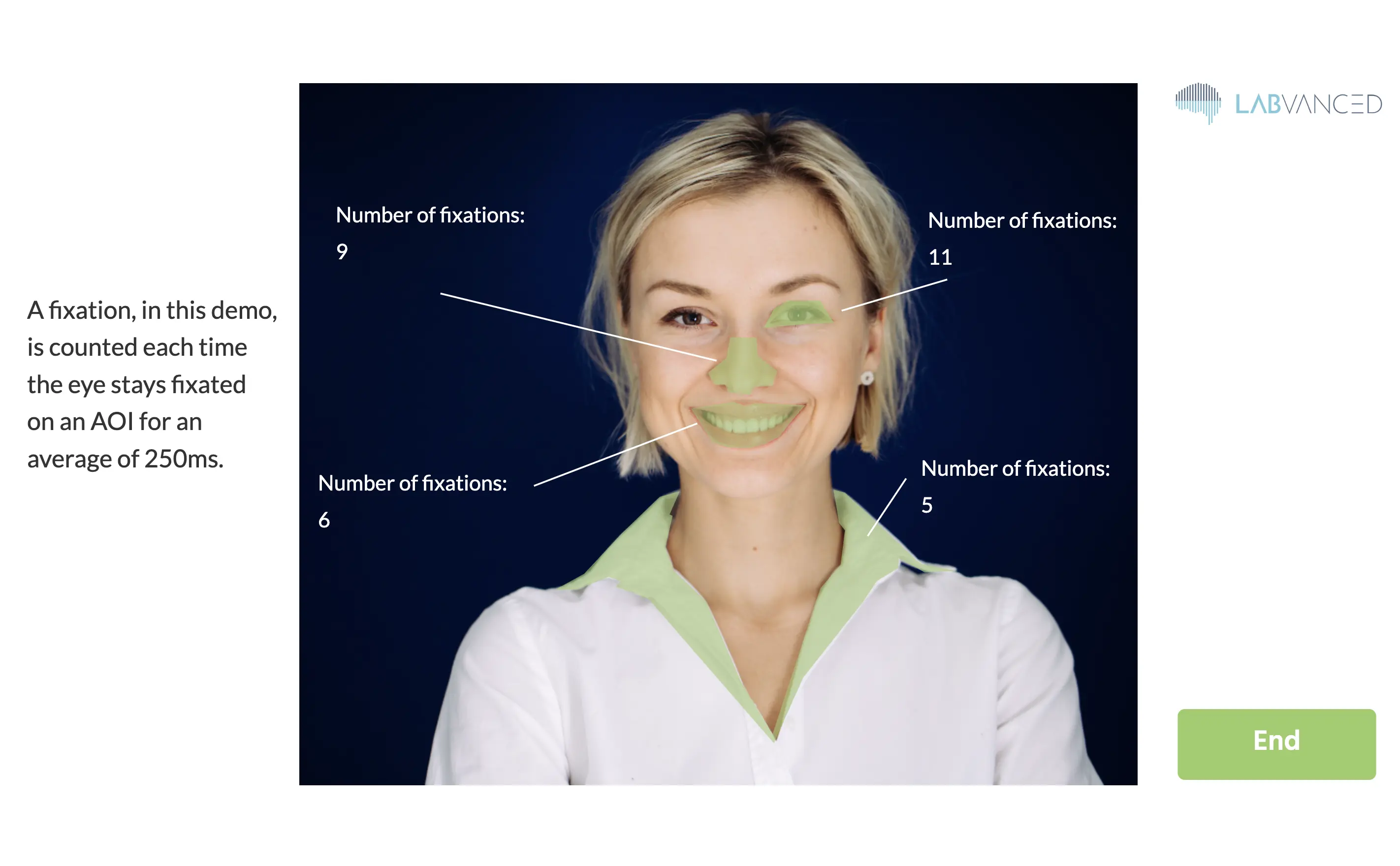
- Complex shapes as AOIs for webcam-based eye tracking using the SVG/Polygon objects: In the past, AOIs or 'masks' could only have been created using rectangle shapes. This isn't really suitable for complex shapes. With this new feature which is now available, you can utilize SVG and polygon objects to create AOIs/masks for complex shapes which can then be used as 'triggers' and/or 'variables' throughout your experiment! For example, you can specify silhouettes, (like people, facial features, or animals) within a complex scene, as your AOIs by uploading SVGs or tracing them within Labvanced using the Polygon object.
- As a side note, thank you to all the researchers that have been using our webcam-based eye tracking as a part of their research methods! We have really seen this number grow since we published our peer-reviewed paper on it a few months ago.
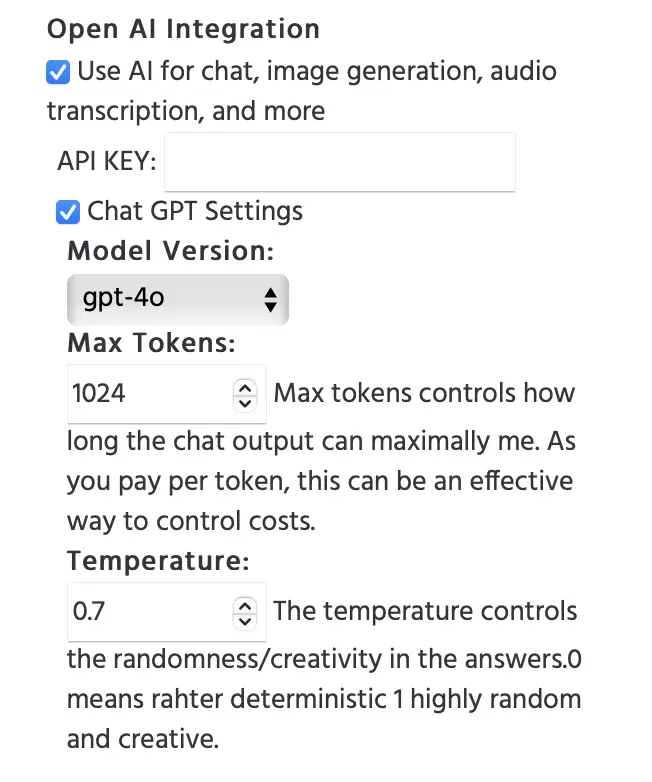
- ChatGPT: A new integration that allows you to connect OpenAI / ChatGPT with Labvanced. Essentially, participants can write in Labvanced using the input field and the response from ChatGPT will be shown right in the experiment! This allows you to collect data about how these interactions are set, but also perform advanced analysis in the background while it's happening!
- Under 'Study Settings' → 'Experiment Features' column, you can make use of the OpenAI integration today:
- Task Wizard: Now, when you create tasks in a new study, you have the Task Wizard available to help you get started. You can specify your overall study structure, including whether you want questionnaires for demographic collection, as well as navigation between the tasks, with just a few clicks, ultimately saving you time for when you are getting started!
IMPROVEMENTS
- Visually separating 'Factors' & 'Randomization' in the editor: If you have been building your experiment in Labvanced recently, you may have noticed that the left panel menus have slightly changed. This has been done to improve the language and terminology, but the inherent data model and structure has remained the same with random factors and fixed factors working as before.
- Smartphone App: The smartphone App has further been evaluated under beta with even more improvements and is expected to go fully live in the upcoming quarter. Now, there is also a library of studies that you can access through it on your phone and start exploring phone-based studies.
NEW DOCS
- Mental Rotation Task | A Spatial Processing Task: An in-depth article about the mental rotation task, including examples of it being used in research!
- 7 Classic Cognitive Tasks: Here, we highlight 7 classic and popular tasks used in cognitive psychology. Is there anything you'd include that's not already listed?
- Music Research with Labvanced: What are other researchers using Labvanced doing in the field of music psychology? This blog post gives an overview of just that by focusing on relevant publications and their research methods!
NEW PUBLICATIONS
- Beyond built density: From coarse to fine-grained analyses of emotional experiences in urban environments in the Journal of Environmental Psychology by Sander, I., et al. (2024).
- Processing of visual social-communication cues during a social-perception of action task in autistic and non-autistic observers in Neuropsychologia by Chouinard, B., Pesquita, A., Enns, J. T., & Chapman, C. S. (2024).
- Multimedia enhanced vocabulary learning: The role of input condition and learner-related factors in System by Zhang, P., & Zhang, S. (2024).
- How self-states help: Observing the embodiment of self-states through nonverbal behavior in Plos One by Engel, I., et al. (2024).
UPCOMING
- Longitudinal studies - email customization: In the past, email reminders were automatically sent based on the time interval settings you specified. Now, we are extending this capability with the additional option of allowing you to customize the text in the automated email reminders for longitudinal studies.
- Desktop App 2.0: A new and improved version of the Labvanced desktop app will be available very soon! The desktop app will have many useful features, like being able to work in online/offline modes, allowing you to work and make recordings locally in your lab, as well as easily connecting with external devices like EEGs.
Q1'24 Release Note
NEW FEATURES
- Labvanced Mobile now in Playstore! (BETA): You can run Labvanced studies now in our dedicated Android app (with just 1 click), giving you even more experimental control and design options. The smartphone app will be ideal for longitudinal testings and clinical studies, but all studies can be opened if designed for mobile use cases. We are now looking for more Beta testers, so please contact us if you are interested! Also, the iOS version will be coming soon too!
- Email verification: New users now must verify their email address upon sign up. Monospace font now available: When adding text elements to your study, you can now select monospace as a font option.
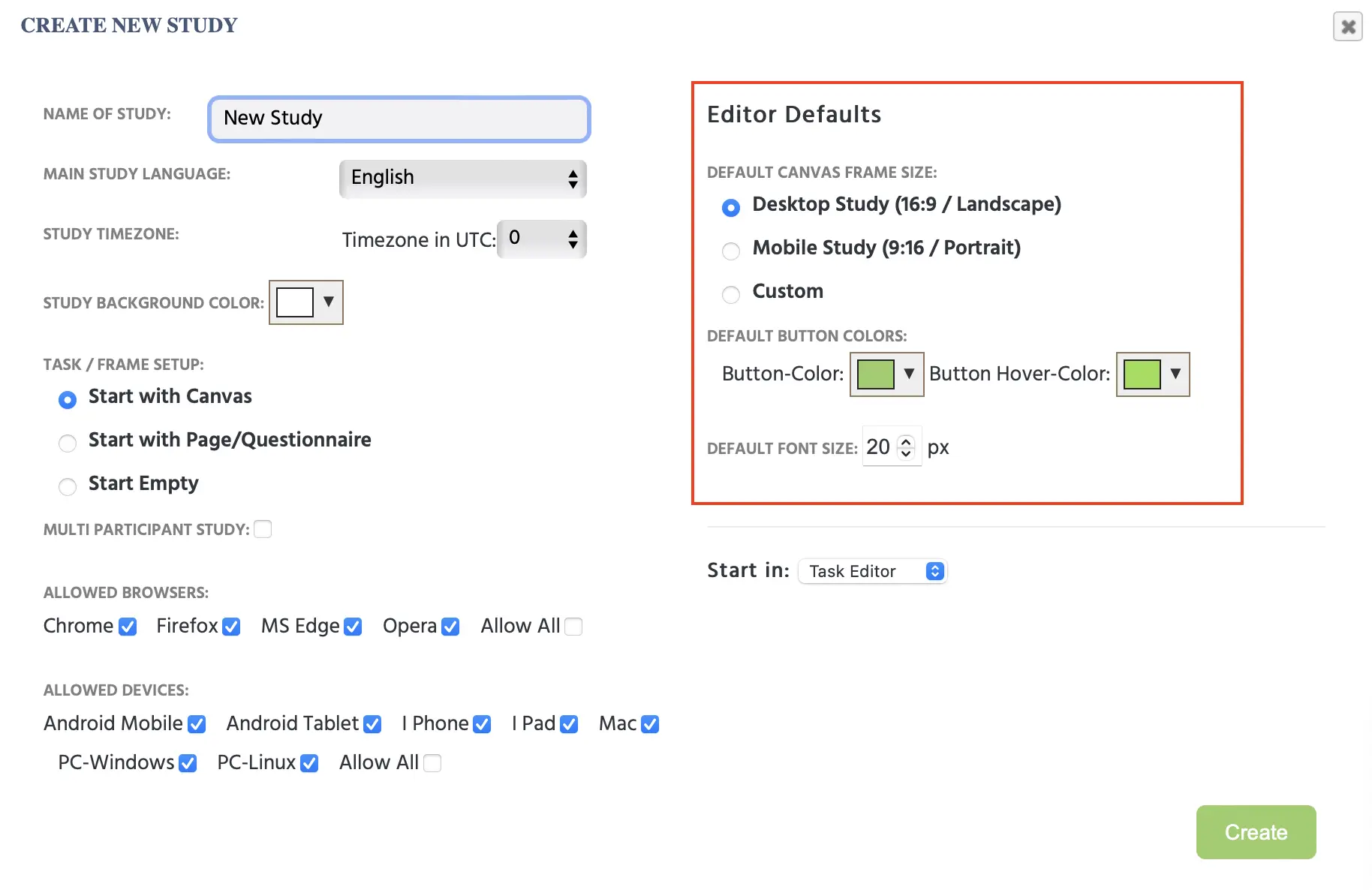
- Default styling for frames: As shown in the image below, you can now set up your new study by specifying defaults for your frames, like setting up frame size for mobile studies with an aspect ratio of 9:16.
- Default styling for study buttons: Also shown in the image below, when creating a new study you can set up a default option for buttons so you don't have to keep styling everytime you add a new button to the study. The selected default settings will create a stylized button automatically.
- Email / notification nurturing: Now released - emails and app notifications are now live, aiming to suggest and give new ideas and assist with onboarding new users as well as help with the overall app experience.
IMPROVEMENTS
- Slide element now improved: The slider element (used for questionnaires) now works now in all cases, even when the slider handle is hidden.
- Improved security: If the password is changed now you are logged out of all devices and all the sessions on all devices are invalidated.
- Changing your email automatically: Changing the email associated with your account can be done easily now via email verification.
NEW DOCS
- Randomization & Balancing: Discover how randomization and balancing are addressed in Labvanced and which parts of the app you can use to ensure your experiment is randomized and balanced.
- API Access: What are the different APIs that you can use for your Labvanced experiment? From the Webhook API, to WebSock and REST API, we've got you covered! Learn more about the options and the circumstances under which you would use them in this API overview.
- Infant-friendly & Remote Eye Tracking: What is the state-of-the-art when it comes to remote and infant-friendly eye tracking? In this blog, we discuss the challenges and solutions for using remote eye tracking as a method in developmental psychology studies.
NEW PUBLICATIONS
How are other researchers using Labvanced? Here are some highlights of recent publications!
- Parallelisms and deviations: two fundamentals of an aesthetics of poetic diction in Philosophical Transactions of the Royal Society B by Menninghaus, W. et al. (2024).
- Touch and look: The role of affective touch in promoting infants' attention towards complex visual scenes in Infancy by Carnevali, L., Della Longa, L., Dragovic, D., & Farroni, T. (2024).
- Effects of a frontal brake light on pedestrians' willingness to cross the street in Transportation Research Interdisciplinary Perspectives by Eisele, D., & Petzoldt, T. (2024).
- Effects of vertically aligned flankers during sentence reading in the Journal of Experimental Psychology: Learning, Memory, and Cognition by Mirault, J., & Grainger, J. (2024).
UPCOMING
- ChatGPT and further AI integrations: Interested in how people use AI such as chatGPT or DALL-E? We believe that research about AI usage will explode over the next few years, and hence we will provide native integrations with chatGPT and other well known AI applications soon.
- Desktop App: If you are a regular user of Labvanced, you will love to see that a dedicated application (for Windows, Linux and Mac) will be released soon which has some advantages over the pure browser-based version of Labvanced.
- All studies are directly available both online and locally, combining the best of both worlds.
- LSL integration and other dedicated hardware connection solutions through the desktop app will be coming next, enabling you to run EEG studies, connect to third party eye-tracker and more.
- More native integrations, for data export, data analysis will be available in the desktop version. Which feature is most exciting to you?
- Eye Tracking - SVG Area: With this new feature, you will be able to use complex shapes as your defined Area of Interest for eye tracking studies. Currently, you can use simple shapes (like a rectangle image) as the Area of Interest. With this new feature, you can upload an SVG of a complex shape (like an elephant) and can create your own invisible masks and count the number of fixations in that area in eye tracking studies. In the future, you will also be able to trace an area.
- PageGazer: Understanding how online users behave and make decisions has strong implications for UX designers, marketeers, e-commerce owners, and even for product management and policy makers.
- However, existing tools that offer to study consumer behavior on websites have clear shortcomings. The 3 most severe limitations are: 1) Requiring additional installations such as browser plugins, strongly limiting who can be a participant. 2) Treating the entire website like a picture or video leading to an inability of tracking interactions or aggregating data across subjects. 3) Only offering mouse tracking, but no way to track attentional processes using eye-tracking technology.
- PageGazer, is a new and powerful tool for online behavior and consumer research that we are developing which will be able to overcome these limitations and thereby vastly expand the kind of data that can be collected and insights that can be gained in remote data collection scenarios.
- If this sounds interesting to you, please subscribe to our PageGazer newsletter to stay in the loop of the latest announcements.