labvanced logoLabVanced
Contact
    • Remote Physiological Measurements
    • Eye Tracking
    • Head & Face-Tracking
    • Emotion Detection
    • Heart Rate Detection (rPPG)
    • Generative AI
    • Audio Transcription
    • EEG & Hardware Integrations
    • Decision Making
    • Reaction Times
    • Keyboard Inputs
    • Mouse Tracking
    • Mobile / Touch
    • Questionnaires
    • Gamepad / Joystick Integration
    • Audio Recordings
    • Audio Transcription
    • Video Recordings
    • Screen Recordings
    • Photos / Snapshots
    • Video Conferencing
    • Canvas Drawings
    • Build with AI
    • Build with Spreadsheets
    • Using the Experiment Editor
    • Coding
    • Creating Questionnaires
    • Balancing & Randomization
    • UX & Website Testing
    • Single Session Studies
    • Factorial Designs
    • Longitudinal & Multi-session Studies
    • Individual & Case Studies
    • Real-time Multi-user Studies
    • Interviews & Video Calls
    • Surveys & Questionnaires
    • Experience Sampling & Diaries
    • Classroom & Group Testing
    • Interventions & Clinical Trials
    • In the Browser
    • Mobile App
    • Desktop App
    • WebBridge Chrome Extension
    • Stroop Test
    • Flanker Task
    • N-back Task
    • Implicit Association Test
    • Trail Making Test
    • Digit Span
    • Corsi Block Tapping
    • Tower of London
    • Balloon Analog Risk Task
    • Preferential Looking
    • Browse more →
    • DASS-21
    • GAD-7
    • Rosenberg Self-Esteem Scale
    • PHQ-9
    • Ten-Item Personality Inventory
    • Big Five Personality Test
    • Adult ADHD Self-Report Scale
    • Browse more →
    • Building a Multi-user Study
    • Webcam Eye Tracking with AOIs
    • Website Frame Eye Tracking
    • Conditional Eye Tracking Opt-in
    • ChatGPT Study
    • Desktop App Study with EEG
    • Between-subjects Group Balancing
    • Building a Reading Study
    • Stroop Task
    • Lexical Decision Task
    • Browse more →
    Public Experiment Library
    • Arts Research
    • Clinical Psychology & Neuropsychology Medicine
    • Cognitive Psychology
    • Developmental Psychology
    • Behavioral Economics & Decision Science
    • Educational Research & Psychology
    • HCI & Human Factors
    • Linguistics & Language Sciences
    • Consumer & Marketing Research
    • Social & Personality Psychology
    • Sport & Movement Science
    • UX & Website Testing
    • Executive Functions
    • Language & Reading
    • Decision-Making & Reasoning
    • Attention
    • Overview
    • HCI & Human Factors
    • UX & Website Testing
    • Consumer & Marketing Research
    • White-Label App
    • PageGazer
    • Webcam vs. Lab Eye Tracking in InfantsAnna Banki & Gabriela Markova
    • Eye Tracking for Influencer MarketingDr. Alexander Edeling
    • Eye Tracking Infant Word ComprehensionDr. Giulia Calignano
    • Sentence Reading and Grammar JudgmentsDr. Jonathan Mirault
    • Regulating Emotions with MusicDr. Katrin Starcke
    • Game-Based Grammar Learning in ChildrenDr. Mireia Marimon
    • Gaze Cueing and AutismMax Soares Miehstein
    • Personality and Hearing in NoiseDr. Malte Wöstmann
    • All interviews →
    • Lab Notes
    • How to Cite Labvanced
    • Labvanced Platform Paper (2017)
    • Webcam Eye Tracking Validation (2024)
    • Webcam Eye Tracking Studies
    • Cognitive Psychology Studies
    • Developmental Psychology Studies
    • Linguistics Studies
    • See all publications →
    • Getting Started
    • Guide
    • Video Tutorials
    • Walkthroughs
    • Live Chat
    • Webinars & Onboarding Calls
    • AI Assistant
    • FAQ
    • Importing Templates Guide
    • Test Templates
    • Live Eye Tracking Metrics
    • Mouse Tracking Demo
    • ChatGPT Demo
    • Audio Recording Object Demo
    • Adding Image Stimuli Demo
    • Score & Feedback Demo
    • Browse all technical demos →
    • Timing Precision
    • Stimuli Presentation
    • Headphone Checks
    • Bot Checks
    • Participant Management
    • Comparisons
    • Research Blog
    • Prolific Integration
    • CloudResearch Integration
    • Sona Systems Integration
    • BeSample Integration
    • Panelabs Integration
    • Clickworker Integration
    • Labvanced Webhook API
    • Labvanced REST API
    • About Us
    • Newsletter Archive
    • Terms & Conditions
    • Data Security & Data Privacy
    • Technical & Organisational Measures
    • Accessibility
    • W-8BEN-E Form
    • Data Processing Agreement Template
    LinkedInYouTubeDiscord
    • Individual
    • Lab
    • Department / Consortium
    • Teaching
    • Campus
    • Commercial
    • Browse recording top-ups →
    • Browse AI token top-ups →
    • Overview
    • Study Building
    • Subject Recruitment
    • Dedicated Support
    Checkout
  • Contact
    • JA
      • 中國人
      • Deutsch
      • Français
      • Español
      • English
      • 日本語
    • Logout
    • Loginlogin icon
    Platform
    Labvanced makes it easy to implement the most advanced study design and reliably collect your data.
    Biosignals & AI
    Remote Physiological MeasurementsEye TrackingHead & Face-TrackingEmotion DetectionHeart Rate Detection (rPPG)Generative AIAudio TranscriptionEEG & Hardware Integrations
    Behavioral Recordings
    Decision MakingReaction TimesKeyboard InputsMouse TrackingMobile / TouchQuestionnairesGamepad / Joystick Integration
    Media Recordings
    Audio RecordingsAudio TranscriptionVideo RecordingsScreen RecordingsPhotos / SnapshotsVideo ConferencingCanvas Drawings
    Implementation Techniques
    Build with AIBuild with SpreadsheetsUsing the Experiment EditorCodingCreating QuestionnairesBalancing & RandomizationUX & Website Testing
    Study Formats

    Your study can take whatever format your research needs. Here are a few popular examples.

    Single Session StudiesFactorial DesignsLongitudinal & Multi-session StudiesIndividual & Case StudiesReal-time Multi-user StudiesInterviews & Video CallsSurveys & QuestionnairesExperience Sampling & DiariesClassroom & Group TestingInterventions & Clinical Trials
    Where Studies Run

    Run your study online in the browser, on mobile or tablet with the mobile app, or in-lab with the desktop app.

    In the BrowserMobile AppDesktop AppWebBridge Chrome Extension
    Tests
    Explore cognitive tests, questionnaires, walkthroughs, and our public experiment library: a starting point for your next study.
    Popular Cognitive Tests
    Stroop TestFlanker TaskN-back TaskImplicit Association TestTrail Making TestDigit SpanCorsi Block TappingTower of LondonBalloon Analog Risk TaskPreferential Looking
    Browse more →
    Questionnaires & Scales
    DASS-21GAD-7Rosenberg Self-Esteem ScalePHQ-9Ten-Item Personality InventoryBig Five Personality TestAdult ADHD Self-Report Scale
    Browse more →
    Public Experiment Library

    Take a look at what other researchers in the community are doing through our extensive, open catalog of shared studies.

    Open the public library →
    Walkthroughs

    Step-by-step builds of complete studies, from a blank project to a running experiment, that you can follow along or adapt.

    Building a Multi-user StudyWebcam Eye Tracking with AOIsWebsite Frame Eye TrackingConditional Eye Tracking Opt-inChatGPT StudyDesktop App Study with EEGBetween-subjects Group BalancingBuilding a Reading StudyStroop TaskLexical Decision Task
    Browse more →
    Research
    One platform for students, academics, and industry researchers studying human behavior.
    Harvard UniversityStanford UniversityCambridge UniversityUCLNYUMax Planck InstituteUCLATU Munich

    Trusted by researchers at 1,500+ universities worldwide

    Academic Research
    Arts ResearchClinical Psychology & Neuropsychology MedicineCognitive PsychologyDevelopmental PsychologyBehavioral Economics & Decision ScienceEducational Research & PsychologyHCI & Human FactorsLinguistics & Language SciencesConsumer & Marketing ResearchSocial & Personality PsychologySport & Movement ScienceUX & Website Testing
    Research Areas
    Executive FunctionsLanguage & ReadingDecision-Making & ReasoningAttention
    Industry / Commercial
    OverviewHCI & Human FactorsUX & Website TestingConsumer & Marketing ResearchWhite-Label AppPageGazer
    Researcher Interviews

    Conversations with researchers about the studies they ran with Labvanced, what worked, and what they learned.

    Webcam vs. Lab Eye Tracking in InfantsAnna Banki & Gabriela MarkovaEye Tracking for Influencer MarketingDr. Alexander EdelingEye Tracking Infant Word ComprehensionDr. Giulia CalignanoSentence Reading and Grammar JudgmentsDr. Jonathan MiraultRegulating Emotions with MusicDr. Katrin StarckeGame-Based Grammar Learning in ChildrenDr. Mireia MarimonGaze Cueing and AutismMax Soares MiehsteinPersonality and Hearing in NoiseDr. Malte Wöstmann
    All interviews →
    Our Research
    Lab NotesHow to Cite Labvanced
    Peer Reviewed Studies

    A selection of peer-reviewed work built on Labvanced: our own platform and validation papers, and studies by the research community grouped by area. Hundreds more are listed on the full publications page.

    Labvanced Platform Paper (2017)Webcam Eye Tracking Validation (2024)Webcam Eye Tracking StudiesCognitive Psychology StudiesDevelopmental Psychology StudiesLinguistics Studies
    See all publications →
    Resources
    Valuable resources to help you learn the platform, stay updated, and more.
    Documentation
    Getting StartedGuideVideo TutorialsWalkthroughs
    Support
    Live ChatWebinars & Onboarding CallsAI AssistantFAQ
    Templates & Demos

    These are a few popular examples. Browse our guide and a selection of technical demos to get started with implementation.

    Importing Templates GuideTest TemplatesLive Eye Tracking MetricsMouse Tracking DemoChatGPT DemoAudio Recording Object DemoAdding Image Stimuli DemoScore & Feedback Demo
    Browse all technical demos →
    Methodology
    Timing PrecisionStimuli PresentationHeadphone ChecksBot ChecksParticipant ManagementComparisonsResearch Blog
    Integrations & APIs
    Prolific IntegrationCloudResearch IntegrationSona Systems IntegrationBeSample IntegrationPanelabs IntegrationClickworker IntegrationLabvanced Webhook APILabvanced REST API
    Company & Legal
    About UsNewsletter ArchiveTerms & ConditionsData Security & Data PrivacyTechnical & Organisational MeasuresAccessibilityW-8BEN-E FormData Processing Agreement Template
    LinkedInYouTubeDiscord
    Pricing
    Our licenses and additional services at a glance.
    Licenses
    IndividualLabDepartment / ConsortiumTeachingCampusCommercial
    Top-Ups

    Need more recordings for your lab or your own research? Simply use one of these recording top-up packages.

    Browse recording top-ups →

    Need more AI tokens for the AI assistant and study translations? Simply use one of these AI token top-up packages.

    Browse AI token top-ups →
    Additional Services

    Hire Labvanced’s expert team to quickly bring your project to the level of rigor it needs.

    OverviewStudy BuildingSubject RecruitmentDedicated Support
    Checkout

    Ready to purchase a license or top-up? Head straight to checkout.

    Go to checkout →
    • 中國人
    • Deutsch
    • Français
    • Español
    • English
    • 日本語
    ストループ課題のオンラインおよび実験室内使用のプレビュー。

    ストループテスト効果

    ストループテスト効果は、選択的注意と認知干渉を評価するために使用される古典的な認知課題です。参加者は、対立する自動的な応答を抑えながら、一つの刺激の次元に応答しなければなりません。

    目次

    • タスクフォーマット
    • 収集データ
    • 技術
    • カスタマイズ
    • 推奨用途

    タスクフォーマット | ストループテストオンラインおよび実験室内

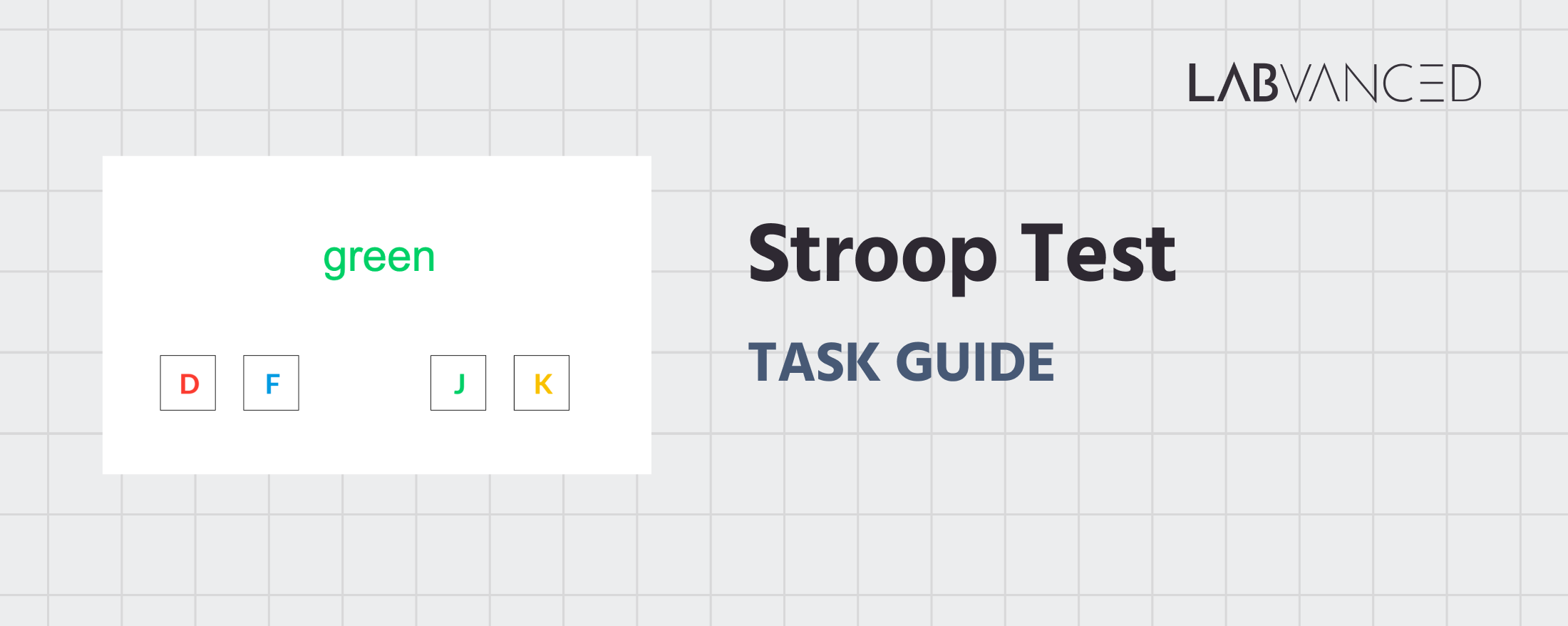
    ストループテスト効果では、参加者に色の言葉が色付きのテキストで表示されます。彼らのタスクは、言葉の意味を無視しながら、単語のフォント色に応答することです。試行は、一致する場合(意味と言葉の色が一致する)と不一致の場合(衝突する)があります。反応ルールに慣れるために、一致する試行の練習ブロックが実験的試行の前に行われます。


    テストしてみる!

    ストループテストの2つのバージョンが利用可能で、それぞれ使用するデバイスと入力方法に最適化されています:

    デスクトップバージョン

    デスクトップバージョンでは、各試行の中央に1つの色の言葉が表示されます。参加者は、単語のフォント色に対応する4つのキー(D, F, J, K)のいずれかを押して、キーボードを使って応答します。色とキーのマッピングは参加者間でバランスが取られています。メインタスクの前にトレーニングセッションが含まれます。


    モバイルバージョン

    モバイルバージョンでは、同じタスク構造と反応ルールを使用します。言葉は色付きのテキストで1つずつ表示され、参加者はフォント色に対応する画面上のボタンをタップして応答します。色と応答のマッピングは参加者間でバランスが取られています。このバージョンは、モバイルデバイス向けに最適化された縦型(9:16)フレームを使用します。

    ストループテストメトリクスと収集データ

    ストループタスクは、自動的なプロセスと制御されたプロセスが対立する際に注意がどのように調整されるかを明らかにする一連の行動測定をキャプチャします。記録された変数により、研究者は反応時間、応答精度、および干渉効果(例:一致する試行と不一致の試行間の違い)を評価できます。これらの指標は、認知制御、応答抑制、およびタスクに関連する情報のために自動応答を抑制する能力を定量化するのに役立ちます。すべての変数は、タスクのVariablesタブ内で表示およびカスタマイズできます。

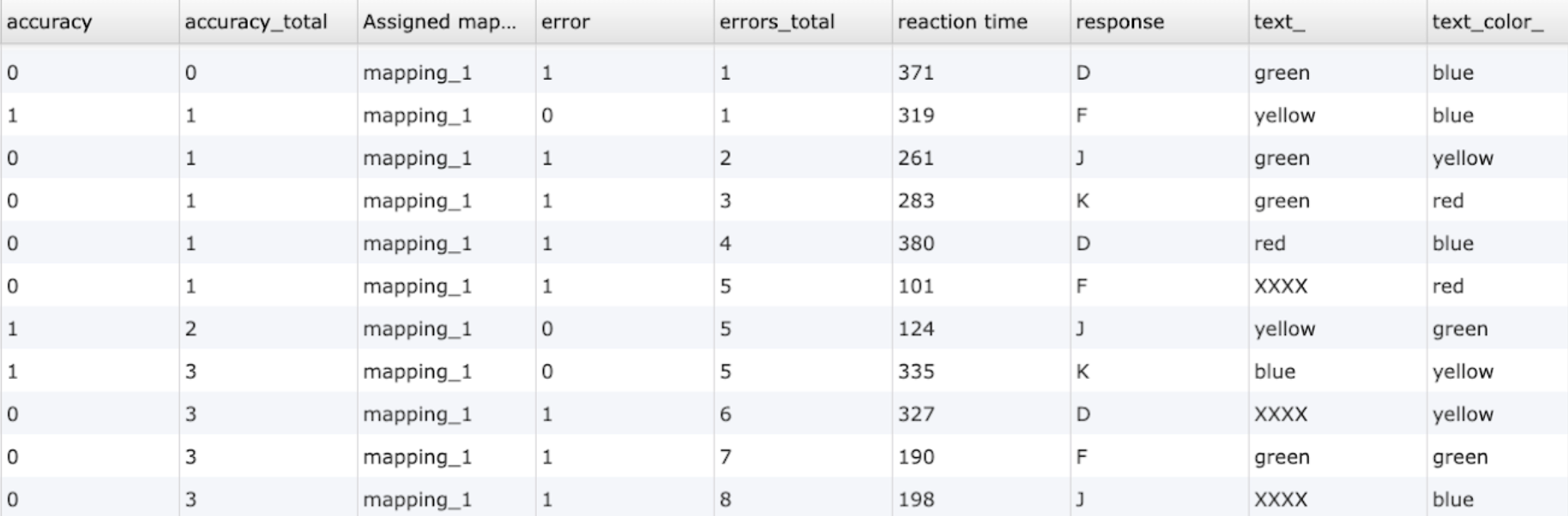
    以下は、Labvanced版のストループタスクで収集された変数の例です:

    変数名説明
    accuracy参加者の答えが正しい(1)か間違っている(0)か
    accuracy_totalなされた正しい答えの総数
    Assigned mappingキーのランダム化のためのグループ割り当て
    error参加者の答えがエラーであったか(1)またはそうでなかったか(0)
    errors_total不正確な応答の総数
    reaction time参加者が応答するのにかかった時間(ミリ秒)
    response選択された応答キー (D, F, J, K)
    text_画面に表示されたテキスト
    text_color_画面に表示されたテキストの色

    オンライン研究のためにストループタスクテンプレートを使用して収集された行動測定と応答のデータプレビュー。

    オンラインストループテストの実際の試行レベル出力を示すデータテーブル。


    ストループテスト

    参加者は、一致または不一致のフォント色で提示された色の言葉を表示し、単語の意味ではなくテキストの色に基づいて応答しなければなりません。


    オンラインおよび実験室内研究のためのストループテストを駆動する技術

    ストループテスト効果は、刺激提示、応答処理、および試行論理に対する正確な制御を必要とします。以下の機能は、異なる研究デザインや参加者環境でタスクを信頼性高く実行するために必要な技術的柔軟性を提供します。

    • 高精度タイミング: ストループテストは、異なる試行タイプ間の反応時間の微妙な違いを検出するためにミリ秒レベルのタイミングに依存しています。Labvancedは、オンラインテスト環境でも信頼性のある認知測定のために、正確な刺激提示と応答ログを確保します。

    • デバイス間の柔軟な応答マッピング: デスクトップデバイスではキーボード入力を介して、タッチ対応デバイスでは画面上のボタンを介して応答を収集できます。同じタスク論理がプラットフォーム間で使用でき、利用可能な入力方法に応じてインターフェースを調整しながら、一貫した応答評価が保証されます。

    • 制御された環境のためのデスクトップアプリサポート: より厳密な実験的制御やハードウェア統合が必要な場合、Labvancedデスクトップアプリを使用してタスクを展開できます。この設定は、安定したタイミングと、実験室研究で一般的に使用されるEEGやその他のLSLベースの機器との互換性をサポートします。

    • リモートおよび縦断的研究のサポート: ストループタスクは、複数のセッションにわたって一貫して提供されるため、時間経過に伴う抑制制御の変化を追跡する縦断研究に適しています。リモートおよびオンライン展開オプションにより、研究者は分散サンプルからデータを収集し、標準化されたタスク動作を維持できます。

    • オプションのウェブカメラ目の動き追跡の統合: タスクは、対称試行と不一致試行中の注視行動、注視パターン、および視覚的注意を調べるために、査読済みのウェブカメラベースの目の動き追跡で拡張できます。これにより、特別なハードウェアを必要とせずに注意プロセスのより豊かな分析が可能になります。

    Labvancedで作成されたストループ課題中のウェブカメラの目の追跡タスクを見ている人

    ウェブカメラ目の追跡

    内蔵のコード不要で査読済みのウェブカメラ目の追跡により、視線パターンと視覚的注意をキャプチャします。
    このストループテストテンプレートオンラインからの正確な反応時間を象徴する時計のアイコン

    精密タイミング

    時間に敏感なタスクのために、ミリ秒単位の正確さで反応時間、タスクパフォーマンスなどをキャプチャします。
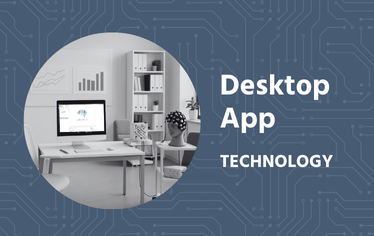
    ストループタスクテンプレートを修正するために使用されるLabvancedのデスクトップアプリの画像

    デスクトップアプリ

    デスクトップアプリを使用してラボ内の研究を実施し、EEGやその他のLSL接続ラボハードウェアと互換性があります。

    ストループテストのカスタマイズ

    特定の研究質問に応じて、オンラインおよびラボ内タスクテンプレートのストループテストを適応する方法は多数あります。以下は、このタスクを変更する際に研究者たちがよく尋ねるテーマのいくつかです。


    テキストと色の設定

    単語とフォントの色は編集可能なテキストオブジェクトとして実装されています。研究者は、フレーム上のテキストを直接編集するか、Object Propertiesパネルを通じて、単語セット、カラーパレット、フォントタイプ、テキストサイズを変更できます。これにより、特定の言語のバージョンや知覚操作の容易な作成が可能になります。


    一貫性と条件ロジック

    ストループ課題の一貫した試行と一貫しない試行は、各試行に表示される単語と色の組み合わせを制御する条件値によって定義されます。これらの値は、期待される応答を決定するためにランタイム中に読み取られます。必要な刺激ロジックを設定するためにTrials & Conditionsパネルを利用できます。


    応答マッピングと評価

    応答キーや画面上のボタンは、入力イベントを編集することで異なる色に再割り当てできます。研究者は、正しい応答が定義される方法、エラーが記録される方法、および刺激オフセット後に応答が受け入れられるかどうかを変更できます。これらすべては、ストループテストタスクの関連イベントの簡単な変更を通じて実現できます。


    試行の流れと練習デザイン

    練習試行は通常、独立したブロックとして実施され、タイミング、フィードバック、試行回数をメインタスクから独立して調整できます。ストループテスト全体のフレーム遷移とフィードバック表示はイベントを通じて制御されており、異なる研究デザインに適応させるために変更できます。


    このタスクのカスタマイズについて助けが必要な場合は、お気軽にお問い合わせください:


    お問い合わせ

    ストループテストの推奨使用法と応用

    ストループテスト効果は、研究、臨床、応用の設定で広く適用でき、オンラインおよびラボ内管理設定で利用可能であり、抑制制御と注意の対立を研究する上で価値があります。

    • 実行機能および認知制御研究: 応答抑制、干渉解決、注意制御メカニズムを研究するために、認知心理学と神経科学で頻繁に使用されています。

    • 発達およびライフスパン研究: 幼少期から思春期にかけての抑制制御の発達や、後期成人期における変化を調べるために適用されます。

    • 臨床および神経心理学的集団: ADHD、うつ病、不安障害、物質使用障害、および抑制制御が障害される可能性のある神経学的状態に関する研究に使用されます。

    • 感情およびストレス研究: 感情的な状態、ストレス、または疲労が認知制御と注意の調整にどのように影響するかを調査する研究にしばしば含まれます。

    • 神経イメージングおよび脳機能研究: 神経イメージングまたは生理学的手法と一般的に組み合わせて、対立処理の神経相関を調査します。


    サインアップ


    参考文献

    • Stroop, J. R. (1935). Studies of interference in serial verbal reactions. Journal of Experimental Psychology, 18(6), 643–662.

    • Elcin, D., Velasquez, M., & Colombo, P. J. (2024). Effects of acute and long-term mindfulness on neural activity and the conflict resolution component of attention. Frontiers in Human Neuroscience, 18, 1359198.

    関連タスク

    ストループテストはLabvancedのタスクライブラリ内の他の抑制制御および応答対立タスクと自然に組み合わされています。

    フランカー課題

    この研究はフランカー課題を使用して選択的注意と抑制制御を測定します。参加者は周囲の干渉物を無視しながら中央の矢印の方向に応答します。反応時間と正確性がパフォーマンス指標として記録されます。

    サイモン課題

    この研究はサイモン課題を使用して認知制御と刺激応答の適合性を測定します。参加者は空間的な位置を無視しながら刺激の色に応答し、反応時間と正確性を通じてサイモン効果を測定します。

    ドットプローブ課題

    このタスクでは、参加者がペアの画像を見た後、小さなドットが表示され、キープレス(デスクトップ)またはボタンプレス(モバイル)でドットの位置にできるだけ早く応答しなければなりません。