labvanced logoLabVanced
Contact
    • Remote Physiological Measurements
    • Eye Tracking
    • Head & Face-Tracking
    • Emotion Detection
    • Heart Rate Detection (rPPG)
    • Generative AI
    • Audio Transcription
    • EEG & Hardware Integrations
    • Decision Making
    • Reaction Times
    • Keyboard Inputs
    • Mouse Tracking
    • Mobile / Touch
    • Questionnaires
    • Gamepad / Joystick Integration
    • Audio Recordings
    • Audio Transcription
    • Video Recordings
    • Screen Recordings
    • Photos / Snapshots
    • Video Conferencing
    • Canvas Drawings
    • Build with AI
    • Build with Spreadsheets
    • Using the Experiment Editor
    • Coding
    • Creating Questionnaires
    • Balancing & Randomization
    • UX & Website Testing
    • Single Session Studies
    • Factorial Designs
    • Longitudinal & Multi-session Studies
    • Individual & Case Studies
    • Real-time Multi-user Studies
    • Interviews & Video Calls
    • Surveys & Questionnaires
    • Experience Sampling & Diaries
    • Classroom & Group Testing
    • Interventions & Clinical Trials
    • In the Browser
    • Mobile App
    • Desktop App
    • WebBridge Chrome Extension
    • Stroop Test
    • Flanker Task
    • N-back Task
    • Implicit Association Test
    • Trail Making Test
    • Digit Span
    • Corsi Block Tapping
    • Tower of London
    • Balloon Analog Risk Task
    • Preferential Looking
    • Browse more →
    • DASS-21
    • GAD-7
    • Rosenberg Self-Esteem Scale
    • PHQ-9
    • Ten-Item Personality Inventory
    • Big Five Personality Test
    • Adult ADHD Self-Report Scale
    • Browse more →
    • Building a Multi-user Study
    • Webcam Eye Tracking with AOIs
    • Website Frame Eye Tracking
    • Conditional Eye Tracking Opt-in
    • ChatGPT Study
    • Desktop App Study with EEG
    • Between-subjects Group Balancing
    • Building a Reading Study
    • Stroop Task
    • Lexical Decision Task
    • Browse more →
    Public Experiment Library
    • Arts Research
    • Clinical Psychology & Neuropsychology Medicine
    • Cognitive Psychology
    • Developmental Psychology
    • Behavioral Economics & Decision Science
    • Educational Research & Psychology
    • HCI & Human Factors
    • Linguistics & Language Sciences
    • Consumer & Marketing Research
    • Social & Personality Psychology
    • Sport & Movement Science
    • UX & Website Testing
    • Executive Functions
    • Language & Reading
    • Decision-Making & Reasoning
    • Attention
    • Overview
    • HCI & Human Factors
    • UX & Website Testing
    • Consumer & Marketing Research
    • White-Label App
    • PageGazer
    • Webcam vs. Lab Eye Tracking in InfantsAnna Banki & Gabriela Markova
    • Eye Tracking for Influencer MarketingDr. Alexander Edeling
    • Eye Tracking Infant Word ComprehensionDr. Giulia Calignano
    • Sentence Reading and Grammar JudgmentsDr. Jonathan Mirault
    • Regulating Emotions with MusicDr. Katrin Starcke
    • Game-Based Grammar Learning in ChildrenDr. Mireia Marimon
    • Gaze Cueing and AutismMax Soares Miehstein
    • Personality and Hearing in NoiseDr. Malte Wöstmann
    • All interviews →
    • Lab Notes
    • How to Cite Labvanced
    • Labvanced Platform Paper (2017)
    • Webcam Eye Tracking Validation (2024)
    • Webcam Eye Tracking Studies
    • Cognitive Psychology Studies
    • Developmental Psychology Studies
    • Linguistics Studies
    • See all publications →
    • Getting Started
    • Guide
    • Video Tutorials
    • Walkthroughs
    • Live Chat
    • Webinars & Onboarding Calls
    • AI Assistant
    • FAQ
    • Importing Templates Guide
    • Test Templates
    • Live Eye Tracking Metrics
    • Mouse Tracking Demo
    • ChatGPT Demo
    • Audio Recording Object Demo
    • Adding Image Stimuli Demo
    • Score & Feedback Demo
    • Browse all technical demos →
    • Timing Precision
    • Stimuli Presentation
    • Headphone Checks
    • Bot Checks
    • Participant Management
    • Comparisons
    • Research Blog
    • Prolific Integration
    • CloudResearch Integration
    • Sona Systems Integration
    • BeSample Integration
    • Panelabs Integration
    • Clickworker Integration
    • Labvanced Webhook API
    • Labvanced REST API
    • About Us
    • Newsletter Archive
    • Terms & Conditions
    • Data Security & Data Privacy
    • Technical & Organisational Measures
    • Accessibility
    • W-8BEN-E Form
    • Data Processing Agreement Template
    LinkedInYouTubeDiscord
    • Individual
    • Lab
    • Department / Consortium
    • Teaching
    • Campus
    • Commercial
    • Browse recording top-ups →
    • Browse AI token top-ups →
    • Overview
    • Study Building
    • Subject Recruitment
    • Dedicated Support
    Checkout
  • Contact
    • JA
      • 中國人
      • Deutsch
      • Français
      • Español
      • English
      • 日本語
    • Logout
    • Loginlogin icon
    Platform
    Labvanced makes it easy to implement the most advanced study design and reliably collect your data.
    Biosignals & AI
    Remote Physiological MeasurementsEye TrackingHead & Face-TrackingEmotion DetectionHeart Rate Detection (rPPG)Generative AIAudio TranscriptionEEG & Hardware Integrations
    Behavioral Recordings
    Decision MakingReaction TimesKeyboard InputsMouse TrackingMobile / TouchQuestionnairesGamepad / Joystick Integration
    Media Recordings
    Audio RecordingsAudio TranscriptionVideo RecordingsScreen RecordingsPhotos / SnapshotsVideo ConferencingCanvas Drawings
    Implementation Techniques
    Build with AIBuild with SpreadsheetsUsing the Experiment EditorCodingCreating QuestionnairesBalancing & RandomizationUX & Website Testing
    Study Formats

    Your study can take whatever format your research needs. Here are a few popular examples.

    Single Session StudiesFactorial DesignsLongitudinal & Multi-session StudiesIndividual & Case StudiesReal-time Multi-user StudiesInterviews & Video CallsSurveys & QuestionnairesExperience Sampling & DiariesClassroom & Group TestingInterventions & Clinical Trials
    Where Studies Run

    Run your study online in the browser, on mobile or tablet with the mobile app, or in-lab with the desktop app.

    In the BrowserMobile AppDesktop AppWebBridge Chrome Extension
    Tests
    Explore cognitive tests, questionnaires, walkthroughs, and our public experiment library: a starting point for your next study.
    Popular Cognitive Tests
    Stroop TestFlanker TaskN-back TaskImplicit Association TestTrail Making TestDigit SpanCorsi Block TappingTower of LondonBalloon Analog Risk TaskPreferential Looking
    Browse more →
    Questionnaires & Scales
    DASS-21GAD-7Rosenberg Self-Esteem ScalePHQ-9Ten-Item Personality InventoryBig Five Personality TestAdult ADHD Self-Report Scale
    Browse more →
    Public Experiment Library

    Take a look at what other researchers in the community are doing through our extensive, open catalog of shared studies.

    Open the public library →
    Walkthroughs

    Step-by-step builds of complete studies, from a blank project to a running experiment, that you can follow along or adapt.

    Building a Multi-user StudyWebcam Eye Tracking with AOIsWebsite Frame Eye TrackingConditional Eye Tracking Opt-inChatGPT StudyDesktop App Study with EEGBetween-subjects Group BalancingBuilding a Reading StudyStroop TaskLexical Decision Task
    Browse more →
    Research
    One platform for students, academics, and industry researchers studying human behavior.
    Harvard UniversityStanford UniversityCambridge UniversityUCLNYUMax Planck InstituteUCLATU Munich

    Trusted by researchers at 1,500+ universities worldwide

    Academic Research
    Arts ResearchClinical Psychology & Neuropsychology MedicineCognitive PsychologyDevelopmental PsychologyBehavioral Economics & Decision ScienceEducational Research & PsychologyHCI & Human FactorsLinguistics & Language SciencesConsumer & Marketing ResearchSocial & Personality PsychologySport & Movement ScienceUX & Website Testing
    Research Areas
    Executive FunctionsLanguage & ReadingDecision-Making & ReasoningAttention
    Industry / Commercial
    OverviewHCI & Human FactorsUX & Website TestingConsumer & Marketing ResearchWhite-Label AppPageGazer
    Researcher Interviews

    Conversations with researchers about the studies they ran with Labvanced, what worked, and what they learned.

    Webcam vs. Lab Eye Tracking in InfantsAnna Banki & Gabriela MarkovaEye Tracking for Influencer MarketingDr. Alexander EdelingEye Tracking Infant Word ComprehensionDr. Giulia CalignanoSentence Reading and Grammar JudgmentsDr. Jonathan MiraultRegulating Emotions with MusicDr. Katrin StarckeGame-Based Grammar Learning in ChildrenDr. Mireia MarimonGaze Cueing and AutismMax Soares MiehsteinPersonality and Hearing in NoiseDr. Malte Wöstmann
    All interviews →
    Our Research
    Lab NotesHow to Cite Labvanced
    Peer Reviewed Studies

    A selection of peer-reviewed work built on Labvanced: our own platform and validation papers, and studies by the research community grouped by area. Hundreds more are listed on the full publications page.

    Labvanced Platform Paper (2017)Webcam Eye Tracking Validation (2024)Webcam Eye Tracking StudiesCognitive Psychology StudiesDevelopmental Psychology StudiesLinguistics Studies
    See all publications →
    Resources
    Valuable resources to help you learn the platform, stay updated, and more.
    Documentation
    Getting StartedGuideVideo TutorialsWalkthroughs
    Support
    Live ChatWebinars & Onboarding CallsAI AssistantFAQ
    Templates & Demos

    These are a few popular examples. Browse our guide and a selection of technical demos to get started with implementation.

    Importing Templates GuideTest TemplatesLive Eye Tracking MetricsMouse Tracking DemoChatGPT DemoAudio Recording Object DemoAdding Image Stimuli DemoScore & Feedback Demo
    Browse all technical demos →
    Methodology
    Timing PrecisionStimuli PresentationHeadphone ChecksBot ChecksParticipant ManagementComparisonsResearch Blog
    Integrations & APIs
    Prolific IntegrationCloudResearch IntegrationSona Systems IntegrationBeSample IntegrationPanelabs IntegrationClickworker IntegrationLabvanced Webhook APILabvanced REST API
    Company & Legal
    About UsNewsletter ArchiveTerms & ConditionsData Security & Data PrivacyTechnical & Organisational MeasuresAccessibilityW-8BEN-E FormData Processing Agreement Template
    LinkedInYouTubeDiscord
    Pricing
    Our licenses and additional services at a glance.
    Licenses
    IndividualLabDepartment / ConsortiumTeachingCampusCommercial
    Top-Ups

    Need more recordings for your lab or your own research? Simply use one of these recording top-up packages.

    Browse recording top-ups →

    Need more AI tokens for the AI assistant and study translations? Simply use one of these AI token top-up packages.

    Browse AI token top-ups →
    Additional Services

    Hire Labvanced’s expert team to quickly bring your project to the level of rigor it needs.

    OverviewStudy BuildingSubject RecruitmentDedicated Support
    Checkout

    Ready to purchase a license or top-up? Head straight to checkout.

    Go to checkout →
    • 中國人
    • Deutsch
    • Français
    • Español
    • English
    • 日本語
    メンタル回転タスク 2Dのオンラインおよびラボ利用のプレビュー。

    メンタル回転タスク 2D

    メンタル回転タスク 2Dは、参加者が回転した二次元(2D)オブジェクトを比較することを要求することで、空間的推論を評価します。これは、認知心理学や神経科学で視覚変換、空間能力、および回転下での意思決定を研究するために広く使用されています。

    目次

    • タスクフォーマット
    • 成果指標
    • 技術
    • カスタマイズ
    • 推奨使用法

    タスクフォーマット | メンタル回転タスク 2D オンラインおよびラボ

    メンタル回転タスク 2Dでは、参加者は異なる回転角度で表示されたフラットな視覚刺激を提示されます。このインポータブルでカスタマイズ可能なメンタル回転 2D タスクでは、参加者は異なる方向で提示された文字を見て、それぞれの文字が通常の(カノニカル)形式で表示されているのか、ミラーレバーサルされた形式で表示されているのかを判断します。参加者は最初にフィードバックを伴う練習ブロックを完了し、メインの試行に進む前に少なくとも90%の正確さを達成する必要があります。実験ブロック中は、文字は制限された時間画面に表示され、フィードバックは提供されません。参加者には、できるだけ迅速かつ正確に回答するよう指示されます。


    試してみる!

    メンタル回転タスク(2D文字)の2つのバージョンが用意されており、使用されるデバイスと入力方法の種類に最適化されています。

    デスクトップ版

    デスクトップ版では、各試行の中央に回転された文字が表示されます。参加者はFおよびJキーを使用して、文字が通常かミラーリバーサルかを示します。このキーと応答のマッピングは参加者間でバランスを取られます。練習試行では正確性のフィードバックが提供され、実験試行では固定された提示時間(例:2000 ms)が使用され、ミスした応答は精度値0で記録されます。


    モバイル版

    モバイル版では、文字が同じ形式で一度に1文字ずつ表示されます。参加者は、画面に表示されたNormalまたはMirrorボタンをタップして応答します。練習試行では正確性のフィードバックが提供され、実験試行では固定された提示時間(例:2000 ms)が使用され、ミスした応答は精度値0で記録されます。このバージョンはタッチスクリーンインタラクションに最適化されており、メインタスクが始まる前に練習試行が含まれています。

    メンタル回転タスク 2Dデータ収集と指標

    メンタル回転タスク 2Dは、個人が回転した視覚刺激をどのようにメンタルに変換し比較するかを示す一連の行動測定をキャプチャします。記録された変数により、研究者は反応時間、応答精度、エラーパターン、および回転角度や刺激タイプ(例:通常試行 vs. ミラー試行)にわたるパフォーマンスの違いを評価できます。これらの測定により、視覚的空間処理効率、メンタル回転速度、およびさまざまなレベルの空間変換要求下での意思決定精度を定量化するのに役立ちます。すべての変数は、タスクのVariablesタブ内で表示およびカスタマイズできます。

    以下は、このバージョンのタスクで研究者が頻繁に分析する最も情報量の多い指標のいくつかです:

    変数名説明
    accuracy試行レベルの精度(1 = 正解、0 = 不正解)
    accuracy_total試行全体での正確な応答の総数
    Assigned mappingキーのランダム化に対するグループ割り当て
    choice参加者が与えた応答(キー押下 = F/J または ボタンクリック = "通常"/"ミラー")
    error試行レベルのエラー(0 = 正解、1 = 不正解)
    errors_total不正確な応答の総数
    letter画面に表示された文字(F, P, Q, G, L, R)
    reaction_time提示された刺激に対する参加者の応答までの時間(ミリ秒)
    rotation_angle文字の回転角度(0°, 60°, 120°, 180°, 240°, 300°)
    stimulus_type刺激が属するカテゴリ(通常またはミラー)

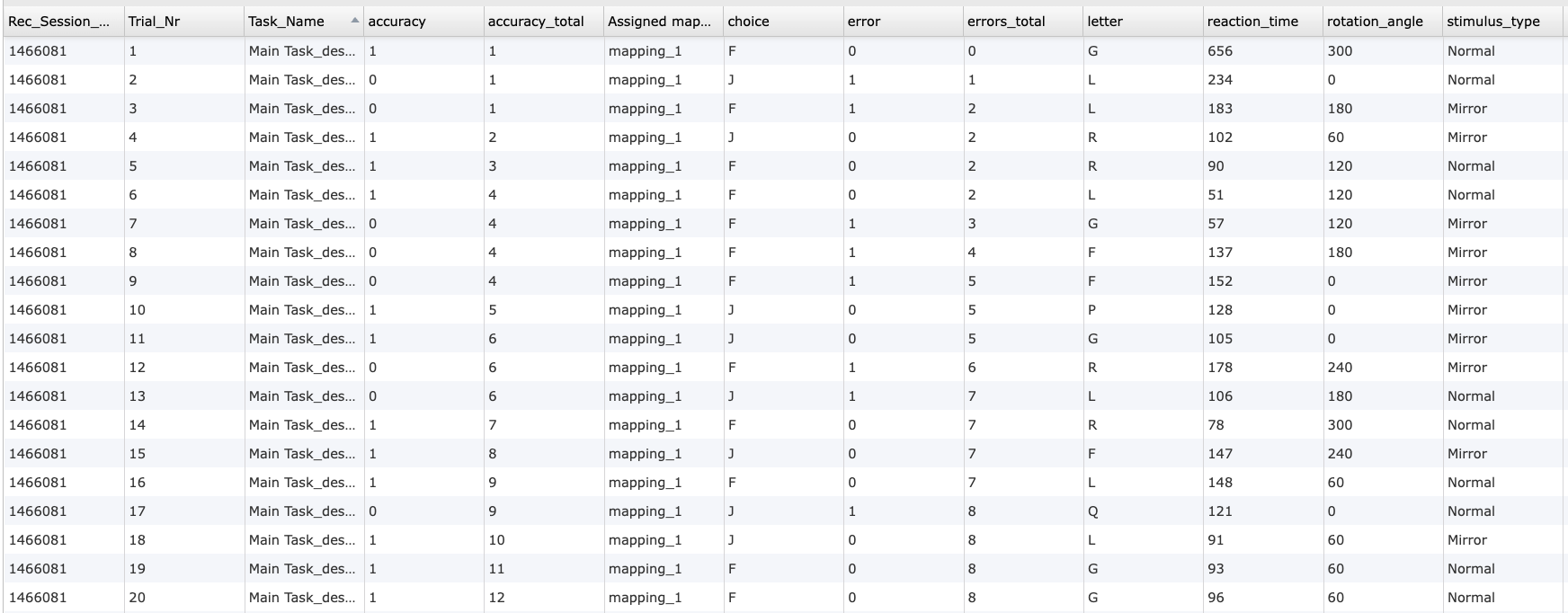
    メンタル回転タスク 2D データプレビュー.

    メンタル回転タスク 2Dからの個々の試行レベルの出力の抜粋を示すデータテーブルで、精度、割り当てられた応答マッピング、参加者の選択、反応時間、回転角、および刺激タイプが含まれています。


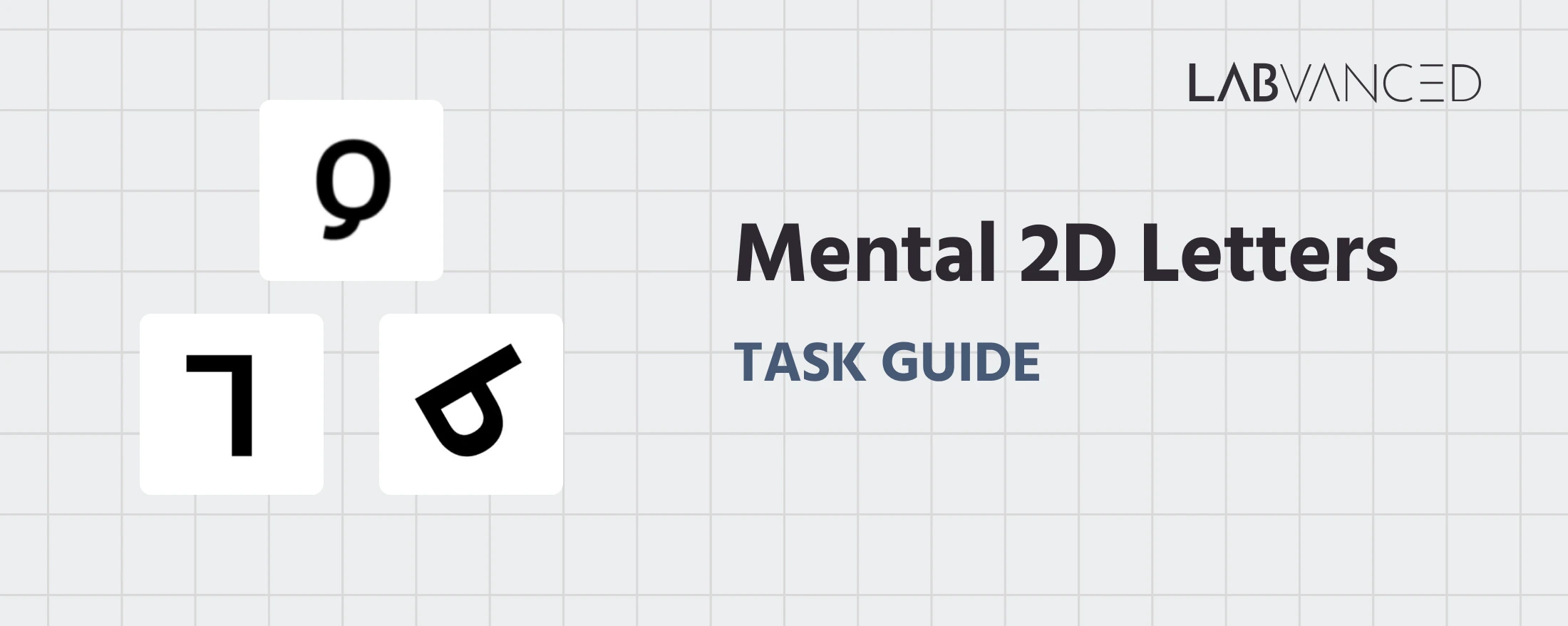
    メンタル回転タスク 2D

    この実験では、異なる方向で文字が提示されます。参加者は各文字が通常かミラーリバーサルかを判断する必要があります。


    メンタル回転タスク 2Dのオンラインおよびラボ研究を支える技術

    メンタル回転タスク 2Dは、刺激の方向、タイミング、および応答処理を正確に制御する必要があります。Labvancedは、さまざまな研究環境でこれらの要件をサポートする柔軟なツールを提供しています。

    • 方向値の正確な制御: 刺激は、調整可能な回転設定を持つ視覚オブジェクトとして提示できます。研究者は複数の角度を定義し、条件ベースの論理を使用して試行に分配できます。

    • デバイス間での柔軟な入力: 応答は、デスクトップデバイス上のキーボード入力や、タッチ対応デバイスの画面上のボタンを通じて収集できます。同じ実験的論理は再利用でき、利用可能な入力方法に応じて応答インターフェースを適応させることができます。

    • 制御実験のためのデスクトップアプリのサポート: 安定したタイミングや外部ハードウェアとの統合が必要なラボベースの研究のために、タスクはLabvancedデスクトップアプリを使用して展開できます。これにより、EEGや他のLSLベースのシステムとの互換性がサポートされます。

    • リモートおよび縦断的デプロイメント: このタスクはリモートで配信可能で、複数のセッションにわたって繰り返すことができるため、空間能力の発達や時間に伴うトレーニング効果を調査する研究に適しています。

    • オプションのWebカメラ視線追跡統合: 研究者はWebカメラを基にした視線追跡を統合し、メンタルローテーション試行中の視線行動や視覚検索戦略を分析できます。

    メンタルローテーションタスク中にWebカメラ視線追跡を利用している人

    Webカメラ視線追跡

    メンタルローテーション試行中の視線パターンと視覚的注意をキャッチします。
    正確な反応時間測定を表すアイコン

    タイミング精度

    ミリ秒単位の精度で反応時間、タスクパフォーマンスなどをキャッチし、時間に敏感なタスクに対応します。
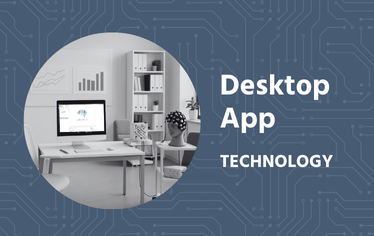
    メンタルローテーション実験を実施するために使用されるLabvancedデスクトップアプリ

    デスクトップアプリ

    EEGやその他のLSL接続ラボハードウェアに対応したデスクトップアプリを使用して、ラボ内研究を行います。

    メンタルローテーションタスク2Dのカスタマイズ

    特定の研究質問に合わせてタスクテンプレートを適応させる方法はいくつかあります。以下は、このタスクの修正に関して研究者がよく尋ねるいくつかのテーマです。


    刺激の提示および方向設定

    メンタルローテーションタスク2Dの研究では、さまざまな刺激タイプを使用できます。研究者は、テキストベースの刺激用にText Objectを追加したり、画像刺激用にImage Objectを追加したり、オブジェクトパネルから形状やSVGベースのオブジェクトを使用して他の視覚形式を追加することで、刺激を直接エディターで置き換えたり編集したりできます。サイズ、間隔、回転角、外観などの視覚プロパティは、Object Propertiesパネルを介して調整できます。


    条件ロジックおよび試行の変動

    回転角と刺激構成は、通常、各試行に表示されるセットアップを決定する試行条件を通じて定義されます。Trials & Conditionsパネルを利用して異なる値を割り当てることができます。これらの値はランタイム中に読み取られ、方向と提示を制御します。


    試行の流れと練習構造

    練習ブロック、フィードバックのタイミング、タスクの進行は、フレームとイベントを通じて制御されます。研究者は、特定の研究デザインに合わせて試行カウント、タイミングパラメータ、進行ルールを調整できます。


    応答処理と試行の流れ

    参加者の選択はクリック/タップまたはキー入力を通じてキャッチされ、イベントロジックを使用して評価されます。研究者は、応答の記録方法、見逃した応答の処理方法、試行の進行方法をすべてイベントシステムを介して変更可能です。ニーズに特有のトリガーまたはアクションを単純に変更してください。


    他に知りたいことがあれば、お気軽にご連絡ください:


    お問い合わせ

    メンタルローテーションタスク2Dの推奨使用法および応用

    メンタルローテーションタスク2Dは、空間推論、視覚イメージ、メンタルトランスフォーメーションプロセスを研究するために、認知心理学および神経科学の分野で広く使用されています。研究者は、反応時間と精度が回転角によってどのように変化するかを調査したり、発達、教育、神経認知的文脈における個人差を研究するために頻繁に使用します。

    • 空間認知研究: 研究者はこのタスクを使用して、個人が異なる回転角を越えて平面的な視覚オブジェクトをどのようにメンタルに変換するかを研究します。特に角度の違いが大きくなるにつれて反応時間が増加するパフォーマンスパターンは、基本的な空間処理メカニズムに関する洞察を提供します。

    • 発達に関する研究: このタスクは、子供期、思春期、大人期を通じて二次元空間推論がどのように進化するかを調べるために頻繁に適用されます。速度と精度の違いは、時間の経過とともに認知戦略や視覚処理効率の変化を理解するのに役立ちます。

    • 教育とスキル習得研究: メンタルローテーションタスク2Dパラダイムは、空間能力と学術的または技術的分野でのパフォーマンスとの関係を探るために使用されます。タスクは平面的な変換を単独で検出するため、研究者は追加の深さの複雑さなしに基本的な空間スキルを評価できます。

    • 神経認知研究: このタスクは、視覚イメージ、注意制御、および空間変換要請下での意思決定を調べる研究に含まれます。研究者はしばしば行動データを視線追跡や神経測定と組み合わせて、空間的判断がどのように形成されるかをより深く理解します。


    サインアップ


    参考文献

    • Xiang, Z., Huang, Y., Luo, G., Ma, H., & Zhang, D. (2021). 若いチベット移民におけるメンタルローテーションタスクのイベント関連脱同期化の減少。Frontiers in Human Neuroscience, 15.

    • Cooper, L. A. (1975). ランダムな二次元形状のメンタルローテーション。Cognitive psychology, 7(1), 20-43.

    関連タスク

    メンタル2Dローテーションタスクは、Labvancedのタスクライブラリにある他の空間認知タスクと自然にペアを形成します。

    メンタルローテーションタスク(3D身体回転)

    この研究は、人々が人間の身体の画像をどのようにメンタルに回転させるかを調査します。参加者は異なる角度から図を見て、持ち上げられた手足が右足か左足かを判断します。

    コルシブロックタッピングテスト

    ブロックが画面上で順次点滅します。参加者は示された順番通りにブロックをクリックしてその配列を繰り返さなければなりません。