labvanced logoLabVanced
Contact
    • Remote Physiological Measurements
    • Eye Tracking
    • Head & Face-Tracking
    • Emotion Detection
    • Heart Rate Detection (rPPG)
    • Generative AI
    • Audio Transcription
    • EEG & Hardware Integrations
    • Decision Making
    • Reaction Times
    • Keyboard Inputs
    • Mouse Tracking
    • Mobile / Touch
    • Questionnaires
    • Gamepad / Joystick Integration
    • Audio Recordings
    • Audio Transcription
    • Video Recordings
    • Screen Recordings
    • Photos / Snapshots
    • Video Conferencing
    • Canvas Drawings
    • Build with AI
    • Build with Spreadsheets
    • Using the Experiment Editor
    • Coding
    • Creating Questionnaires
    • Balancing & Randomization
    • UX & Website Testing
    • Single Session Studies
    • Factorial Designs
    • Longitudinal & Multi-session Studies
    • Individual & Case Studies
    • Real-time Multi-user Studies
    • Interviews & Video Calls
    • Surveys & Questionnaires
    • Experience Sampling & Diaries
    • Classroom & Group Testing
    • Interventions & Clinical Trials
    • In the Browser
    • Mobile App
    • Desktop App
    • WebBridge Chrome Extension
    • Stroop Test
    • Flanker Task
    • N-back Task
    • Implicit Association Test
    • Trail Making Test
    • Digit Span
    • Corsi Block Tapping
    • Tower of London
    • Balloon Analog Risk Task
    • Preferential Looking
    • Browse more →
    • DASS-21
    • GAD-7
    • Rosenberg Self-Esteem Scale
    • PHQ-9
    • Ten-Item Personality Inventory
    • Big Five Personality Test
    • Adult ADHD Self-Report Scale
    • Browse more →
    • Building a Multi-user Study
    • Webcam Eye Tracking with AOIs
    • Website Frame Eye Tracking
    • Conditional Eye Tracking Opt-in
    • ChatGPT Study
    • Desktop App Study with EEG
    • Between-subjects Group Balancing
    • Building a Reading Study
    • Stroop Task
    • Lexical Decision Task
    • Browse more →
    Public Experiment Library
    • Arts Research
    • Clinical Psychology & Neuropsychology Medicine
    • Cognitive Psychology
    • Developmental Psychology
    • Behavioral Economics & Decision Science
    • Educational Research & Psychology
    • HCI & Human Factors
    • Linguistics & Language Sciences
    • Consumer & Marketing Research
    • Social & Personality Psychology
    • Sport & Movement Science
    • UX & Website Testing
    • Executive Functions
    • Language & Reading
    • Decision-Making & Reasoning
    • Attention
    • Overview
    • HCI & Human Factors
    • UX & Website Testing
    • Consumer & Marketing Research
    • White-Label App
    • PageGazer
    • Webcam vs. Lab Eye Tracking in InfantsAnna Banki & Gabriela Markova
    • Eye Tracking for Influencer MarketingDr. Alexander Edeling
    • Eye Tracking Infant Word ComprehensionDr. Giulia Calignano
    • Sentence Reading and Grammar JudgmentsDr. Jonathan Mirault
    • Regulating Emotions with MusicDr. Katrin Starcke
    • Game-Based Grammar Learning in ChildrenDr. Mireia Marimon
    • Gaze Cueing and AutismMax Soares Miehstein
    • Personality and Hearing in NoiseDr. Malte Wöstmann
    • All interviews →
    • Lab Notes
    • How to Cite Labvanced
    • Labvanced Platform Paper (2017)
    • Webcam Eye Tracking Validation (2024)
    • Webcam Eye Tracking Studies
    • Cognitive Psychology Studies
    • Developmental Psychology Studies
    • Linguistics Studies
    • See all publications →
    • Getting Started
    • Guide
    • Video Tutorials
    • Walkthroughs
    • Live Chat
    • Webinars & Onboarding Calls
    • AI Assistant
    • FAQ
    • Importing Templates Guide
    • Test Templates
    • Live Eye Tracking Metrics
    • Mouse Tracking Demo
    • ChatGPT Demo
    • Audio Recording Object Demo
    • Adding Image Stimuli Demo
    • Score & Feedback Demo
    • Browse all technical demos →
    • Timing Precision
    • Stimuli Presentation
    • Headphone Checks
    • Bot Checks
    • Participant Management
    • Comparisons
    • Research Blog
    • Prolific Integration
    • CloudResearch Integration
    • Sona Systems Integration
    • BeSample Integration
    • Panelabs Integration
    • Clickworker Integration
    • Labvanced Webhook API
    • Labvanced REST API
    • About Us
    • Newsletter Archive
    • Terms & Conditions
    • Data Security & Data Privacy
    • Technical & Organisational Measures
    • Accessibility
    • W-8BEN-E Form
    • Data Processing Agreement Template
    LinkedInYouTubeDiscord
    • Individual
    • Lab
    • Department / Consortium
    • Teaching
    • Campus
    • Commercial
    • Browse recording top-ups →
    • Browse AI token top-ups →
    • Overview
    • Study Building
    • Subject Recruitment
    • Dedicated Support
    Checkout
  • Contact
    • JA
      • 中國人
      • Deutsch
      • Français
      • Español
      • English
      • 日本語
    • Logout
    • Loginlogin icon
    Platform
    Labvanced makes it easy to implement the most advanced study design and reliably collect your data.
    Biosignals & AI
    Remote Physiological MeasurementsEye TrackingHead & Face-TrackingEmotion DetectionHeart Rate Detection (rPPG)Generative AIAudio TranscriptionEEG & Hardware Integrations
    Behavioral Recordings
    Decision MakingReaction TimesKeyboard InputsMouse TrackingMobile / TouchQuestionnairesGamepad / Joystick Integration
    Media Recordings
    Audio RecordingsAudio TranscriptionVideo RecordingsScreen RecordingsPhotos / SnapshotsVideo ConferencingCanvas Drawings
    Implementation Techniques
    Build with AIBuild with SpreadsheetsUsing the Experiment EditorCodingCreating QuestionnairesBalancing & RandomizationUX & Website Testing
    Study Formats

    Your study can take whatever format your research needs. Here are a few popular examples.

    Single Session StudiesFactorial DesignsLongitudinal & Multi-session StudiesIndividual & Case StudiesReal-time Multi-user StudiesInterviews & Video CallsSurveys & QuestionnairesExperience Sampling & DiariesClassroom & Group TestingInterventions & Clinical Trials
    Where Studies Run

    Run your study online in the browser, on mobile or tablet with the mobile app, or in-lab with the desktop app.

    In the BrowserMobile AppDesktop AppWebBridge Chrome Extension
    Tests
    Explore cognitive tests, questionnaires, walkthroughs, and our public experiment library: a starting point for your next study.
    Popular Cognitive Tests
    Stroop TestFlanker TaskN-back TaskImplicit Association TestTrail Making TestDigit SpanCorsi Block TappingTower of LondonBalloon Analog Risk TaskPreferential Looking
    Browse more →
    Questionnaires & Scales
    DASS-21GAD-7Rosenberg Self-Esteem ScalePHQ-9Ten-Item Personality InventoryBig Five Personality TestAdult ADHD Self-Report Scale
    Browse more →
    Public Experiment Library

    Take a look at what other researchers in the community are doing through our extensive, open catalog of shared studies.

    Open the public library →
    Walkthroughs

    Step-by-step builds of complete studies, from a blank project to a running experiment, that you can follow along or adapt.

    Building a Multi-user StudyWebcam Eye Tracking with AOIsWebsite Frame Eye TrackingConditional Eye Tracking Opt-inChatGPT StudyDesktop App Study with EEGBetween-subjects Group BalancingBuilding a Reading StudyStroop TaskLexical Decision Task
    Browse more →
    Research
    One platform for students, academics, and industry researchers studying human behavior.
    Harvard UniversityStanford UniversityCambridge UniversityUCLNYUMax Planck InstituteUCLATU Munich

    Trusted by researchers at 1,500+ universities worldwide

    Academic Research
    Arts ResearchClinical Psychology & Neuropsychology MedicineCognitive PsychologyDevelopmental PsychologyBehavioral Economics & Decision ScienceEducational Research & PsychologyHCI & Human FactorsLinguistics & Language SciencesConsumer & Marketing ResearchSocial & Personality PsychologySport & Movement ScienceUX & Website Testing
    Research Areas
    Executive FunctionsLanguage & ReadingDecision-Making & ReasoningAttention
    Industry / Commercial
    OverviewHCI & Human FactorsUX & Website TestingConsumer & Marketing ResearchWhite-Label AppPageGazer
    Researcher Interviews

    Conversations with researchers about the studies they ran with Labvanced, what worked, and what they learned.

    Webcam vs. Lab Eye Tracking in InfantsAnna Banki & Gabriela MarkovaEye Tracking for Influencer MarketingDr. Alexander EdelingEye Tracking Infant Word ComprehensionDr. Giulia CalignanoSentence Reading and Grammar JudgmentsDr. Jonathan MiraultRegulating Emotions with MusicDr. Katrin StarckeGame-Based Grammar Learning in ChildrenDr. Mireia MarimonGaze Cueing and AutismMax Soares MiehsteinPersonality and Hearing in NoiseDr. Malte Wöstmann
    All interviews →
    Our Research
    Lab NotesHow to Cite Labvanced
    Peer Reviewed Studies

    A selection of peer-reviewed work built on Labvanced: our own platform and validation papers, and studies by the research community grouped by area. Hundreds more are listed on the full publications page.

    Labvanced Platform Paper (2017)Webcam Eye Tracking Validation (2024)Webcam Eye Tracking StudiesCognitive Psychology StudiesDevelopmental Psychology StudiesLinguistics Studies
    See all publications →
    Resources
    Valuable resources to help you learn the platform, stay updated, and more.
    Documentation
    Getting StartedGuideVideo TutorialsWalkthroughs
    Support
    Live ChatWebinars & Onboarding CallsAI AssistantFAQ
    Templates & Demos

    These are a few popular examples. Browse our guide and a selection of technical demos to get started with implementation.

    Importing Templates GuideTest TemplatesLive Eye Tracking MetricsMouse Tracking DemoChatGPT DemoAudio Recording Object DemoAdding Image Stimuli DemoScore & Feedback Demo
    Browse all technical demos →
    Methodology
    Timing PrecisionStimuli PresentationHeadphone ChecksBot ChecksParticipant ManagementComparisonsResearch Blog
    Integrations & APIs
    Prolific IntegrationCloudResearch IntegrationSona Systems IntegrationBeSample IntegrationPanelabs IntegrationClickworker IntegrationLabvanced Webhook APILabvanced REST API
    Company & Legal
    About UsNewsletter ArchiveTerms & ConditionsData Security & Data PrivacyTechnical & Organisational MeasuresAccessibilityW-8BEN-E FormData Processing Agreement Template
    LinkedInYouTubeDiscord
    Pricing
    Our licenses and additional services at a glance.
    Licenses
    IndividualLabDepartment / ConsortiumTeachingCampusCommercial
    Top-Ups

    Need more recordings for your lab or your own research? Simply use one of these recording top-up packages.

    Browse recording top-ups →

    Need more AI tokens for the AI assistant and study translations? Simply use one of these AI token top-up packages.

    Browse AI token top-ups →
    Additional Services

    Hire Labvanced’s expert team to quickly bring your project to the level of rigor it needs.

    OverviewStudy BuildingSubject RecruitmentDedicated Support
    Checkout

    Ready to purchase a license or top-up? Head straight to checkout.

    Go to checkout →
    • 中國人
    • Deutsch
    • Français
    • Español
    • English
    • 日本語
    • はじめに
    • ガイド
      • はじめに

        • タスクエディタ
        • フレーム
          • キャンバスフレーム
          • ページフレーム
          • ウェブサイトフレーム
          • オーバーレイとダイアログ | Labvanced
        • トライアルタイムライン
        • 刺激提示
        • 応答の正確性
        • オブジェクト
        • イベント
        • 変数
        • タスクウィザード
        • AIアシスタント
        • トライアルシステム
        • 実験設計
          • 研究の作成
          • Labvancedでのテンプレートのインポート
          • データフレームパターン
          • マルチユーザー実験デザイン
          • 縦断実験デザイン
      • 注目のトピック

        • ランダム化とバランス
        • アイ・トラッキング
          • 注視追跡タスクにおける刺激の提示
          • 眼球追跡キャリブレーション設定の選択方法
          • タスクにおける視線追跡の設定
          • 注視データの記録とエクスポート
          • 形状を興味領域 (AOI) として使用する方法
          • 参加者キャリブレーション体験
        • ウェブブリッジ
          • ウェブサイト AOI の選択 | アンカー、調整、および AOI トラッキングの検証
          • ウェブサイト AOI におけるマウスの動作の追跡 | ウェブブリッジガイド
        • アンケート
        • デスクトップアプリ
        • サンプル研究
        • 参加者募集
        • APIアクセス
          • REST API
          • Webhook API
          • WebSocket API
        • その他のトピック

          • 正確な刺激のタイミング
          • マルチユーザー研究
          • Labvancedにおける頭追跡 | ガイド
      • メインアプリタブ

        • 概要: メインタブ
        • ダッシュボード
        • 私の研究
        • 共有研究
        • 私のファイル
        • 実験ライブラリ
        • 私のアカウント
        • ライセンスとサービス
      • 研究タブ

        • 概要: 研究特有のタブ
        • 研究デザイン
          • タスク
          • ブロック
          • セッション
          • グループ
        • タスクエディタ
          • タスクコントロール
          • 試行システム
          • フレームタイプ
          • オブジェクト
          • オブジェクトプロパティテーブル
          • 変数
          • システム変数表
          • イベントシステム
          • テキストエディタの機能
          • タスクエディタにおける視線追跡オプション
          • タスクにおけるヘッドトラッキング
          • マルチユーザー研究
        • 設定
        • 変数
        • メディア
        • テキストと翻訳
        • 開始と参加
        • 被験者管理
        • データビューとエクスポート
    • ビデオチュートリアル
      • ビデオ概要
      • Labvancedの始め方
      • タスクの作成
      • エレメントビデオ
      • イベントと変数
      • 高度なトピック
    • ウォークスルー
      • イントロダクション
      • ストループタスク
      • 語彙的意思決定タスク
      • ポズナー注視キューイングタスク
      • 変化盲目的フリッカーのパラダイム
      • 眼球追跡サンプル研究
      • 乳児眼球追跡研究
      • マウストラッキングによる注意捕捉研究
      • 迅速な連続視覚提示
      • ChatGPT研究
      • 眼球追跡デモ:AOIとしてのSVG
      • マルチユーザーデモ:被験者のカーソルを表示
      • ゲームパッド / ジョイスティックコントローラ - 基本設定
      • EEG統合付きデスクトップアプリ研究
      • 被験者間グループのバランスと変数設定
      • マルチユーザー研究の構築
      • ウェブサイトフレーム眼球追跡ウォークスルー
      • 条件付きウェブカメラ眼球追跡
      • テキストセグメンテーション研究の構築
      • AIを使った研究の構築
    • FAQ
      • 機能
      • サポートポリシーとガイドライン
      • セキュリティとデータプライバシー
      • ライセンス
      • Labvancedの精度
      • プログラマティック使用とAPI
      • Labvancedをオフラインで使用する
      • トラブルシューティング
      • 研究作成に関する質問
    Labvancedにおける要件アクションの分岐フローチャート

    要件アクション (If... Then... Else If)

    目次

    • 概要
    • 仕組み
    • 研究および例示シナリオ
      • Role_Idによる分岐
      • フランカー型タスクにおける正確性のスコアリング
    • さらに読む

    概要

    Requirement ActionはLabvancedの条件ロジックブロックです:if-then文を評価し、その文が真である場合にのみ一連のアクションを実行します。これは、変数の値、参加者の役割、以前の応答、または研究がチェックする必要のあるその他の条件に応じて異なる動作をさせるためのメカニズムです。

    仕組み

    要件アクションは他のアクションと同様に追加されます:Add Actionをクリックして、次にControl Actions → Requirement Actions (If...Then)を選択します。
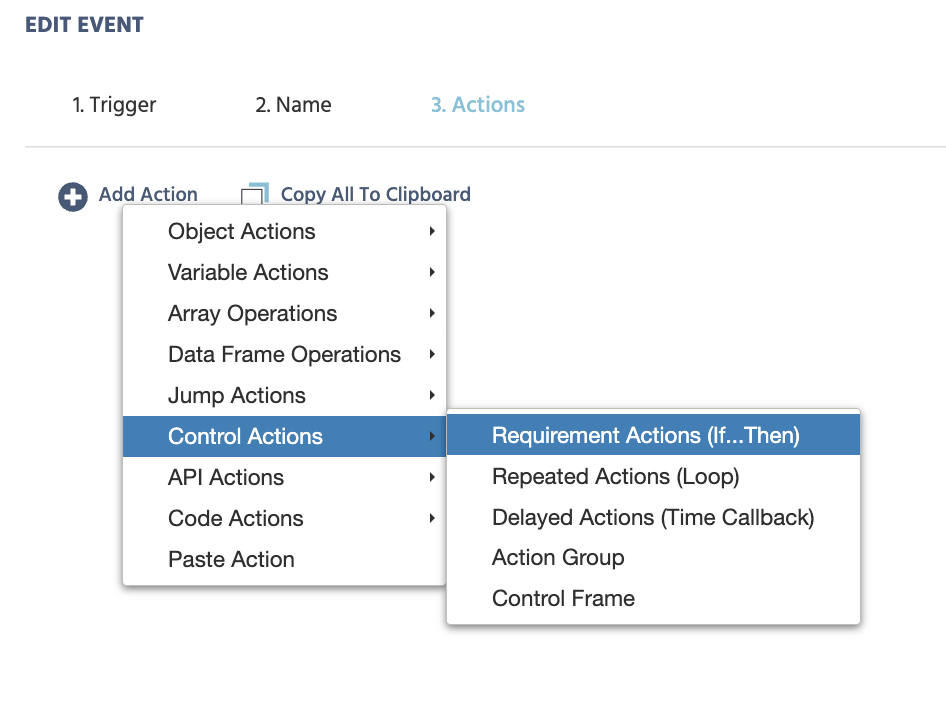
    Labvancedのアクションを追加メニューで要件アクション(If...Then)を展開
    コントロールアクションの下にあるイベントエディターのアクション追加メニューから要件アクションを追加します。

    要件アクションは以下のいくつかの部分から構成されています:

    • 要件追加:文に比較を追加します。比較演算子(等しい、小さい、異なるなど)の間に変数、定数、または他の値を比較できる値選択メニューが両側に表示されます。
    • ANDグループを追加:ANDグループ内のすべての要件が真でなければ、全体のグループが真と判断されません。複数の条件が同時に満たされる必要がある場合に使用します。
    • ORグループを追加:ORグループ内の1つの要件が真であれば、全体のグループが真と判断されます。異なるケースに対して同じアクションを実行する場合に使用します。
    • アクションシーケンス:Thenの下にあるアクションのリストで、If文の要件が満たされたときのみ実行されます。Add Actionアイコンを使用して新しいアクションを追加します。
    • Else-Ifケースを追加:要件アクションは、いくつかのIf/Else-If文を順番に持つことができます。要件が真である最初のものだけが実行され、マッチが見つかると残り、さらに後のElse-Ifケースはスキップされます。
    • Elseケースを追加:フォールバックです。If/Else-If文のどれも真でない場合、Elseケースで定義されたアクションが実行されます。

    研究および例示シナリオ

    以下はRequirement Actionの使用例です:

    Role_Idによる分岐

    マルチユーザー研究における要件アクションの最も一般的な使用は、参加者による分岐です。最小限の例:

    • 要件追加:左側は変数Role_Idを選択;比較はequalに設定;右側は定数の数1。
    • Then:その参加者に適用されるアクション、たとえばターゲット画像を表示するSet Object Propertyアクション。
    • Elseケースを追加:他のすべての参加者に適用されるアクション。

    Role_Idが何であり、このパターンがすべての非対称マルチユーザーデザインの基礎であるかについての完全な説明は、Role_Idを参照してください。

    フランカー型タスクにおける正確性のスコアリング

    ネストされたAND/ORグループにより、複数の有効な組み合わせでレスポンスを正確とスコアリングすることが可能です。実際の例は、フランカータスクのMain_task_desktop_Flanker、フレーム3(Response Window)内のResponse Recording & Progressionイベント(キー押下によってトリガー)から:

    • If、ORグループ内:(target_direction_desktopはleftに等しい AND choiceはDに等しい)、または(target_direction_desktopはrightに等しい AND choiceはKに等しい。
    • Then:Set / Record Variableはaccuracyを1に設定します。

    左ターゲットのD押下または右ターゲットのK押下のいずれかの組み合わせが正確としてカウントされるため、2つのANDグループは共有のORグループの下に組み合わされ、別々の要件アクションとして記述されることはありません。
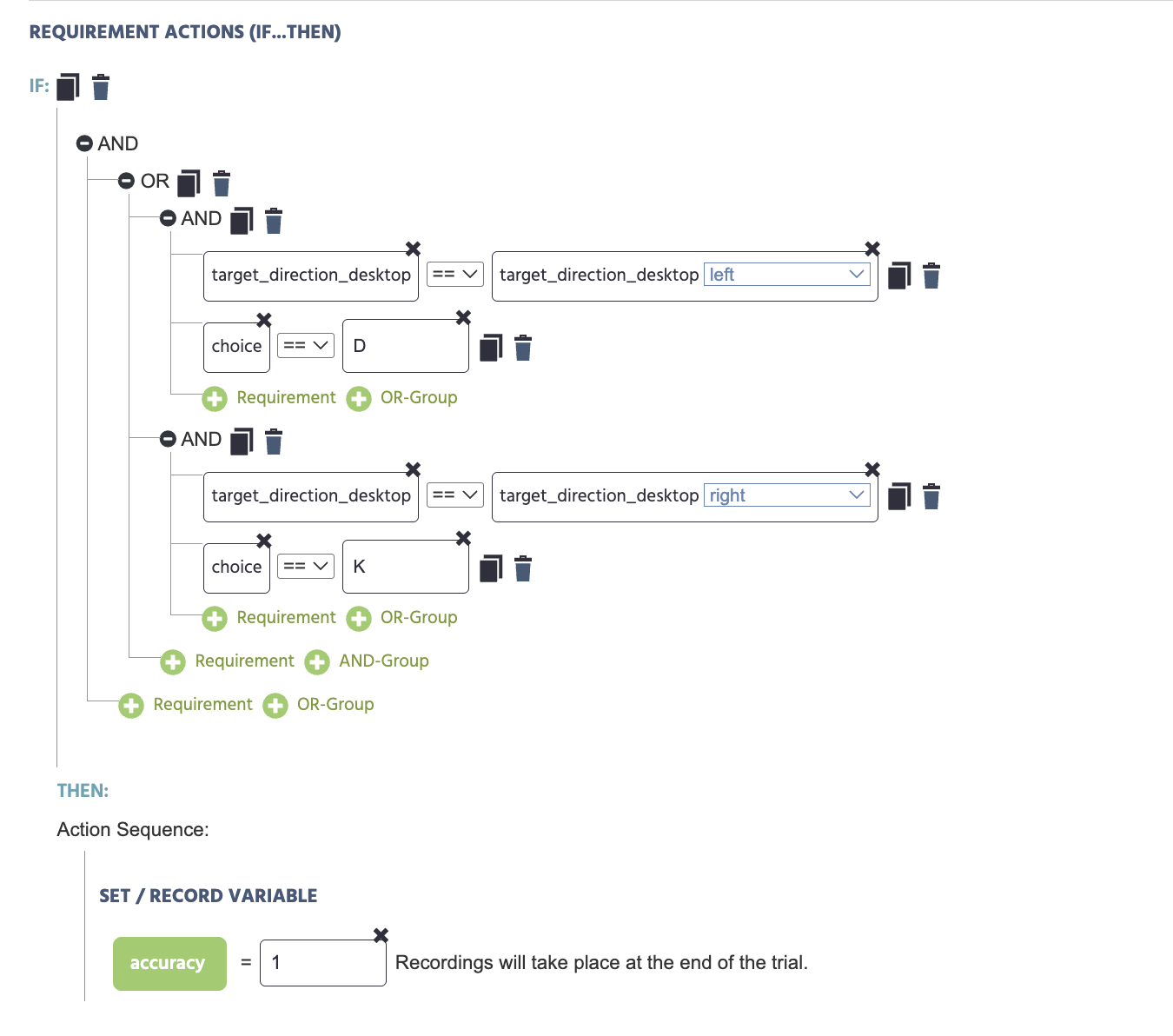
    フランカータスクにおけるターゲット方向とキー選択を確認して精度変数を設定するネストされた要件アクション
    フランカータスクの応答ウィンドウフレームからの要件アクション、2つの有効なターゲット/応答の組み合わせから精度をスコアリングします。
    さらに読む

    Labvancedにおけるイベントシステムの図解、すべてのトリガーとアクションの完全なリファレンス

    イベントシステム

    要件アクションの完全なパラメータリストを含め、Labvancedにおけるすべてのトリガーとアクションの完全なリファレンス。

    Role_Id

    Role_Id

    マルチユーザー研究において、要件アクション内で最も一般的にチェックされるシステム変数。

    マルチユーザー研究の構築

    マルチユーザー研究の構築

    参加者ごとに異なるコンテンツを割り当てるために要件アクションを使用したステップバイステップのウォークスルー。