labvanced logoLabVanced
Contact
    • Remote Physiological Measurements
    • Eye Tracking
    • Head & Face-Tracking
    • Emotion Detection
    • Heart Rate Detection (rPPG)
    • Generative AI
    • Audio Transcription
    • EEG & Hardware Integrations
    • Decision Making
    • Reaction Times
    • Keyboard Inputs
    • Mouse Tracking
    • Mobile / Touch
    • Questionnaires
    • Gamepad / Joystick Integration
    • Audio Recordings
    • Audio Transcription
    • Video Recordings
    • Screen Recordings
    • Photos / Snapshots
    • Video Conferencing
    • Canvas Drawings
    • Build with AI
    • Build with Spreadsheets
    • Using the Experiment Editor
    • Coding
    • Creating Questionnaires
    • Balancing & Randomization
    • UX & Website Testing
    • Single Session Studies
    • Factorial Designs
    • Longitudinal & Multi-session Studies
    • Individual & Case Studies
    • Real-time Multi-user Studies
    • Interviews & Video Calls
    • Surveys & Questionnaires
    • Experience Sampling & Diaries
    • Classroom & Group Testing
    • Interventions & Clinical Trials
    • In the Browser
    • Mobile App
    • Desktop App
    • WebBridge Chrome Extension
    • Stroop Test
    • Flanker Task
    • N-back Task
    • Implicit Association Test
    • Trail Making Test
    • Digit Span
    • Corsi Block Tapping
    • Tower of London
    • Balloon Analog Risk Task
    • Preferential Looking
    • Browse more →
    • DASS-21
    • GAD-7
    • Rosenberg Self-Esteem Scale
    • PHQ-9
    • Ten-Item Personality Inventory
    • Big Five Personality Test
    • Adult ADHD Self-Report Scale
    • Browse more →
    • Building a Multi-user Study
    • Webcam Eye Tracking with AOIs
    • Website Frame Eye Tracking
    • Conditional Eye Tracking Opt-in
    • ChatGPT Study
    • Desktop App Study with EEG
    • Between-subjects Group Balancing
    • Building a Reading Study
    • Stroop Task
    • Lexical Decision Task
    • Browse more →
    Public Experiment Library
    • Arts Research
    • Clinical Psychology & Neuropsychology Medicine
    • Cognitive Psychology
    • Developmental Psychology
    • Behavioral Economics & Decision Science
    • Educational Research & Psychology
    • HCI & Human Factors
    • Linguistics & Language Sciences
    • Consumer & Marketing Research
    • Social & Personality Psychology
    • Sport & Movement Science
    • UX & Website Testing
    • Executive Functions
    • Language & Reading
    • Decision-Making & Reasoning
    • Attention
    • Overview
    • HCI & Human Factors
    • UX & Website Testing
    • Consumer & Marketing Research
    • White-Label App
    • PageGazer
    • Webcam vs. Lab Eye Tracking in InfantsAnna Banki & Gabriela Markova
    • Eye Tracking for Influencer MarketingDr. Alexander Edeling
    • Eye Tracking Infant Word ComprehensionDr. Giulia Calignano
    • Sentence Reading and Grammar JudgmentsDr. Jonathan Mirault
    • Regulating Emotions with MusicDr. Katrin Starcke
    • Game-Based Grammar Learning in ChildrenDr. Mireia Marimon
    • Gaze Cueing and AutismMax Soares Miehstein
    • Personality and Hearing in NoiseDr. Malte Wöstmann
    • All interviews →
    • Lab Notes
    • How to Cite Labvanced
    • Labvanced Platform Paper (2017)
    • Webcam Eye Tracking Validation (2024)
    • Webcam Eye Tracking Studies
    • Cognitive Psychology Studies
    • Developmental Psychology Studies
    • Linguistics Studies
    • See all publications →
    • Getting Started
    • Guide
    • Video Tutorials
    • Walkthroughs
    • Live Chat
    • Webinars & Onboarding Calls
    • AI Assistant
    • FAQ
    • Importing Templates Guide
    • Test Templates
    • Live Eye Tracking Metrics
    • Mouse Tracking Demo
    • ChatGPT Demo
    • Audio Recording Object Demo
    • Adding Image Stimuli Demo
    • Score & Feedback Demo
    • Browse all technical demos →
    • Timing Precision
    • Stimuli Presentation
    • Headphone Checks
    • Bot Checks
    • Participant Management
    • Comparisons
    • Research Blog
    • Prolific Integration
    • CloudResearch Integration
    • Sona Systems Integration
    • BeSample Integration
    • Panelabs Integration
    • Clickworker Integration
    • Labvanced Webhook API
    • Labvanced REST API
    • About Us
    • Newsletter Archive
    • Terms & Conditions
    • Data Security & Data Privacy
    • Technical & Organisational Measures
    • Accessibility
    • W-8BEN-E Form
    • Data Processing Agreement Template
    LinkedInYouTubeDiscord
    • Individual
    • Lab
    • Department / Consortium
    • Teaching
    • Campus
    • Commercial
    • Browse recording top-ups →
    • Browse AI token top-ups →
    • Overview
    • Study Building
    • Subject Recruitment
    • Dedicated Support
    Checkout
  • Contact
    • ZH
      • 中國人
      • Deutsch
      • Français
      • Español
      • English
      • 日本語
    • Logout
    • Loginlogin icon
    Platform
    Labvanced makes it easy to implement the most advanced study design and reliably collect your data.
    Biosignals & AI
    Remote Physiological MeasurementsEye TrackingHead & Face-TrackingEmotion DetectionHeart Rate Detection (rPPG)Generative AIAudio TranscriptionEEG & Hardware Integrations
    Behavioral Recordings
    Decision MakingReaction TimesKeyboard InputsMouse TrackingMobile / TouchQuestionnairesGamepad / Joystick Integration
    Media Recordings
    Audio RecordingsAudio TranscriptionVideo RecordingsScreen RecordingsPhotos / SnapshotsVideo ConferencingCanvas Drawings
    Implementation Techniques
    Build with AIBuild with SpreadsheetsUsing the Experiment EditorCodingCreating QuestionnairesBalancing & RandomizationUX & Website Testing
    Study Formats

    Your study can take whatever format your research needs. Here are a few popular examples.

    Single Session StudiesFactorial DesignsLongitudinal & Multi-session StudiesIndividual & Case StudiesReal-time Multi-user StudiesInterviews & Video CallsSurveys & QuestionnairesExperience Sampling & DiariesClassroom & Group TestingInterventions & Clinical Trials
    Where Studies Run

    Run your study online in the browser, on mobile or tablet with the mobile app, or in-lab with the desktop app.

    In the BrowserMobile AppDesktop AppWebBridge Chrome Extension
    Tests
    Explore cognitive tests, questionnaires, walkthroughs, and our public experiment library: a starting point for your next study.
    Popular Cognitive Tests
    Stroop TestFlanker TaskN-back TaskImplicit Association TestTrail Making TestDigit SpanCorsi Block TappingTower of LondonBalloon Analog Risk TaskPreferential Looking
    Browse more →
    Questionnaires & Scales
    DASS-21GAD-7Rosenberg Self-Esteem ScalePHQ-9Ten-Item Personality InventoryBig Five Personality TestAdult ADHD Self-Report Scale
    Browse more →
    Public Experiment Library

    Take a look at what other researchers in the community are doing through our extensive, open catalog of shared studies.

    Open the public library →
    Walkthroughs

    Step-by-step builds of complete studies, from a blank project to a running experiment, that you can follow along or adapt.

    Building a Multi-user StudyWebcam Eye Tracking with AOIsWebsite Frame Eye TrackingConditional Eye Tracking Opt-inChatGPT StudyDesktop App Study with EEGBetween-subjects Group BalancingBuilding a Reading StudyStroop TaskLexical Decision Task
    Browse more →
    Research
    One platform for students, academics, and industry researchers studying human behavior.
    Harvard UniversityStanford UniversityCambridge UniversityUCLNYUMax Planck InstituteUCLATU Munich

    Trusted by researchers at 1,500+ universities worldwide

    Academic Research
    Arts ResearchClinical Psychology & Neuropsychology MedicineCognitive PsychologyDevelopmental PsychologyBehavioral Economics & Decision ScienceEducational Research & PsychologyHCI & Human FactorsLinguistics & Language SciencesConsumer & Marketing ResearchSocial & Personality PsychologySport & Movement ScienceUX & Website Testing
    Research Areas
    Executive FunctionsLanguage & ReadingDecision-Making & ReasoningAttention
    Industry / Commercial
    OverviewHCI & Human FactorsUX & Website TestingConsumer & Marketing ResearchWhite-Label AppPageGazer
    Researcher Interviews

    Conversations with researchers about the studies they ran with Labvanced, what worked, and what they learned.

    Webcam vs. Lab Eye Tracking in InfantsAnna Banki & Gabriela MarkovaEye Tracking for Influencer MarketingDr. Alexander EdelingEye Tracking Infant Word ComprehensionDr. Giulia CalignanoSentence Reading and Grammar JudgmentsDr. Jonathan MiraultRegulating Emotions with MusicDr. Katrin StarckeGame-Based Grammar Learning in ChildrenDr. Mireia MarimonGaze Cueing and AutismMax Soares MiehsteinPersonality and Hearing in NoiseDr. Malte Wöstmann
    All interviews →
    Our Research
    Lab NotesHow to Cite Labvanced
    Peer Reviewed Studies

    A selection of peer-reviewed work built on Labvanced: our own platform and validation papers, and studies by the research community grouped by area. Hundreds more are listed on the full publications page.

    Labvanced Platform Paper (2017)Webcam Eye Tracking Validation (2024)Webcam Eye Tracking StudiesCognitive Psychology StudiesDevelopmental Psychology StudiesLinguistics Studies
    See all publications →
    Resources
    Valuable resources to help you learn the platform, stay updated, and more.
    Documentation
    Getting StartedGuideVideo TutorialsWalkthroughs
    Support
    Live ChatWebinars & Onboarding CallsAI AssistantFAQ
    Templates & Demos

    These are a few popular examples. Browse our guide and a selection of technical demos to get started with implementation.

    Importing Templates GuideTest TemplatesLive Eye Tracking MetricsMouse Tracking DemoChatGPT DemoAudio Recording Object DemoAdding Image Stimuli DemoScore & Feedback Demo
    Browse all technical demos →
    Methodology
    Timing PrecisionStimuli PresentationHeadphone ChecksBot ChecksParticipant ManagementComparisonsResearch Blog
    Integrations & APIs
    Prolific IntegrationCloudResearch IntegrationSona Systems IntegrationBeSample IntegrationPanelabs IntegrationClickworker IntegrationLabvanced Webhook APILabvanced REST API
    Company & Legal
    About UsNewsletter ArchiveTerms & ConditionsData Security & Data PrivacyTechnical & Organisational MeasuresAccessibilityW-8BEN-E FormData Processing Agreement Template
    LinkedInYouTubeDiscord
    Pricing
    Our licenses and additional services at a glance.
    Licenses
    IndividualLabDepartment / ConsortiumTeachingCampusCommercial
    Top-Ups

    Need more recordings for your lab or your own research? Simply use one of these recording top-up packages.

    Browse recording top-ups →

    Need more AI tokens for the AI assistant and study translations? Simply use one of these AI token top-up packages.

    Browse AI token top-ups →
    Additional Services

    Hire Labvanced’s expert team to quickly bring your project to the level of rigor it needs.

    OverviewStudy BuildingSubject RecruitmentDedicated Support
    Checkout

    Ready to purchase a license or top-up? Head straight to checkout.

    Go to checkout →
    • 中國人
    • Deutsch
    • Français
    • Español
    • English
    • 日本語
    • 入门
    • 指南
      • 入门

        • 任务编辑器
        • 框架
          • 画布框架
          • 页面框架
          • 网站框架
          • 覆盖层与对话框 | Labvanced
        • 试验时间线
        • 刺激呈现
        • 反应的正确性
        • 对象
        • 事件
        • 变量
        • 任务向导
        • AI助手
        • 试验系统
        • 实验设计
          • 创建研究
          • 在 Labvanced 中导入模板
          • 数据框模式
          • 多用户实验设计
          • 纵向实验设计
      • 特色主题

        • 随机化与平衡
        • 眼动追踪
          • 在眼动追踪任务中呈现刺激
          • 如何选择眼动追踪校准设置
          • 在任务中设置眼动追踪
          • 记录和导出注视数据
          • 使用形状作为兴趣区域 (AOI) 进行眼动跟踪
          • 参与者校准体验
        • 网络桥接
          • 选择网站 AOI | 锚点、调整和验证 AOI 跟踪
          • 在网站区域(AOI)上跟踪鼠标行为 | Web Bridge指南
        • 问卷
        • 桌面应用
        • 示例研究
        • 参与者招募
        • API访问
          • REST API
          • Webhook API
          • WebSocket API
        • 其他主题

          • 精确的刺激时间
          • 多用户研究
          • 头部追踪在 Labvanced 中 | 指南
      • 主应用标签

        • 概览:主标签
        • 仪表板
        • 我的研究
        • 共享研究
        • 我的文件
        • 实验库
        • 我的账户
        • 许可证与服务
      • 研究标签

        • 概览:研究特定标签
        • 研究设计
          • 任务
          • 区块
          • 会话
          • 组
        • 任务编辑器
          • 任务控制
          • 试验系统
          • 框架类型
          • 对象
          • 对象属性表
          • 变量
          • 系统变量表
          • 事件系统
          • 文本编辑器功能
          • 任务编辑器中的眼动追踪选项
          • 任务中的头部追踪
          • 多用户研究
        • 设置
        • 变量
        • 媒体
        • 文本与翻译
        • 启动与参与
        • 受试者管理
        • 数据视图和导出
    • 视频教程
      • 视频概述
      • 在 Labvanced 中入门
      • 创建任务
      • 元素视频
      • 事件与变量
      • 高级主题
    • 演练
      • 介绍
      • 斯特鲁普任务
      • 词汇决策任务
      • 波斯纳注视提示任务
      • 注意盲点闪烁范式
      • 眼动追踪示例研究
      • 婴儿眼动追踪研究
      • 使用鼠标追踪的注意捕获研究
      • 快速串行视觉呈现
      • ChatGPT 研究
      • 眼动追踪演示:将 SVG 作为关注区域
      • 多用户演示:显示参与者的光标
      • 游戏手柄/操纵杆控制器 - 基本设置
      • 带有 EEG 集成的桌面应用研究
      • 被试间组平衡和变量设置
      • 构建多用户研究
      • 网站框架眼动追踪演练
      • 条件网络摄像头眼动追踪
      • 文本分段研究构建
      • 构建一个与 AI 的研究
    • 常见问题
      • 功能
      • 支持政策与指南
      • 安全与数据隐私
      • 许可
      • Labvanced 的精确度
      • 编程使用与 API
      • 离线使用 Labvanced
      • 故障排除
      • 研究创建问题
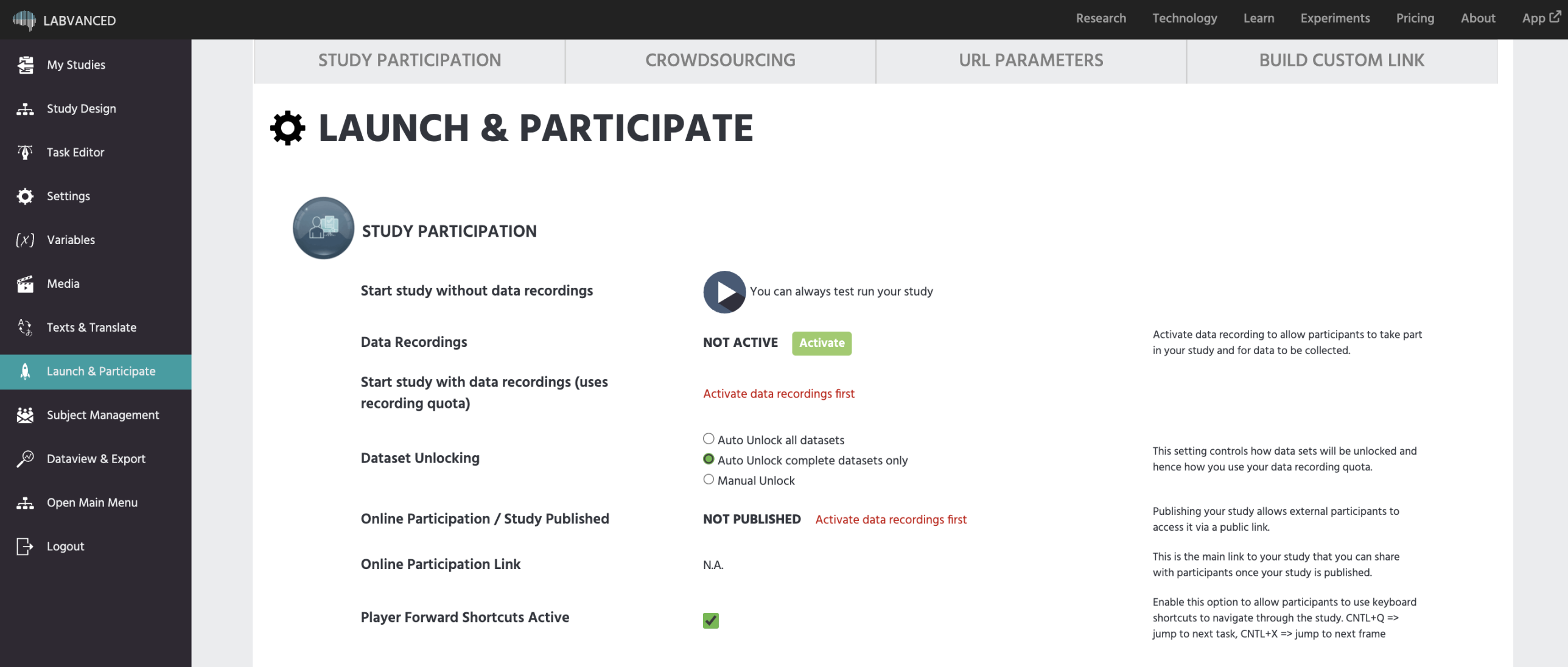
    Labvanced 中启动与参与选项卡的表示.

    启动与参与

    使用 Launch & Participate 选项卡,您可以运行整个实验,无论是否记录数据,同时也可以用它连接众包平台并创建自定义的在线参与链接。
    目录

    • 研究参与
    • 众包设置
    • URL 参数
    • 创建自定义链接

    Labvanced 中启动与参与选项卡的预览.

    研究参与

    无数据记录启动研究

    允许您在不记录任何数据的情况下测试整个研究。请记得在 Study Design 选项卡下将所有相关任务添加到块和会话中!

    数据记录

    激活数据记录以允许参与者参加您的研究并收集数据。

    启动带数据记录的研究(使用记录配额)

    单击以运行带有数据记录的研究。

    数据集解锁

    此设置控制数据集的解锁方式,从而决定您如何使用数据记录配额。

    在线参与 / 研究已发布

    发布您的研究允许外部参与者通过公共链接访问它。

    在线参与链接

    这是研究的主要链接,您可以在研究发布后与参与者分享。

    要创建自定义参与链接,请参阅以下 URL Parameters 部分并利用此选项卡的 Build Custom Link 区域。

    启用播放器快速跳转

    启用此选项以允许参与者使用键盘快捷键在研究中导航。CNTL+Q 跳转到下一个任务,CNTL+X 跳转到下一个框架。当您在构建时测试研究(在正式数据收集开始之前)时,这个选项非常方便,但建议在正式数据收集过程开始后禁用它。

    众包设置

    您的研究可以轻松连接到领先的众包平台和面板:

    Labvanced 众包

    Labvanced 提供使用各种平台和工具的受试者招募服务。您将受益于:

    • 具有竞争力的定价
    • Labvanced 提供的免费实验检查

    联系我们 ,告知您的研究要求以获取报价。

    Prolific

    • Prolific 集成指南

    CloudResearch

    • CloudResearch 集成指南

    SONA 系统

    • SONA 系统集成指南

    besample

    • besample 集成指南

    Panelabs

    • Panelabs 集成指南

    Clickworker

    • Clickworker 集成指南

    其他面板

    如果您选择的众包平台不在此列,请注意,任何其他平台或面板也可以与 Labvanced 集成。您通常需要做的是读取特定的 URL 参数,以创建完成链接。若您有任何问题,请 联系我们。

    URL 参数

    Launch & Participate 选项卡的这一部分提供了 Labvanced 自动读取的参数的有用概述。如果您需要将 Labvanced 与其他工具或平台链接,或自定义参与过程,例如将受试者强制进入特定组或会话,您可以使用这些参数。

    除了下面列出的参数外,Labvanced 会自动记录参与链接上存在的所有参数,无论是否已知,存储在名为 URL_Search_Params 的系统变量中,无需任何事件或设置。请参见 URL_Search_Params 了解它捕获的内容以及如何从中读取特定参数。

    &group=XX

    强制参与者进入特定组。

    • 示例: https://www.labvanced.com/player.html?id=79036&group=1
    • 可能值: 组号(整数)。

    &session=XX

    强制参与者进入特定会话。

    • 示例: https://www.labvanced.com/player.html?id=79036&session=1
    • 可能值: 会话号(整数)。

    &type=XX

    告诉 Labvanced 使用哪个众包平台。

    • 示例: https://www.labvanced.com/player.html?id=79036&type=prolific
    • 可能值:
      • prolific
      • cloud-research
      • sona
      • besample
      • panelabs
      • csv (对于 clickworker)

    &subject_code=XX

    实验者生成的受试者 ID。

    • 示例: https://www.labvanced.com/player.html?id=79036&subject_code=181L2Fbde
    • 可能值: 可能的值:字母数字代码(字符串)。
    • 注意: 这也用于保存 Sona 的受试者 ID。

    &token=XX

    Labvanced 生成的受试者 ID。

    • 示例: https://www.labvanced.com/player.html?id=79036&token=1a23ssdh45aswcde
    • 可能值: 字母数字代码(字符串)。

    &PROLIFIC_PID=XX

    参与者的 Prolific ID。

    • 示例: https://www.labvanced.com/player.html?id=79036&PROLIFIC_PID=6fh73dasfg3e
    • 可能值: 字母数字代码(字符串)。

    &participantId=XX

    参与者的 CloudResearch 参与者 ID。

    • 示例: https://www.labvanced.com/player.html?id=79036&participantId=7bd235512f
    • 可能值: 字母数字代码(字符串)。

    &response_id=XX

    参与者的 besample 响应 ID。

    • 示例: https://www.labvanced.com/player.html?id=79036&response_id=62138
    • 可能值: 数字代码(整数)。

    &bpid=XX

    besample 参与者 ID。

    • 示例: https://www.labvanced.com/player.html?id=79036&bpid=62138
    • 可能值: 数字代码(整数)。

    &mpcode=XX

    Panelabs 参与者 ID。

    • 示例: https://www.labvanced.com/player.html?id=79036&mpcode=62138
    • 可能值: 字母数字代码(字符串)。
    • 注意: type=panelabs 所需。它会附加到研究结束时显示给参与者的 Panelabs 完成链接上。

    &user_id=XX

    参与者的 Clickworker ID。

    • 示例: https://www.labvanced.com/player.html?id=79036&user_id=j2301
    • 可能值: 字母数字代码(字符串)。

    &role_id=XX

    强制受试者在多用户研究中进入特定的 "role_id"。

    • 示例: https://www.labvanced.com/player.html?id=79036&role_id=1
    • 可能值: 角色 ID(整数)。

    &multiuser_group_id=XX

    强制受试者在多用户研究中进入特定的 "multi_user_group"。

    • 示例: https://www.labvanced.com/player.html?id=79036&multiuser_group_id=329
    • 可能值: 字母数字(字符串)。

    &study_language=XX

    强制以特定语言(如果可用)显示研究。

    • 示例: https://www.labvanced.com/player.html?id=79036&study_language=English
    • 可能值: 语言名称(例如英语,法语,西班牙语,德语)。

    自定义 URL 参数

    您也可以插入和读取任何其他 URL 参数。

    • 示例: https://www.labvanced.com/player.html?id=79036&custom=xyz
    • 功能: 您可以将此自定义 URL 参数与事件结合使用,以在实验中读取值。了解更多。

    创建自定义链接

    Launch & Participate 选项卡的这一部分有助于为您的研究构建可用的自定义链接。

    有关这些字段参考内容的信息,请访问 URL Parameters 上面的部分。

    对于每个字段,您可以输入特定的值。填写所有字段并非强制,只需填写您需要的字段。当相关字段完成后,单击 Generate Link 按钮,链接将为您创建。

    Prev
    文本与翻译
    Next
    受试者管理