labvanced logoLabVanced
Contact
    • Remote Physiological Measurements
    • Eye Tracking
    • Head & Face-Tracking
    • Emotion Detection
    • Heart Rate Detection (rPPG)
    • Generative AI
    • Audio Transcription
    • EEG & Hardware Integrations
    • Decision Making
    • Reaction Times
    • Keyboard Inputs
    • Mouse Tracking
    • Mobile / Touch
    • Questionnaires
    • Gamepad / Joystick Integration
    • Audio Recordings
    • Audio Transcription
    • Video Recordings
    • Screen Recordings
    • Photos / Snapshots
    • Video Conferencing
    • Canvas Drawings
    • Build with AI
    • Build with Spreadsheets
    • Using the Experiment Editor
    • Coding
    • Creating Questionnaires
    • Balancing & Randomization
    • UX & Website Testing
    • Single Session Studies
    • Factorial Designs
    • Longitudinal & Multi-session Studies
    • Individual & Case Studies
    • Real-time Multi-user Studies
    • Interviews & Video Calls
    • Surveys & Questionnaires
    • Experience Sampling & Diaries
    • Classroom & Group Testing
    • Interventions & Clinical Trials
    • In the Browser
    • Mobile App
    • Desktop App
    • WebBridge Chrome Extension
    • Stroop Test
    • Flanker Task
    • N-back Task
    • Implicit Association Test
    • Trail Making Test
    • Digit Span
    • Corsi Block Tapping
    • Tower of London
    • Balloon Analog Risk Task
    • Preferential Looking
    • Browse more →
    • DASS-21
    • GAD-7
    • Rosenberg Self-Esteem Scale
    • PHQ-9
    • Ten-Item Personality Inventory
    • Big Five Personality Test
    • Adult ADHD Self-Report Scale
    • Browse more →
    • Building a Multi-user Study
    • Webcam Eye Tracking with AOIs
    • Website Frame Eye Tracking
    • Conditional Eye Tracking Opt-in
    • ChatGPT Study
    • Desktop App Study with EEG
    • Between-subjects Group Balancing
    • Building a Reading Study
    • Stroop Task
    • Lexical Decision Task
    • Browse more →
    Public Experiment Library
    • Arts Research
    • Clinical Psychology & Neuropsychology Medicine
    • Cognitive Psychology
    • Developmental Psychology
    • Behavioral Economics & Decision Science
    • Educational Research & Psychology
    • HCI & Human Factors
    • Linguistics & Language Sciences
    • Consumer & Marketing Research
    • Social & Personality Psychology
    • Sport & Movement Science
    • UX & Website Testing
    • Executive Functions
    • Language & Reading
    • Decision-Making & Reasoning
    • Attention
    • Overview
    • HCI & Human Factors
    • UX & Website Testing
    • Consumer & Marketing Research
    • White-Label App
    • PageGazer
    • Webcam vs. Lab Eye Tracking in InfantsAnna Banki & Gabriela Markova
    • Eye Tracking for Influencer MarketingDr. Alexander Edeling
    • Eye Tracking Infant Word ComprehensionDr. Giulia Calignano
    • Sentence Reading and Grammar JudgmentsDr. Jonathan Mirault
    • Regulating Emotions with MusicDr. Katrin Starcke
    • Game-Based Grammar Learning in ChildrenDr. Mireia Marimon
    • Gaze Cueing and AutismMax Soares Miehstein
    • Personality and Hearing in NoiseDr. Malte Wöstmann
    • All interviews →
    • Lab Notes
    • How to Cite Labvanced
    • Labvanced Platform Paper (2017)
    • Webcam Eye Tracking Validation (2024)
    • Webcam Eye Tracking Studies
    • Cognitive Psychology Studies
    • Developmental Psychology Studies
    • Linguistics Studies
    • See all publications →
    • Getting Started
    • Guide
    • Video Tutorials
    • Walkthroughs
    • Live Chat
    • Webinars & Onboarding Calls
    • AI Assistant
    • FAQ
    • Importing Templates Guide
    • Test Templates
    • Live Eye Tracking Metrics
    • Mouse Tracking Demo
    • ChatGPT Demo
    • Audio Recording Object Demo
    • Adding Image Stimuli Demo
    • Score & Feedback Demo
    • Browse all technical demos →
    • Timing Precision
    • Stimuli Presentation
    • Headphone Checks
    • Bot Checks
    • Participant Management
    • Comparisons
    • Research Blog
    • Prolific Integration
    • CloudResearch Integration
    • Sona Systems Integration
    • BeSample Integration
    • Panelabs Integration
    • Clickworker Integration
    • Labvanced Webhook API
    • Labvanced REST API
    • About Us
    • Newsletter Archive
    • Terms & Conditions
    • Data Security & Data Privacy
    • Technical & Organisational Measures
    • Accessibility
    • W-8BEN-E Form
    • Data Processing Agreement Template
    LinkedInYouTubeDiscord
    • Individual
    • Lab
    • Department / Consortium
    • Teaching
    • Campus
    • Commercial
    • Browse recording top-ups →
    • Browse AI token top-ups →
    • Overview
    • Study Building
    • Subject Recruitment
    • Dedicated Support
    Checkout
  • Contact
    • JA
      • 中國人
      • Deutsch
      • Français
      • Español
      • English
      • 日本語
    • Logout
    • Loginlogin icon
    Platform
    Labvanced makes it easy to implement the most advanced study design and reliably collect your data.
    Biosignals & AI
    Remote Physiological MeasurementsEye TrackingHead & Face-TrackingEmotion DetectionHeart Rate Detection (rPPG)Generative AIAudio TranscriptionEEG & Hardware Integrations
    Behavioral Recordings
    Decision MakingReaction TimesKeyboard InputsMouse TrackingMobile / TouchQuestionnairesGamepad / Joystick Integration
    Media Recordings
    Audio RecordingsAudio TranscriptionVideo RecordingsScreen RecordingsPhotos / SnapshotsVideo ConferencingCanvas Drawings
    Implementation Techniques
    Build with AIBuild with SpreadsheetsUsing the Experiment EditorCodingCreating QuestionnairesBalancing & RandomizationUX & Website Testing
    Study Formats

    Your study can take whatever format your research needs. Here are a few popular examples.

    Single Session StudiesFactorial DesignsLongitudinal & Multi-session StudiesIndividual & Case StudiesReal-time Multi-user StudiesInterviews & Video CallsSurveys & QuestionnairesExperience Sampling & DiariesClassroom & Group TestingInterventions & Clinical Trials
    Where Studies Run

    Run your study online in the browser, on mobile or tablet with the mobile app, or in-lab with the desktop app.

    In the BrowserMobile AppDesktop AppWebBridge Chrome Extension
    Tests
    Explore cognitive tests, questionnaires, walkthroughs, and our public experiment library: a starting point for your next study.
    Popular Cognitive Tests
    Stroop TestFlanker TaskN-back TaskImplicit Association TestTrail Making TestDigit SpanCorsi Block TappingTower of LondonBalloon Analog Risk TaskPreferential Looking
    Browse more →
    Questionnaires & Scales
    DASS-21GAD-7Rosenberg Self-Esteem ScalePHQ-9Ten-Item Personality InventoryBig Five Personality TestAdult ADHD Self-Report Scale
    Browse more →
    Public Experiment Library

    Take a look at what other researchers in the community are doing through our extensive, open catalog of shared studies.

    Open the public library →
    Walkthroughs

    Step-by-step builds of complete studies, from a blank project to a running experiment, that you can follow along or adapt.

    Building a Multi-user StudyWebcam Eye Tracking with AOIsWebsite Frame Eye TrackingConditional Eye Tracking Opt-inChatGPT StudyDesktop App Study with EEGBetween-subjects Group BalancingBuilding a Reading StudyStroop TaskLexical Decision Task
    Browse more →
    Research
    One platform for students, academics, and industry researchers studying human behavior.
    Harvard UniversityStanford UniversityCambridge UniversityUCLNYUMax Planck InstituteUCLATU Munich

    Trusted by researchers at 1,500+ universities worldwide

    Academic Research
    Arts ResearchClinical Psychology & Neuropsychology MedicineCognitive PsychologyDevelopmental PsychologyBehavioral Economics & Decision ScienceEducational Research & PsychologyHCI & Human FactorsLinguistics & Language SciencesConsumer & Marketing ResearchSocial & Personality PsychologySport & Movement ScienceUX & Website Testing
    Research Areas
    Executive FunctionsLanguage & ReadingDecision-Making & ReasoningAttention
    Industry / Commercial
    OverviewHCI & Human FactorsUX & Website TestingConsumer & Marketing ResearchWhite-Label AppPageGazer
    Researcher Interviews

    Conversations with researchers about the studies they ran with Labvanced, what worked, and what they learned.

    Webcam vs. Lab Eye Tracking in InfantsAnna Banki & Gabriela MarkovaEye Tracking for Influencer MarketingDr. Alexander EdelingEye Tracking Infant Word ComprehensionDr. Giulia CalignanoSentence Reading and Grammar JudgmentsDr. Jonathan MiraultRegulating Emotions with MusicDr. Katrin StarckeGame-Based Grammar Learning in ChildrenDr. Mireia MarimonGaze Cueing and AutismMax Soares MiehsteinPersonality and Hearing in NoiseDr. Malte Wöstmann
    All interviews →
    Our Research
    Lab NotesHow to Cite Labvanced
    Peer Reviewed Studies

    A selection of peer-reviewed work built on Labvanced: our own platform and validation papers, and studies by the research community grouped by area. Hundreds more are listed on the full publications page.

    Labvanced Platform Paper (2017)Webcam Eye Tracking Validation (2024)Webcam Eye Tracking StudiesCognitive Psychology StudiesDevelopmental Psychology StudiesLinguistics Studies
    See all publications →
    Resources
    Valuable resources to help you learn the platform, stay updated, and more.
    Documentation
    Getting StartedGuideVideo TutorialsWalkthroughs
    Support
    Live ChatWebinars & Onboarding CallsAI AssistantFAQ
    Templates & Demos

    These are a few popular examples. Browse our guide and a selection of technical demos to get started with implementation.

    Importing Templates GuideTest TemplatesLive Eye Tracking MetricsMouse Tracking DemoChatGPT DemoAudio Recording Object DemoAdding Image Stimuli DemoScore & Feedback Demo
    Browse all technical demos →
    Methodology
    Timing PrecisionStimuli PresentationHeadphone ChecksBot ChecksParticipant ManagementComparisonsResearch Blog
    Integrations & APIs
    Prolific IntegrationCloudResearch IntegrationSona Systems IntegrationBeSample IntegrationPanelabs IntegrationClickworker IntegrationLabvanced Webhook APILabvanced REST API
    Company & Legal
    About UsNewsletter ArchiveTerms & ConditionsData Security & Data PrivacyTechnical & Organisational MeasuresAccessibilityW-8BEN-E FormData Processing Agreement Template
    LinkedInYouTubeDiscord
    Pricing
    Our licenses and additional services at a glance.
    Licenses
    IndividualLabDepartment / ConsortiumTeachingCampusCommercial
    Top-Ups

    Need more recordings for your lab or your own research? Simply use one of these recording top-up packages.

    Browse recording top-ups →

    Need more AI tokens for the AI assistant and study translations? Simply use one of these AI token top-up packages.

    Browse AI token top-ups →
    Additional Services

    Hire Labvanced’s expert team to quickly bring your project to the level of rigor it needs.

    OverviewStudy BuildingSubject RecruitmentDedicated Support
    Checkout

    Ready to purchase a license or top-up? Head straight to checkout.

    Go to checkout →
    • 中國人
    • Deutsch
    • Français
    • Español
    • English
    • 日本語
    • はじめに
    • ガイド
      • はじめに

        • タスクエディタ
        • フレーム
          • キャンバスフレーム
          • ページフレーム
          • ウェブサイトフレーム
          • オーバーレイとダイアログ | Labvanced
        • トライアルタイムライン
        • 刺激提示
        • 応答の正確性
        • オブジェクト
        • イベント
        • 変数
        • タスクウィザード
        • AIアシスタント
        • トライアルシステム
        • 実験設計
          • 研究の作成
          • Labvancedでのテンプレートのインポート
          • データフレームパターン
          • マルチユーザー実験デザイン
          • 縦断実験デザイン
      • 注目のトピック

        • ランダム化とバランス
        • アイ・トラッキング
          • 注視追跡タスクにおける刺激の提示
          • 眼球追跡キャリブレーション設定の選択方法
          • タスクにおける視線追跡の設定
          • 注視データの記録とエクスポート
          • 形状を興味領域 (AOI) として使用する方法
          • 参加者キャリブレーション体験
        • ウェブブリッジ
          • ウェブサイト AOI の選択 | アンカー、調整、および AOI トラッキングの検証
          • ウェブサイト AOI におけるマウスの動作の追跡 | ウェブブリッジガイド
        • アンケート
        • デスクトップアプリ
        • サンプル研究
        • 参加者募集
        • APIアクセス
          • REST API
          • Webhook API
          • WebSocket API
        • その他のトピック

          • 正確な刺激のタイミング
          • マルチユーザー研究
          • Labvancedにおける頭追跡 | ガイド
      • メインアプリタブ

        • 概要: メインタブ
        • ダッシュボード
        • 私の研究
        • 共有研究
        • 私のファイル
        • 実験ライブラリ
        • 私のアカウント
        • ライセンスとサービス
      • 研究タブ

        • 概要: 研究特有のタブ
        • 研究デザイン
          • タスク
          • ブロック
          • セッション
          • グループ
        • タスクエディタ
          • タスクコントロール
          • 試行システム
          • フレームタイプ
          • オブジェクト
          • オブジェクトプロパティテーブル
          • 変数
          • システム変数表
          • イベントシステム
          • テキストエディタの機能
          • タスクエディタにおける視線追跡オプション
          • タスクにおけるヘッドトラッキング
          • マルチユーザー研究
        • 設定
        • 変数
        • メディア
        • テキストと翻訳
        • 開始と参加
        • 被験者管理
        • データビューとエクスポート
    • ビデオチュートリアル
      • ビデオ概要
      • Labvancedの始め方
      • タスクの作成
      • エレメントビデオ
      • イベントと変数
      • 高度なトピック
    • ウォークスルー
      • イントロダクション
      • ストループタスク
      • 語彙的意思決定タスク
      • ポズナー注視キューイングタスク
      • 変化盲目的フリッカーのパラダイム
      • 眼球追跡サンプル研究
      • 乳児眼球追跡研究
      • マウストラッキングによる注意捕捉研究
      • 迅速な連続視覚提示
      • ChatGPT研究
      • 眼球追跡デモ:AOIとしてのSVG
      • マルチユーザーデモ:被験者のカーソルを表示
      • ゲームパッド / ジョイスティックコントローラ - 基本設定
      • EEG統合付きデスクトップアプリ研究
      • 被験者間グループのバランスと変数設定
      • マルチユーザー研究の構築
      • ウェブサイトフレーム眼球追跡ウォークスルー
      • 条件付きウェブカメラ眼球追跡
      • テキストセグメンテーション研究の構築
      • AIを使った研究の構築
    • FAQ
      • 機能
      • サポートポリシーとガイドライン
      • セキュリティとデータプライバシー
      • ライセンス
      • Labvancedの精度
      • プログラマティック使用とAPI
      • Labvancedをオフラインで使用する
      • トラブルシューティング
      • 研究作成に関する質問
    Labvancedのランチ & 参加タブを表す画像.

    ランチ & 参加

    Launch & Participateタブを使用すると、データを記録するかどうかにかかわらず、実験全体を実行でき、また、クラウドソーシングプラットフォームに接続してカスタムのオンライン参加リンクを作成することもできます。
    目次

    • 研究参加
    • クラウドソーシング
    • URLパラメータ
    • カスタムリンクを作成

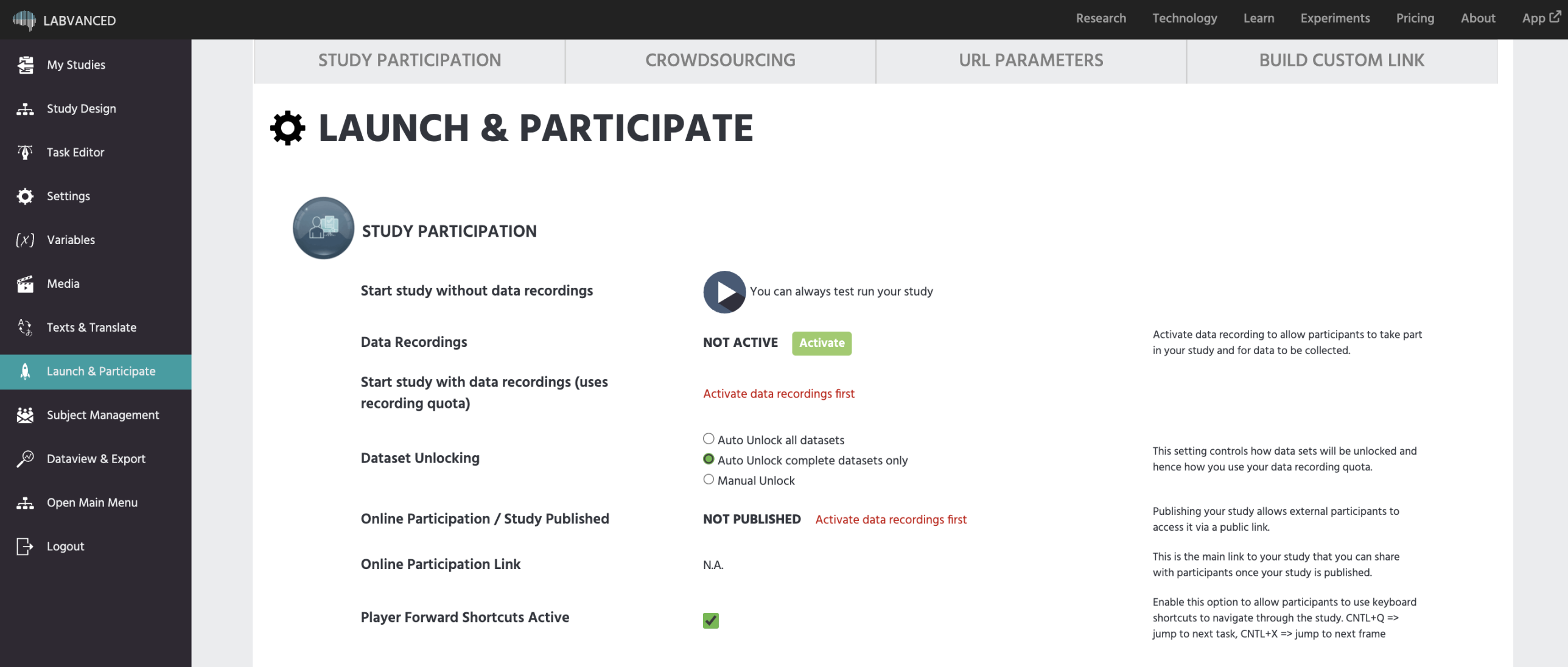
    Labvancedのランチ & 参加タブのプレビュー.

    研究参加

    データ録音なしで研究を開始

    データを記録せずに全体の研究をテストできるようにします。Study Designタブの下に関連するすべてのタスクをブロックとセッションに追加することを忘れないでください!

    データ録音

    データ録音を有効にして、参加者が研究に参加できるようにし、データを収集します。

    データ録音を使用して研究を開始(録音クォータを使用)

    データ録音を伴って研究を実行するにはクリックします。

    データセットの解除

    この設定は、データセットがどのように解除されるかを制御し、それによってデータ録音クォータの使用方法を決定します。

    オンライン参加 / 研究公開

    研究を公開すると、外部の参加者が公開リンクを介してアクセスできるようになります。

    オンライン参加リンク

    これは、研究が公開された後に参加者と共有できる、あなたの研究への主要なリンクです。

    カスタム参加リンクを作成するには、URL Parametersの下のセクションを参照し、このタブのBuild Custom Linkエリアを利用してください。

    プレイヤー前進ショートカットを有効にする

    このオプションを有効にすると、参加者がキーボードショートカットを使用して研究をナビゲートできるようになります。次のタスクにジャンプするにはCNTL+Q、次のフレームにジャンプするにはCNTL+Xを使用します。これは、公式なデータ収集が始まる前に研究を構築しながらテストする際に便利ですが、公式なデータ収集プロセスが始まると無効にすることをお勧めします。

    クラウドソーシングの設定

    あなたの研究は、主要なクラウドソーシングプラットフォームやパネルに簡単に接続できます:

    Labvancedクラウドソーシング

    Labvancedは、さまざまなプラットフォームやツールを使用して被験者募集サービスを提供します。以下のメリットがあります:

    • 競争力のある価格
    • Labvancedによる無料実験チェック

    あなたの研究要件に基づいて見積もりを希望する場合は、お問い合わせください。

    Prolific

    • Prolificの統合ガイド

    CloudResearch

    • CloudResearchの統合ガイド

    SONA SYSTEMS

    • SONA Systemsの統合ガイド

    besample

    • besampleの統合ガイド

    Panelabs

    • Panelabsの統合ガイド

    Clickworker

    • Clickworkerの統合ガイド

    その他のパネル

    選択したクラウドソーシングプラットフォームがここにリストされていない場合、Labvancedと統合できる他のプラットフォームやパネルもあります。通常は、被験者用の完了リンクを作成するために特定のURLパラメータを読み取る必要があります。質問がある場合は、お問い合わせください。

    URLパラメータ

    Launch & Participateタブのこのセクションは、Labvancedによって自動的に読み取られるパラメータの便利な概要を提供します。これらのパラメータは、Labvancedを他のツールやプラットフォームにリンクさせたり、被験者を特定のグループやセッションに強制的に配置したりするなど、参加プロセスをカスタマイズする際に使用できます。

    以下に示すパラメータの他に、Labvancedは参加リンクに存在するすべてのパラメータを自動的に、要求なしでシステム変数URL_Search_Paramsに記録します。何がキャプチャされ、特定のパラメータをどのように読み出すかについては、URL_Search_Paramsを参照してください。

    &group=XX

    参加者を特定のグループに強制します。

    • 例: https://www.labvanced.com/player.html?id=79036&group=1
    • 可能な値: グループ番号(整数)。

    &session=XX

    参加者を特定のセッションに強制します。

    • 例: https://www.labvanced.com/player.html?id=79036&session=1
    • 可能な値: セッション番号(整数)。

    &type=XX

    Labvancedに使用されているクラウドソーシングプラットフォームを知らせます。

    • 例: https://www.labvanced.com/player.html?id=79036&type=prolific
    • 可能な値:
      • prolific
      • cloud-research
      • sona
      • besample
      • panelabs
      • csv (クリックワーカー用)

    &subject_code=XX

    被験者用に実験者が生成したIDです。

    • 例: https://www.labvanced.com/player.html?id=79036&subject_code=181L2Fbde
    • 可能な値: アルファベットと数字のコード(文字列)。
    • 注: これはSonaの被験者IDを保存するためにも使用されます。

    &token=XX

    被験者用にLabvancedが生成したID。

    • 例: https://www.labvanced.com/player.html?id=79036&token=1a23ssdh45aswcde
    • 可能な値: アルファベットと数字のコード(文字列)。

    &PROLIFIC_PID=XX

    参加者用のProlific ID。

    • 例: https://www.labvanced.com/player.html?id=79036&PROLIFIC_PID=6fh73dasfg3e
    • 可能な値: アルファベットと数字のコード(文字列)。

    &participantId=XX

    参加者用のCloudResearch参加者ID。

    • 例: https://www.labvanced.com/player.html?id=79036&participantId=7bd235512f
    • 可能な値: アルファベットと数字のコード(文字列)。

    &response_id=XX

    参加者用のbesample応答ID。

    • 例: https://www.labvanced.com/player.html?id=79036&response_id=62138
    • 可能な値: 数値コード(整数)。

    &bpid=XX

    besample参加者ID。

    • 例: https://www.labvanced.com/player.html?id=79036&bpid=62138
    • 可能な値: 数値コード(整数)。

    &mpcode=XX

    Panelabs参加者ID。

    • 例: https://www.labvanced.com/player.html?id=79036&mpcode=62138
    • 可能な値: アルファベットと数字のコード(文字列)。
    • 注: type=panelabsに必要です。これは、研究の最後に参加者に表示されるPanelabs完了リンクに付加されます。

    &user_id=XX

    参加者用のClickworker ID。

    • 例: https://www.labvanced.com/player.html?id=79036&user_id=j2301
    • 可能な値: アルファベットと数字のコード(文字列)。

    &role_id=XX

    マルチユーザー研究において、特定の「role_id」に被験者を強制します。

    • 例: https://www.labvanced.com/player.html?id=79036&role_id=1
    • 可能な値: 役割ID(整数)。

    &multiuser_group_id=XX

    マルチユーザー研究において、特定の「multi_user_group」に被験者を強制します。

    • 例: https://www.labvanced.com/player.html?id=79036&multiuser_group_id=329
    • 可能な値: アルファベット(文字列)。

    &study_language=XX

    研究を特定の言語(利用可能な場合)で表示するように強制します。

    • 例: https://www.labvanced.com/player.html?id=79036&study_language=English
    • 可能な値: 言語名(例:英語、フランス語、スペイン語、ドイツ語)。

    カスタムURLパラメータ

    その他のURLパラメータも挿入して読み取ることができます。

    • 例: https://www.labvanced.com/player.html?id=79036&custom=xyz
    • 機能: このカスタムURLパラメータをイベントと組み合わせて、実験中に値を読み取ることができます。詳細を学ぶ

    カスタムリンクを作成

    Launch & Participateタブのこの部分は、あなたの研究に使いやすいカスタムリンクを構築するのに役立ちます。

    これらのフィールドが何を指すのかについては、URL Parametersのセクションを参照してください。

    各フィールドについて、特定の値を入力できます。すべてのフィールドを埋める必要はなく、必要なものだけを入力します。該当するフィールドが完了したら、Generate Linkボタンをクリックすると、リンクが作成されます。

    Prev
    テキストと翻訳
    Next
    被験者管理